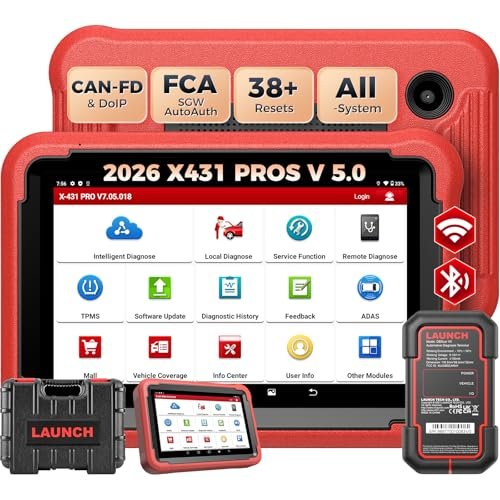
The Launch X431 V+ is a capable professional scanner for mechanics who need deep diagnostics and active tests.
A basic OBD2 reader can find engine codes, but it often stops there. If you run a repair shop or fix cars at home, you may need more. You may want to check ABS, airbags, transmission, and other control units. You may also need to test parts before replacing them.
This is where the LAUNCH X431 V+ comes into the picture. It aims to give mechanics more control over vehicle checks and service work. For U.S. buyers, it may be useful for work on several car brands. Still, the exact software version and vehicle coverage matter before you buy.

Is the Launch X431 V+ Good?
Yes, the Launch X431 V+ is worth considering if you need more than basic code reading. It is a professional scan tool built for deeper vehicle checks. It can access many control units on supported cars. It also offers active tests and service functions.
One of its main strengths is its wide range of diagnostic tools. You can read codes, view live data, clear faults, and test certain parts through the scanner. Supported service tasks may include ABS bleeding, oil resets, and steering angle sensor calibration. The exact list depends on the vehicle and software package.
I would place this scanner in the professional and serious DIY category. It can help a small repair shop handle many common diagnostic jobs. It may also help an advanced home mechanic find faults with less guesswork. However, it is not a replacement for every factory scan tool.
There is one key buying detail. LAUNCH sells different X431 V+ versions, including V4.0 and V5.0. Their hardware, vehicle protocols, and included tools can differ. Buyers should confirm the exact version before paying.

My First impression of the Launch X431 V+
The X431 V+ package is designed around a tablet and a vehicle communication unit. This gives the tool a familiar tablet-style layout. The screen makes it easier to view fault codes, live data, and test results than a small handheld reader.
Packaging can vary by seller and version. I would check the listing for the tablet, VCI connector, cables, charger, and any extra adapters. Do not assume every package includes the same parts. A clear box list can prevent problems after delivery.
The setup process starts with charging the tablet and connecting it to Wi-Fi. You then register the device and check its diagnostic software. The first software update may take time. A stable internet connection can make this step easier.
The menu has many tools, so a new user may need time to learn it. Basic code reading is easier than advanced coding or active tests. I would start with a known vehicle and learn each menu before using advanced functions. This is a tool that rewards practice.

Key Features of the Launch X431 V+
- Full System Diagnostics: The scanner can access many vehicle control units on supported models. These may include the engine, transmission, ABS, airbag, body, and other systems. This gives mechanics a wider view of vehicle faults than a basic engine code reader.
- Bidirectional Control: Bidirectional control lets the scanner send commands to certain vehicle parts. You can use supported active tests to check how a component responds. This can help narrow down a fault before you replace a part. Available tests vary by make, model, year, and system.
- Live Data Display: The tool can show live data from supported control units. You can check sensor readings and watch values as the engine runs. This can help when a fault appears only under certain conditions. It also gives mechanics more useful details than a code alone.
- Service Reset Functions: The X431 V+ offers service functions for supported vehicles. These may include oil reset, electronic parking brake service, steering angle calibration, and battery registration. Some versions and vehicle packages offer more functions than others. Check the exact service list before buying.
- ECU Coding Functions: Supported versions and vehicles can offer ECU coding functions. These may help with certain module settings and part replacement tasks. Coding is not the same as full ECU programming. Not every car or control unit supports every coding task.
- Wireless VCI Connection: The VCI connects the tablet to the vehicle through a wireless link on supported packages. This reduces the need to keep the tablet beside the OBD2 port. You can move around the vehicle while viewing data. The connection still needs a stable link.
- Vehicle Identification: Supported versions offer automatic VIN identification. This can help select the right vehicle software and reduce manual entry. If automatic detection fails, you can select the vehicle by make, model, and year. Coverage depends on the installed software.
- CAN FD and DoIP Support: Some newer V5.0 configurations support CAN FD and DoIP communication. These protocols are used by certain newer vehicles. Adapter needs can vary, especially for DoIP. Buyers should check the included VCI and adapter list instead of assuming every X431 V+ version has the same support.

✅ What I Like
- ✔ Full-system access can help mechanics find faults beyond the engine control unit.
- ✔ Bidirectional tests can help check supported parts before buying replacements.
- ✔ Live data gives more detail when a fault does not have a clear cause.
- ✔ Service reset tools can support common maintenance jobs on compatible vehicles.
- ✔ The tablet screen makes codes, data, and test results easier to view.
- ✔ Wireless communication can make workshop use more convenient.
- ✔ Broad brand coverage makes it useful for shops that work on different vehicle types.
- ✔ Supported ECU coding adds useful options for certain repair and setup tasks.
⚠️ What Could Be Better
- ✖ The many menus and advanced tools can take time for new users to learn.
- ✖ Some advanced functions depend on the vehicle, software version, and paid updates.
- ✖ ECU coding and special tests are not available for every vehicle or control unit.

Who Should Buy the Launch X431 V+?
I would consider this scanner if I worked on several vehicle brands each week. Its full-system access and active tests can make fault checks more useful. It may also help reduce the time spent switching between basic code readers and separate service tools.
For a small repair shop, the range of functions is a strong reason to consider it. A skilled DIY user may also find value in the extra data and service options. However, a casual driver who only wants to read a check engine light may not need this much equipment.
Before ordering, I would check the supported vehicles and functions for the exact model year of each car I service. I would also confirm the update period, renewal cost, warranty, and seller support. These details can affect the long-term value more than the tablet itself.
| Best For | Why It Fits |
|---|---|
| Independent Auto Repair Shops | Full-system diagnostics and active tests can help with a wide range of repair jobs across supported brands. |
| Experienced Home Mechanics | Live data, service resets, and deeper system access offer more control than a basic OBD2 reader. |
| Multi-Brand Technicians | Broad vehicle software coverage can help when working on different American, Asian, and European vehicles. |
| Automotive Diagnostic Students | The tool can help users learn about vehicle control units, fault codes, live data, and active tests. |

Alternative Products You Can Consider
| Product | Best For | Key Difference |
|---|---|---|
| Launch X431 V+ | Independent shops and advanced DIY users | A broad LAUNCH diagnostic platform with full-system access and supported active tests. |
| Autel MaxiSys MS906 Pro | Mechanics who prefer the Autel platform | Uses Autel diagnostic software and its own vehicle coverage and service tools. |
| TOPDON Phoenix Lite 2 | Home garages and smaller repair shops | Offers a different tablet-based diagnostic platform with supported bidirectional functions. |
| LAUNCH X431 PRO3S+ | Technicians who want another LAUNCH option | A related professional scanner with features that depend on its exact version and package. |

Final Verdict: Should You Buy the Launch X431 V+?
The Launch X431 V+ is a strong option for people who need professional vehicle diagnostics. Its main value comes from full-system access, live data, active tests, and service functions. These tools can help a mechanic find faults and check parts with more confidence. It is a better fit for regular repair work than simple code reading.
I would choose it for a busy home garage or an independent repair shop that handles many car brands. However, I would not buy it without checking the exact version. V4.0 and V5.0 packages can differ in important ways. Protocol support, adapters, and software updates deserve special attention.
Casual drivers may get better value from a simpler scanner. Buyers who need deep factory-level programming may also need a more specialized tool. The biggest reason to choose the X431 V+ is its range of diagnostic functions. Its biggest drawback is that coverage and advanced features depend on the vehicle and software package.
Overall, it is worth considering if you will use its advanced tools often. Check the seller, warranty, update terms, and vehicle coverage before placing your order. A little research now can help you avoid an expensive mismatch.