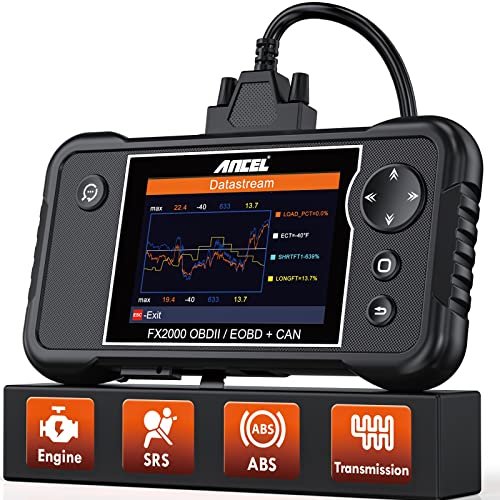
The ANCEL FX2000 is worth considering for DIY users who need engine, ABS, SRS, and transmission diagnostics.
A warning light can turn a normal drive into a stressful trip. You may see the check engine light, an ABS warning, or an airbag light on your dashboard. A basic code reader may not tell you enough about the problem.
This is where a four-system scanner can help. The ANCEL FX2000 aims to give car owners more control over vehicle checks. It can read faults from key systems and show live data. For drivers in the US who want to avoid a diagnostic visit for every warning light, this type of tool may offer real value.

Is the ANCEL FX2000 Good?
The ANCEL FX2000 is a useful step up from a basic OBD2 code reader. Its main strength is four-system diagnosis. It can check the engine, anti-lock braking system, airbag system, and transmission on supported vehicles. This gives it more range than a tool that only reads engine codes.
I like the idea of having these key systems in one handheld tool. A driver can use it to check warning codes, view live data, and learn more about a fault before visiting a repair shop. It also supports graph views, freeze frame data, and common emissions tests. These tools can make basic fault checks easier.
Still, buyers should know its limits. The FX2000 is not a full shop scan tool. It does not replace advanced coding, module programming, or every special service function. Some features also depend on the car’s make, model, year, and system support. A feature listed by the maker may not work on every car.
My view is simple: the FX2000 makes sense for DIY car owners who need more than engine code reading. It may also suit small repair shops that handle basic checks. But users who need advanced service work should look at a higher-level scanner.

My First impression of the ANCEL FX2000
The FX2000 uses a handheld design with a built-in color screen. It has a wired OBD2 connection, so you do not need to pair it with a phone. This also means you can use its main features without relying on a wireless link.
The product is sold as a diagnostic kit. The listed package contents include the scanner, a diagnostic cable, storage media, and user guides. Check the seller’s current box list before you buy, as package contents can vary by version.
Setup should be simple for most users. Plug the cable into the vehicle’s OBD2 port, turn on the ignition as directed, and follow the screen menu. You may need to select the car make, model, year, and system before the scan starts.
The screen menus and built-in code help are useful for new users. Still, I would read the manual before clearing any code. A fault code is a clue, not proof that a certain part has failed. Good diagnosis needs more than one number.

What Makes It Stand Out: Key Features
- Four-System Diagnostics: The FX2000 can diagnose four key vehicle systems: engine, ABS, SRS, and transmission. This is its main selling point. It gives users access to more fault information than a basic engine-only reader. Actual system access depends on the vehicle and its supported diagnostic functions.
- Engine Code Reading and Clearing: The scanner reads and clears supported engine diagnostic trouble codes. It can also show code descriptions to help users understand possible faults. This is useful when the check engine light comes on. However, clearing a code does not repair the fault that caused it.
- ABS Diagnostics: The FX2000 can read supported anti-lock braking system fault codes and display available data. This may help users investigate an ABS warning light or a wheel speed sensor fault. Brake system problems need care. Never use a scan result as a reason to ignore a real brake issue.
- SRS and Airbag Diagnostics: The scanner supports fault checks for the supplemental restraint system on compatible vehicles. It can help identify stored airbag-related codes. This is useful when an airbag warning light appears. Airbag repairs can be dangerous, so leave electrical work on restraint systems to a trained technician when needed.
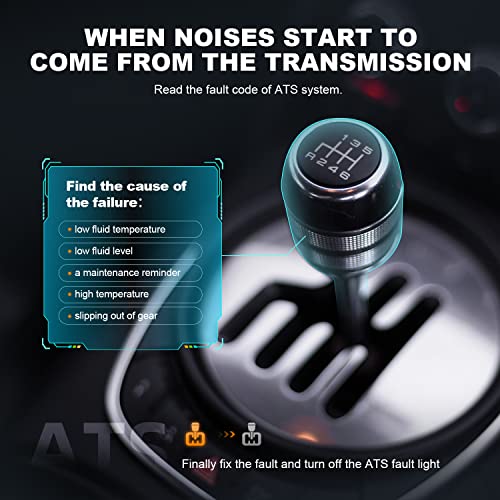
- Transmission Diagnostics: The FX2000 can access supported transmission control module codes and available live data. This may help users investigate warning lights or shifting concerns. It does not mean the tool can find every mechanical transmission fault. Some problems need pressure checks, fluid checks, or a road test.
- Live Data and Graph Display: The tool can show real-time data from supported vehicle systems. It can display some values in graph form. This helps users watch sensor readings and spot changes over time. The graph view can also make it easier to discuss a problem with a mechanic.
- Freeze Frame Data: Freeze frame data shows a snapshot of vehicle conditions when a supported fault was stored. It may include details such as engine speed and other sensor values. This can help explain when a fault took place. It is useful when a warning appears only from time to time.
- OBD2 Emissions Tests: The FX2000 supports common OBD2 functions such as I/M readiness, O2 sensor tests, EVAP system tests, and onboard monitor checks. These features can help users review emissions system status before an inspection. The EVAP function asks the vehicle to run a supported test; the scanner does not perform a physical leak test.
- Vehicle Information: The scanner can retrieve supported vehicle details such as VIN, calibration ID, and calibration verification number. This can help users confirm vehicle information during a diagnostic session. Available information varies by car.
- PC Connection and Software Updates: The FX2000 supports software updates through a computer connection and its supplied storage method. ANCEL lists free lifetime software updates for the model. Buyers should follow the official update guide and check the correct software for their device before starting an update.
✅ What I Like
- ✔ Four-system coverage gives it more value than an engine-only code reader.
- ✔ ABS and SRS support can help users investigate important dashboard warnings.
- ✔ Live data graphs make sensor readings easier to follow during diagnosis.
- ✔ Freeze frame data helps show the conditions present when a fault occurred.
- ✔ Built-in code descriptions can help new users understand stored fault codes.
- ✔ A wired connection avoids phone pairing and wireless connection issues.
- ✔ I/M readiness and emissions tests help users check vehicle monitor status.
- ✔ Free lifetime software updates are a useful benefit when supported updates remain available.
⚠️ What Could Be Better
- ✖ Vehicle coverage varies, so some systems and functions may not work on every car.
- ✖ It lacks the advanced coding, programming, and broad service functions found on higher-end scan tools.
- ✖ The wired design and computer-based update process may feel less convenient than newer wireless tools.

My Recommendation
I would consider the FX2000 if I owned an older or compatible OBD2 vehicle and wanted to check more than the engine system. Its four-system coverage is the main reason to choose it. It can help narrow down faults before I decide whether a repair shop needs to inspect the car.
It also makes sense for people who work on family cars or handle basic vehicle checks at home. The live data and freeze frame tools add useful detail. However, I would check the official vehicle coverage list before buying. Do not assume that every function works on every vehicle from 1996 onward.
| Best For | Why It Fits |
|---|---|
| DIY Car Owners | It can read supported engine, ABS, SRS, and transmission codes without a trip to a repair shop for a basic scan. |
| Home Mechanics | Live data, freeze frame details, and code descriptions can help during basic fault checks and repair planning. |
| Used Car Owners | It can help check stored faults and available system data before or after buying a compatible used vehicle. |
| Small Repair Shops | Four-system access can support basic diagnostic work on vehicles covered by the tool. |

Alternative Products You Can Consider
| Product | Best For | Key Difference |
|---|---|---|
| ANCEL FX2000 | DIY users needing four-system diagnosis | Handheld tool with engine, ABS, SRS, and transmission support on compatible vehicles. |
| LAUNCH CRP123X | Users comparing multi-system handheld scanners | Offers a similar four-system diagnostic focus with a different interface and software setup. |
| FOXWELL NT630 Plus | ABS and SRS checks | Places more focus on brake and airbag diagnostics. |
| BlueDriver Bluetooth Pro OBDII Scan Tool | Drivers who prefer phone-based diagnostics | Uses a wireless sensor and phone app rather than a dedicated handheld screen. |

Final Verdict: Should You Buy the ANCEL FX2000?
The ANCEL FX2000 is worth a look if you want one tool for basic checks across four important vehicle systems. Its engine, ABS, SRS, and transmission support gives it a clear edge over simple code readers. Live data, freeze frame information, and emissions tests add more value for DIY users.
I would choose it for home diagnosis and basic repair work on a confirmed compatible vehicle. I would not buy it for advanced programming, coding, or complex shop repairs. Its biggest limit is vehicle-specific support. Check your exact car and the functions you need before placing an order. If those needs match, the FX2000 can be a useful addition to your garage.