The MUCAR BT200 is worth considering for DIY drivers who want Bluetooth access to more than basic engine codes.
A check engine light can turn a normal drive into a stressful day. You may wonder if the car has a small sensor issue or a more serious fault. A trip to a repair shop just to read a code can also cost time and money.
This is where a home OBD2 scanner can help. The MUCAR BT200 connects to your phone and gives you access to vehicle fault codes and live data. It also offers wider system scans on supported cars. For drivers who like to check problems before visiting a mechanic, this tool may be worth a look.
Is the MUCAR BT200 a Good OBD2 Scanner?
The MUCAR BT200 is a useful Bluetooth diagnostic tool for car owners who want more than a basic code reader. It works with the MUCAR mobile app and can scan supported vehicle systems. You can read fault codes, clear supported codes, and view live data.
Its main strength is its wider diagnostic scope. Many low-cost OBD2 readers focus on engine and emissions codes. The BT200 aims to cover other systems, such as ABS, airbags, and transmission modules, when the vehicle and software support them. This gives DIY users more ways to look into a warning light.
There is one key detail to check before buying. The regular BT200 and BT200 Pro do not offer the same reset services. The regular BT200 lists two reset services for one year, while the Pro lists more. Do not pay for the regular model expecting every Pro function.
I would put this scanner on the shortlist for drivers who enjoy basic car care and want phone-based diagnostics. It is less suited to people who need a standalone tool with a built-in screen or advanced workshop coding. Vehicle coverage also matters more than the number of features on the box.
My First Impression of the MUCAR BT200
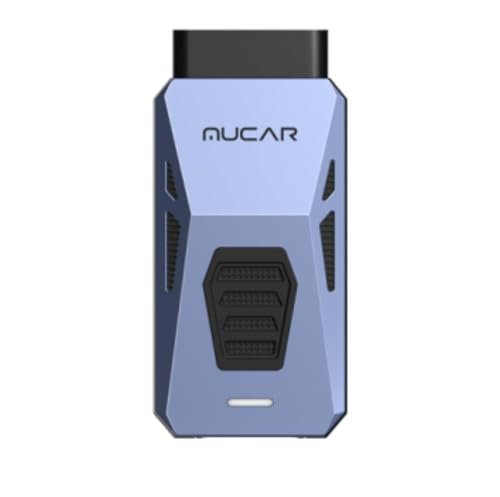
The BT200 uses a small plug-in design instead of a large handheld screen. This keeps the main unit simple and easy to store. You connect it to the car’s OBD2 port and use your phone to view the results.
The listed package includes the diagnostic connector, a storage bag, and a user manual. The unit uses a protective outer shell. Its compact shape should also make it easy to keep in a glove box or tool bag.
Setup needs a few steps. First, install the MUCAR app on a supported phone. Then plug the scanner into the vehicle’s OBD2 port and connect through Bluetooth. The app may need to download the correct vehicle software before the first scan, so a stable internet connection helps.
There is no built-in display to read. You must keep your phone nearby during use. This design works well if you prefer phone apps, but it may feel less simple than a wired scanner with its own screen.
What Makes the MUCAR BT200 Stand Out? Key Features
- Full-System Diagnostics: The BT200 can scan supported vehicle control units beyond the engine system. Depending on the car, these may include ABS, airbags, transmission, and other modules. This gives you a wider view of vehicle faults than a basic engine code reader.
- Bluetooth Phone Connection: The scanner connects to a phone through Bluetooth. You use the MUCAR app to start scans and view the results. This removes the need for a large handheld screen and makes the tool easy to carry.
- OBD2 and EOBD Functions: The BT200 supports standard OBD2 and EOBD functions on compatible vehicles. These include reading and clearing fault codes, viewing live data, and checking other supported diagnostic information. These tools can help you look into common engine and emissions issues.
- Live Data Stream: Live data lets you view sensor readings while the engine runs. This can help you spot values that look unusual and understand how parts of the engine system behave. The data available depends on the vehicle and its control modules.
- Automatic VIN Recognition: The automatic VIN feature can identify supported vehicle details without making you enter every item by hand. This can make the first scan easier. Manual vehicle selection may still be needed if automatic recognition does not work.
- Two Reset Services on the Regular BT200: The standard BT200 offers two listed maintenance reset services for one year: oil reset and steering angle sensor reset. These functions can help after certain repairs or maintenance tasks. Their use depends on vehicle coverage and the correct repair procedure.
- Vehicle Software Downloads: The MUCAR app downloads the diagnostic software needed for the selected vehicle. This allows the scanner to work with different supported makes. The first download may take time and needs a good internet connection.
- Firmware and Software Updates: The device can check its firmware when connected to the app. Standard OBD2 and full-system diagnostic updates are listed as lifetime free. Buyers should check the current terms for maintenance services, as these have separate limits.
✅ What I Like About the MUCAR BT200
- ✔ Full-system scanning gives it a wider purpose than a basic engine-only OBD2 reader on supported vehicles.
- ✔ Bluetooth connection removes the need for a large handheld display and keeps the tool easy to carry.
- ✔ Live data helps users look beyond a simple fault code and check sensor readings.
- ✔ Automatic VIN recognition can save time during vehicle setup.
- ✔ Standard OBD2 and full-system diagnostic updates are listed as lifetime free.
- ✔ The phone app makes scan results easier to view on a familiar screen.
- ✔ The compact plug-in design needs little storage space in a home garage or car.
⚠️ What Could Be Better
- ✖ It needs a compatible phone and the MUCAR app, so it cannot work as a standalone scanner.
- ✖ The regular BT200 has fewer reset services than the BT200 Pro, and the first-year service limit needs careful attention.
- ✖ Some diagnostic functions may not work on every make, model, year, or control unit.
Who Should Buy the MUCAR BT200?
The BT200 makes the most sense for drivers who want to understand car warning lights before they book a repair. It can help you read fault codes and check supported systems from your phone. This can make a home garage more useful without buying a large diagnostic tablet.
I would also consider it for people who maintain their own cars. Live data and wider system scans can help with early checks after a warning appears. Still, a scan tool does not confirm every mechanical fault. You may need a proper test or a mechanic to find the real cause.
Before ordering, check the official vehicle coverage for your exact make, model, year, and engine. Also confirm whether the regular BT200 includes the service function you need. The Pro model has a different service list, so the two versions should not be treated as the same tool.
| Best For | Why It Fits |
|---|---|
| DIY Car Owners | It gives home users access to fault codes, live data, and wider system scans on supported cars. |
| Drivers With Warning Lights | It can help identify stored faults and give drivers more information before visiting a repair shop. |
| Home Garage Users | Its compact Bluetooth design is easy to store and does not need a separate diagnostic screen. |
| Car Maintenance Learners | Live data and system scans can help users learn how vehicle sensors and control systems work. |
Alternative OBD2 Scanners You Can Consider
| Product | Best For | Key Difference |
|---|---|---|
| MUCAR BT200 | Phone-based full-system diagnostics | Uses the MUCAR app and offers wider system scans on supported vehicles. |
| BlueDriver Bluetooth Pro | Drivers who want app-based diagnostic reports | Uses the BlueDriver app and its own supported diagnostic coverage. |
| OBDLink MX+ | Users who value app choice | Works with compatible third-party apps as well as supported OBDLink software. |
| Innova 5610 | Drivers who prefer a handheld scanner | Has a dedicated screen rather than relying on a phone for the main display. |
Final Verdict: Should You Buy the MUCAR BT200?
The MUCAR BT200 is a practical choice for DIY drivers who want more insight into their cars. Its Bluetooth setup, live data, and full-system scan support make it more useful than a simple engine code reader on compatible vehicles. It can help you find stored faults and make better choices before a repair visit.
However, it is not the right tool for every buyer. You need a compatible phone, an internet connection for software downloads, and a vehicle that supports the functions you want. The regular model also has fewer reset services than the Pro version.
My buying advice is simple: check your vehicle coverage first, then compare the regular BT200 with the Pro and other scanners. If its supported systems meet your needs, it is worth considering. If you need a built-in screen, a dedicated handheld tool may be a better fit.