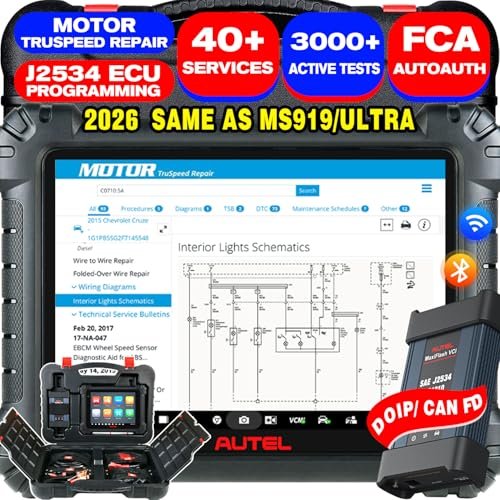
The Autel MS909 is a powerful professional scanner for shops that need advanced diagnostics, coding, and repair tools.
A check engine light can turn a simple repair into a long day. You may scan the car, find a fault code, and still have no clear idea what caused it. Basic code readers often leave out the deeper tests that a busy repair shop needs.
That is why many US mechanics look at advanced scan tools like the Autel MaxiSYS MS909. It aims to bring many diagnostic tasks into one tablet. You can scan vehicle systems, view live data, run active tests, and perform supported coding tasks. It is built for people who work on cars every day, not just drivers who want to clear a warning light.

Is the Autel MaxiSYS MS909 Good?
Yes, the Autel MS909 is a strong option for professional auto repair shops and skilled technicians. It offers far more than basic OBD2 code reading. Its main strengths include full-system diagnostics, bidirectional controls, ECU coding, module topology mapping, and broad vehicle coverage. The included MaxiFlash VCI also supports advanced vehicle communication needs.
I see its biggest value in the range of work it can help with. A technician can scan several vehicle systems, check live data, and run supported component tests from one tablet. This can help narrow down faults before replacing parts. It also supports repair reports and vehicle records, which can help keep shop work organized.
However, this is not a simple plug-and-play code reader for every driver. Some advanced functions depend on the vehicle, its software, and the maker’s rules. ECU programming and secure gateway access may need extra tools, accounts, or subscriptions. You should also check the current software plan before you buy.
The MS909 makes the most sense when you can use its advanced tools on a regular basis. A home user who only needs to read and clear engine codes may spend far more than needed. For a busy shop, its wider range of tests may make the cost easier to justify.

My First impression of the Autel MS909
The MS909 has the look of a serious shop tool. Its large tablet screen gives it more room than a small handheld scanner. The design also makes sense for long repair sessions, where clear menus and easy access to test data matter.
The standard package is built around the main tablet and MaxiFlash VCI. A typical package may also include the main cable, power adapter, USB cable, spare fuses, and a carrying case. Exact items can vary by seller, so check the box list before placing an order.
The 9.7-inch screen has a resolution of 1536 x 2048. This gives the tablet enough room to show system data and repair details. Its Android platform also makes it feel closer to a work tablet than a small code reader.
Getting started takes a few steps. You need to charge the tablet, connect it to Wi-Fi, register the device, and install the available updates. Then pair the VCI and connect it to the car. New users should take time to learn the menus before using coding or active test functions.

What Makes It Stand Out? Key Features
- Full-System Diagnostics: The MS909 can scan many vehicle control modules on supported cars. These may include the engine, transmission, ABS, airbag, body, and other electronic systems. It can read and clear fault codes and show related data. This gives a technician a wider view than a basic engine code reader.
- Bidirectional Control: Bidirectional tests let the scanner send commands to supported vehicle parts. A technician may use these tests to check items such as fans, pumps, valves, and other electronic parts. This helps show whether a part responds to a command. Available tests vary by vehicle make, model, year, and system.
- ECU Coding and Programming Support: The MS909 supports certain ECU coding and programming tasks. These functions can help with module setup, supported repairs, and vehicle changes. It also supports J2534 pass-through use through the MaxiFlash interface for compatible programming work. Buyers must check the exact vehicle and software needs before relying on this feature.
- Topology Module Mapping: Topology mapping gives a visual view of vehicle modules and their status on supported models. It uses color-coded information to help show which systems have faults or communication issues. This can make complex electrical problems easier to trace. The feature does not work on every vehicle.
- MaxiFlash VCI and Advanced Protocols: The included MaxiFlash VCI links the tablet to the vehicle. The MS909 supports advanced communication protocols such as DoIP, D-PDU, and CAN FD, along with other vehicle networks. This helps it work with newer vehicle systems that need more than basic OBD2 communication.
- Live Data and Data Graphs: The scanner can show live data from supported vehicle modules. A technician can check sensor readings and watch how values change during a test. Graph views can help reveal patterns that may be hard to spot in a list of numbers. This is useful when a fault does not appear all the time.
- Service and Maintenance Functions: The MS909 offers a range of service functions for supported vehicles. These can include oil reset, electronic parking brake service, battery registration, steering angle reset, and other maintenance tasks. The exact list depends on vehicle coverage. It is best to check the support list for your most common cars.
- ScanVIN and Camera Tools: The tablet has front and rear cameras. Its ScanVIN tools can use camera input to help identify a vehicle through supported VIN or barcode features. This can reduce manual entry and speed up the start of a scan. The system still needs the correct vehicle data to work well.
- Diagnostic Reports and Data Manager: The MS909 can create diagnostic reports and store vehicle and customer records. Its data tools help keep scan results, notes, and repair details in one place. Pre-scan and post-scan reports can also help shops show the state of a car before and after work.
- Rechargeable Battery and Large Display: The tablet uses a 15,000mAh battery. Autel lists up to eight hours of continuous use under its stated conditions. The large touchscreen also gives technicians room to review data without using a small handheld display. Actual battery life can change with screen use, wireless links, and test tasks.

✅ What I Like
- ✔ Full-system scanning gives technicians access to many vehicle modules beyond the engine control unit.
- ✔ Bidirectional tests help check how supported parts respond to commands instead of relying only on fault codes.
- ✔ ECU coding and supported programming tools make it useful for advanced repair and module work.
- ✔ Topology mapping offers a clear view of vehicle networks on supported models.
- ✔ DoIP, D-PDU, and CAN FD support help with newer vehicle communication needs.
- ✔ The 9.7-inch high-resolution touchscreen gives enough room to view scan data and repair details.
- ✔ Live data and graph tools help technicians study changing sensor values during diagnosis.
- ✔ Diagnostic reports and customer records help shops keep repair information in order.
- ✔ The 15,000mAh battery supports mobile use around a workshop without a constant power connection.
- ✔ The included MaxiFlash VCI supports advanced vehicle communication and compatible J2534 work.
⚠️ What Could Be Better
- ✖ The purchase cost can be high for home users and small shops that only need basic code reading.
- ✖ Some advanced functions need extra accounts, paid services, or added hardware. Buyers should check these costs before ordering.
- ✖ Vehicle coverage is not the same for every make and model, so some features may not work on a specific car.

My Recommendation
I would put the MS909 on the shortlist for repair shops that work on many vehicle brands. It offers a wide set of diagnostic tools in one system. Its strongest use case is finding faults, testing parts, and carrying out supported module work without switching between several basic scan tools.
It is also worth a look for experienced independent mechanics. The bidirectional tests and live data can help with faults that need more than a quick code check. The topology view can also help when several modules report a problem at once.
I would not suggest buying it just because it has a long feature list. First, check the cars you service most often. Then confirm that the functions you need are supported and that the software plan fits your budget. Also check whether you need extra tools for programming, ADAS work, or secure gateway access.
| Best For | Why It Fits |
|---|---|
| Professional Auto Repair Shops | It combines full-system scans, active tests, service functions, and diagnostic reports for daily repair work. |
| Independent Automotive Technicians | Its live data, bidirectional tests, and supported ECU coding can help with complex vehicle faults. |
| Multi-Brand Repair Businesses | Its coverage across many US, Asian, and European brands makes it useful for shops that service different vehicles. |
| Advanced Automotive Training Centers | Its diagnostic menus and vehicle network tools can help students learn how modern electronic systems work. |
| Experienced Mobile Mechanics | The tablet and wireless VCI offer a flexible setup for diagnosis at different work sites. |

Alternative Products You Can Consider
| Product | Best For | Key Difference |
|---|---|---|
| Autel MaxiSYS MS909 | Advanced multi-brand diagnostics | Offers topology mapping, advanced communication protocols, bidirectional tests, and supported ECU coding. |
| Autel MaxiSYS MS919 | Shops needing more electrical test tools | Uses a VCMI interface that combines vehicle communication with added measurement tools. |
| Autel MaxiSYS MS906 Pro | Professional general repair work | A different professional scanner option for advanced diagnostics and service tasks. |
| Autel MaxiSYS MS909S2 | Shops seeking newer hardware | Adds an updated tablet platform, a larger screen, newer software, and VCI hardware. |

Final Verdict: Which Should You Buy?
The Autel MaxiSYS MS909 is a serious diagnostic tool for people who repair cars for a living. Its mix of full-system scanning, live data, active tests, coding, and topology mapping gives it a wide range of uses. It can help a shop move beyond basic code reading and take a closer look at vehicle faults.
I would choose it for a busy independent shop that works on several brands and needs advanced diagnostic tools. A home mechanic may get better value from a simpler scanner. A shop that needs more electrical test hardware may want to compare the MS919. Buyers who want newer hardware should also look at the MS909S2.
The biggest thing to check is vehicle and feature support. A long feature list does not mean every function works on every car. Software updates, secure gateway access, and added hardware can also affect the total cost. Check these details before you buy.
Overall, the MS909 is worth considering when you can use its advanced tools often. It is not the cheapest way to read a fault code. Its real value lies in the wider repair work it can support.