The Best Automotive Diagnostic Platforms help drivers and mechanics read fault codes, view live data, and find vehicle problems faster.
Your check engine light comes on during a busy morning. Your car still runs, but you do not know what went wrong. A trip to the repair shop may take time and money. A good automotive diagnostic tool can help you find the fault code before you make your next move. Some tools work well for home garages. Others support busy repair shops, truck fleets, and ECU bench tests. I have selected ten options for different needs, from simple OBD2 readers to advanced professional diagnostic systems. This guide explains what each tool can do, where it fits, and what to check before you buy.
🏆 Top 3 Products

Innova 5210 OBD2 Scanner & Engine Code Reader
It offers a useful mix of engine diagnostics, live data, battery testing, oil reset, and app support for everyday vehicle owners.

Bosch Automotive Tools 3824A ESI[Truck] Professional Diagnostic Solution
Its professional tablet and wireless vehicle interface make it a strong choice for commercial truck repair shops.

ANCEL AD410 Enhanced OBD2 Scanner
It provides simple engine code reading and live data without the cost or setup of a complex shop system.
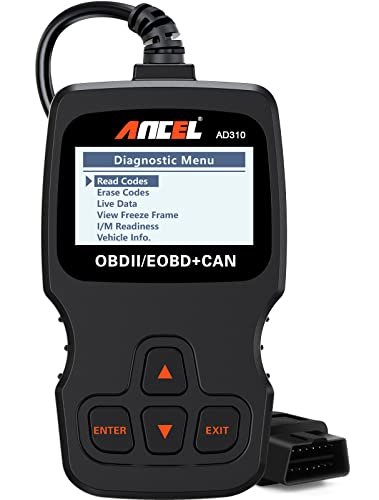
ANCEL AD310 Classic OBD2 Scanner
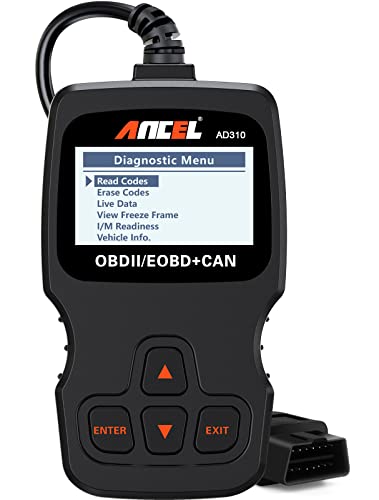
The ANCEL AD310 Classic is a simple OBD2 scanner for everyday car owners. It helps you read and clear common engine fault codes. It works with compatible OBD2 vehicles from 1996 onward in the United States. Its small screen shows useful information without the need for a phone or computer.
I like this scanner for basic home garage work. You can plug it into the vehicle’s OBD2 port and start checking common engine problems. It helps you review fault codes and check emissions readiness before an inspection. It is a basic tool, so do not expect advanced system scans or complex repair functions.
✅ Pros
- ✔ Simple controls make it easy for new car owners to use.
- ✔ Reads common engine fault codes without extra software.
- ✔ Clears supported fault codes after the repair is complete.
- ✔ Works with many compatible 1996 and newer OBD2 vehicles.
- ✔ Small body fits easily inside a glove box or tool drawer.
- ✔ Built-in screen removes the need for a phone or tablet.
- ✔ OBD2 port power means you do not need to charge it.
⚠️ Cons
- ✖ Does not provide full ABS, airbag, or transmission system scans.
- ✖ Basic screen offers less detail than a modern tablet platform.
- ✖ Cannot replace advanced bidirectional tools used in professional shops.
My Recommendation
I recommend the ANCEL AD310 for drivers who want a low-cost way to check common engine faults. It makes sense for basic home maintenance, simple troubleshooting, and quick emissions checks. It is not a complete professional diagnostic platform. Still, it can help you understand a check engine light before you visit a repair shop. Among the Best Automotive Diagnostic Platforms for beginners, this is a practical starting point.
| Best For | Why |
|---|---|
| First-time car owners | Its simple buttons and screen make basic engine code checks easy. |
| Home garage use | It handles common engine faults without extra computer equipment. |
| Basic emissions checks | It helps review supported readiness information before an inspection. |
GODIAG GT100+ ECU Breakout Box
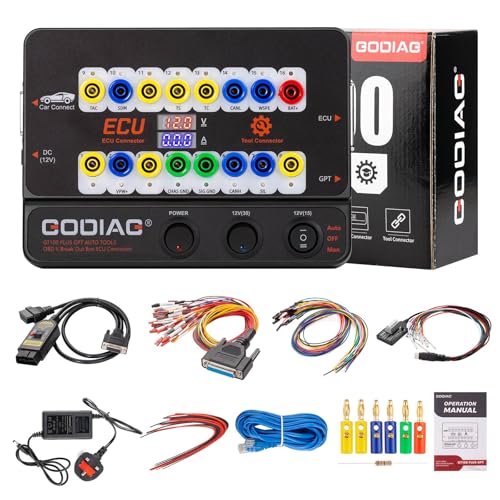
The GODIAG GT100+ is a special tool for ECU bench testing and vehicle communication work. It gives technicians easier access to OBD2 pins and ECU connections. Its voltage and current display helps users watch electrical activity during a test. It also works with compatible diagnostic and programming equipment.
I see this unit as a workshop tool rather than a normal code reader. It can help technicians connect an ECU outside the vehicle and check communication. Its breakout connections make signal testing more convenient. You still need the right wiring, power supply, and compatible diagnostic software to complete the work.
✅ Pros
- ✔ Provides easy access to important OBD2 connector pins.
- ✔ Current display helps monitor ECU electrical activity during testing.
- ✔ Supports ECU bench testing with compatible diagnostic equipment.
- ✔ Helps technicians check communication between tools and vehicle modules.
- ✔ Useful for module testing without keeping every ECU inside the vehicle.
- ✔ Provides flexible connection points for professional electrical work.
- ✔ Can support advanced programming and diagnostic bench setups.
⚠️ Cons
- ✖ It is not a standalone scanner for reading normal engine codes.
- ✖ New users may struggle with wiring and pin connections.
- ✖ Requires compatible programming tools and suitable external power equipment.
My Recommendation
I recommend the GODIAG GT100+ for automotive electricians, ECU repair specialists, and technicians who perform module programming. Its current display and flexible connections can make bench work easier. It is a poor choice for someone who only wants to clear a check engine light. If your work includes module testing, it deserves a place among specialized Best Automotive Diagnostic Platforms.
| Best For | Why |
|---|---|
| ECU repair specialists | It gives direct access to module connections during bench tests. |
| Automotive electricians | Its current display helps with electrical checks and troubleshooting. |
| Programming technicians | It works with compatible programming and diagnostic equipment. |
GODIAG GT100 OBD2 Breakout Box

The GODIAG GT100 is an OBD2 breakout box for automotive electrical and ECU testing. It helps technicians access connector pins during diagnostic work. You can use it with compatible scan tools and programming devices. It is useful when you need to check communication or connect an ECU on a workbench.
This model suits people who already understand vehicle wiring and module connections. It can make some testing tasks easier by giving you a clear connection point. I would consider it for a dedicated diagnostic bench or electronics repair area. It does not replace a scanner, because you still need another tool to read data and perform supported tests.
✅ Pros
- ✔ Provides convenient access to OBD2 connector pins.
- ✔ Supports ECU bench testing with compatible external equipment.
- ✔ Helps technicians check vehicle communication during troubleshooting.
- ✔ Works with compatible automotive scan and programming tools.
- ✔ Useful for module connections outside the vehicle.
- ✔ Can reduce repeated access to tight vehicle connector locations.
- ✔ Fits specialized automotive electrical and electronics work.
⚠️ Cons
- ✖ Does not work as an independent OBD2 code reader.
- ✖ Lacks the GT100+ electronic current display feature.
- ✖ Requires technical knowledge and compatible test equipment.
My Recommendation
I recommend the GODIAG GT100 for technicians who need a basic breakout box for ECU testing. It can help with wiring checks, communication tests, and bench connections. The GT100+ may suit users who want an added current display and more advanced functions. For a simple car owner, however, a handheld OBD2 scanner makes far more sense.
| Best For | Why |
|---|---|
| ECU bench testing | It provides useful connections for testing separate control modules. |
| Automotive electronics shops | It helps organize module connections during repair work. |
| Experienced technicians | It offers a practical tool for specialized electrical tests. |
FOXWELL NT301 Live Data OBD2 Scanner

The FOXWELL NT301 is a handheld OBD2 scanner made for engine diagnostics. It reads and clears supported check engine fault codes. Its live data feature helps you view engine readings while the vehicle runs. This can help you spot unusual values and narrow down a possible problem.
I like the NT301 for people who want more than a basic code reader but do not need a large tablet. Its screen gives you direct access to useful engine information. You can also review supported emissions readiness data. It remains a general OBD2 tool, so you should not expect full access to every vehicle module.
✅ Pros
- ✔ Reads and clears supported engine fault codes.
- ✔ Displays live engine data for basic troubleshooting.
- ✔ Helps users review emissions readiness information.
- ✔ Offers a dedicated screen for quick diagnostic checks.
- ✔ Works well for home mechanics and small garages.
- ✔ Does not require a separate phone or tablet.
- ✔ Provides a useful step up from very basic code readers.
⚠️ Cons
- ✖ Does not provide complete ABS, SRS, and transmission diagnostics.
- ✖ Advanced service resets and coding are outside its main purpose.
- ✖ A wired connection can limit movement around the vehicle.
My Recommendation
I recommend the FOXWELL NT301 for home mechanics who want easy access to live engine data. It is useful when a warning light appears and you need more information than a fault code alone. It also suits small garages that handle basic engine checks. I would choose a more advanced scanner for full-system diagnostics or service functions. It remains a solid option in the Best Automotive Diagnostic Platforms category for everyday engine work.
| Best For | Why |
|---|---|
| DIY mechanics | Live data helps them review engine readings during troubleshooting. |
| Small repair garages | It offers useful engine code checks in a simple format. |
| Emissions preparation | It helps review supported readiness monitor information. |
Bosch ESI Truck 3824A Diagnostic System
The Bosch ESI Truck 3824A is a professional diagnostic solution for heavy-duty and commercial vehicles. It combines an HDS 1000 tablet with a wireless vehicle communication interface. It targets repair shops that work on trucks, buses, and other commercial equipment. Its professional software can support diagnostics across many vehicle makes and systems.
I would put this system on the shortlist for a busy truck repair facility. It offers a much wider purpose than a small consumer OBD2 scanner. Depending on vehicle coverage and software access, technicians can use advanced tests and control functions. Before buying, check the current software license, supported vehicles, cable needs, and repair information package.
✅ Pros
- ✔ Designed for professional heavy-duty and commercial vehicle diagnostics.
- ✔ Includes a dedicated HDS 1000 diagnostic tablet.
- ✔ Wireless vehicle communication helps reduce cable clutter.
- ✔ Supports diagnostics across many commercial vehicle makes and systems.
- ✔ Offers advanced test functions for supported vehicle applications.
- ✔ Can help technicians investigate complex engine and transmission faults.
- ✔ Suitable for repair shops that service commercial fleets.
- ✔ Offers a more complete workshop setup than a basic code reader.
⚠️ Cons
- ✖ Costs more than simple consumer OBD2 scanners.
- ✖ Software licenses and repair information may require extra spending.
- ✖ Vehicle coverage and functions vary by make, model, and software version.
- ✖ It may be excessive for a home garage or passenger car owner.
My Recommendation
I recommend the Bosch ESI Truck 3824A for professional truck shops and commercial fleet service teams. It is the strongest choice here for broad heavy-duty diagnostic work. Its tablet and wireless interface support a more complete shop workflow. Check the included license and vehicle coverage before ordering. For buyers comparing the Best Automotive Diagnostic Platforms for commercial repair, this system deserves serious attention.
| Best For | Why |
|---|---|
| Heavy-duty repair shops | It is designed for complex commercial vehicle diagnostic work. |
| Fleet maintenance teams | It can help investigate faults across supported fleet vehicles. |
| Professional truck technicians | Its tablet and wireless interface support workshop use. |
Innova 5210 OBD2 Diagnostic Scanner
The Innova 5210 is a useful diagnostic tool for drivers who want several features in one handheld unit. It reads engine codes and provides live vehicle data. It also offers battery and charging system tests, plus supported oil reset functions. Bluetooth support adds a link to a compatible repair app for more repair guidance.
I like this model because it covers more everyday tasks than a basic engine code reader. You can check a warning light, review live readings, and test the battery system. It can also access supported ABS codes on compatible vehicles. Its exact features depend on the vehicle, so check the coverage details before you buy.
✅ Pros
- ✔ Reads and clears supported engine fault codes.
- ✔ Provides live data for useful engine checks.
- ✔ Includes battery and charging system testing.
- ✔ Offers supported oil light reset functions.
- ✔ Bluetooth support works with a compatible repair app.
- ✔ Provides access to supported ABS diagnostic information.
- ✔ Combines several common maintenance checks in one device.
- ✔ Useful for drivers who maintain their own vehicles.
⚠️ Cons
- ✖ Not every function works on every vehicle make and model.
- ✖ Does not provide the full advanced functions of higher-end shop scanners.
- ✖ Some newer vehicle security systems can limit available functions.
- ✖ It is not a complete heavy-duty truck diagnostic platform.
My Recommendation
I recommend the Innova 5210 as the best overall choice for many everyday car owners. It combines engine diagnostics, live data, battery testing, and useful service functions. Its app support adds value for drivers who want help understanding fault codes. I would still check exact vehicle coverage before buying. For a balanced mix of features and ease of use, it is one of the Best Automotive Diagnostic Platforms on this list.
| Best For | Why |
|---|---|
| Everyday car owners | It combines several common vehicle checks in one handheld scanner. |
| Home mechanics | Live data and battery tests help with routine troubleshooting. |
| Basic ABS checks | It can access supported ABS codes on compatible vehicles. |
ANCEL AD410 Enhanced OBD2 Code Reader
The ANCEL AD410 is an enhanced OBD2 code reader for drivers and home mechanics. It helps read and erase supported engine fault codes. It also displays live data from the vehicle computer. Its color screen and simple controls make common diagnostic tasks easier to follow.
I would choose this scanner for someone who wants a direct and simple tool. It connects to the OBD2 port and gets power from the vehicle. You do not need a separate phone app for basic checks. It focuses on standard OBD2 engine diagnostics, so it is not the right tool for every repair shop task.
✅ Pros
- ✔ Reads and clears supported engine diagnostic trouble codes.
- ✔ Displays live data from the vehicle computer.
- ✔ Color screen makes basic information easier to read.
- ✔ Simple controls suit beginners and home mechanics.
- ✔ Supports common OBD2 communication protocols.
- ✔ Does not need a phone or separate battery.
- ✔ Compact design fits well in a small tool kit.
- ✔ Useful for quick checks before visiting a repair shop.
⚠️ Cons
- ✖ Does not offer complete ABS, airbag, or transmission system scans.
- ✖ Lacks advanced bidirectional tests and coding functions.
- ✖ A basic handheld display cannot match a large diagnostic tablet.
My Recommendation
I recommend the ANCEL AD410 for drivers who want a simple and affordable OBD2 scanner. It is a good match for basic engine checks and routine troubleshooting. The color display makes it easier to review readings than a very basic code reader. It cannot replace a professional all-system scanner, but it offers useful value for home use. It is one of the Best Automotive Diagnostic Platforms for buyers who want to keep things simple.
| Best For | Why |
|---|---|
| Budget-conscious drivers | It provides core engine diagnostic functions without a complex setup. |
| DIY vehicle maintenance | Live data and fault codes help with basic checks. |
| New scanner users | Its screen and controls make the learning process easier. |
NEXIQ USB-Link 3 Wired Truck Diagnostic Adapter

The NEXIQ USB-Link 3 Wired Edition is a vehicle communication adapter for commercial truck diagnostics. It connects compatible vehicles to a computer or other supported device through a wired connection. It works with suitable diagnostic software to help technicians read vehicle information and investigate faults. It is built for workshops that service commercial engines and truck systems.
I would consider this adapter for a shop that already uses compatible truck diagnostic software. Its wired connection can provide a direct link without depending on a wireless signal. The included software and repair information package should be checked carefully before purchase. The adapter itself is not a complete diagnostic platform, because you need supported software to access its full functions.
✅ Pros
- ✔ Designed for commercial vehicle diagnostic communication.
- ✔ Wired USB connection provides a direct computer link.
- ✔ Works with compatible heavy-duty diagnostic software.
- ✔ Supports a wide range of vehicle communication needs.
- ✔ Useful for truck repair shops and fleet service teams.
- ✔ Can help technicians access data from supported engine systems.
- ✔ Suitable for workshop and field diagnostic tasks.
- ✔ Offers a practical interface for professional truck diagnostics.
⚠️ Cons
- ✖ Requires compatible diagnostic software to perform useful scan work.
- ✖ The wired connection limits movement around the vehicle.
- ✖ Software licensing and vehicle coverage need careful checking.
- ✖ Not intended as a simple passenger car code reader.
My Recommendation
I recommend the NEXIQ USB-Link 3 Wired Edition for professional truck technicians who need a reliable communication adapter. It makes sense for shops that already have suitable diagnostic applications. The wired setup is useful when you prefer a direct computer connection. Before buying, confirm the software, drivers, adapters, and vehicle coverage included in the package. It is a strong specialist option among the Best Automotive Diagnostic Platforms for commercial vehicles.
| Best For | Why |
|---|---|
| Commercial truck shops | It connects supported trucks with compatible diagnostic applications. |
| Fleet maintenance teams | It supports professional vehicle communication and fault checks. |
| Computer-based diagnostics | Its wired USB connection links the vehicle to a supported computer. |
3-in-1 OBD2 Scanner and Battery Tester

This 3-in-1 OBD2 scanner combines engine code reading with battery and cranking tests. It also lists live data and EVAP testing among its functions. That mix can help drivers check more than one part of a common vehicle problem. It aims to offer several useful checks in one handheld diagnostic device.
I like the idea of combining engine and battery checks in one tool. A weak battery can cause starting trouble and strange electrical symptoms. An engine code reader can help you investigate a separate warning light. Before buying this model, I would check its brand support, exact vehicle coverage, battery test range, and update policy.
✅ Pros
- ✔ Combines OBD2 engine diagnostics with battery testing.
- ✔ Includes a cranking test for starting system checks.
- ✔ Offers live data for supported vehicle readings.
- ✔ Lists EVAP testing among its diagnostic functions.
- ✔ Can reduce the need for separate basic test tools.
- ✔ Useful for routine home garage troubleshooting.
- ✔ Gives drivers more information than a basic code reader.
- ✔ Suitable for users who want several common checks in one unit.
⚠️ Cons
- ✖ The exact brand and long-term software support need checking.
- ✖ Battery test results depend on correct settings and connections.
- ✖ Vehicle coverage may vary across different makes and models.
- ✖ It does not replace a professional all-system diagnostic platform.
My Recommendation
I recommend this 3-in-1 scanner for drivers who want engine and basic battery checks in one device. It may suit a home garage where space and tool cost matter. Its cranking test can add value when you are checking a starting problem. Still, I would verify the manufacturer, warranty, and vehicle list before ordering. It is worth comparing with other Best Automotive Diagnostic Platforms if you want a multi-purpose home tool.
| Best For | Why |
|---|---|
| Home garage owners | It combines several basic vehicle checks in one device. |
| Battery troubleshooting | Its battery and cranking tests help investigate starting issues. |
| DIY maintenance | Live data and engine codes support common troubleshooting tasks. |
ANCEL AD410 PRO Scanner and Battery Tester

The ANCEL AD410 PRO combines OBD2 engine diagnostics with battery testing. It offers fault code reading, live data, and EVAP test functions. Its battery features include cranking and charging system checks for supported 12V applications. This makes it useful for drivers who want to investigate engine warnings and common electrical problems.
I see the AD410 PRO as a useful step above a basic code reader. You can check engine faults and review battery system information with one tool. This can help when a car has both a warning light and a starting problem. The product also lists motorcycle use, but you should confirm the correct connector and model coverage before buying.
✅ Pros
- ✔ Combines OBD2 scanning with battery testing functions.
- ✔ Reads and clears supported engine fault codes.
- ✔ Provides live data for basic engine troubleshooting.
- ✔ Includes EVAP testing for supported vehicles.
- ✔ Offers cranking tests for starting system checks.
- ✔ Provides charging system checks for supported 12V applications.
- ✔ Reduces the need to buy separate basic diagnostic tools.
- ✔ Useful for home garages and small repair operations.
⚠️ Cons
- ✖ Does not offer complete access to every vehicle control module.
- ✖ Battery testing requires the correct battery type and test settings.
- ✖ Motorcycle compatibility depends on supported models and connectors.
- ✖ It lacks the advanced functions of high-end professional scan tablets.
My Recommendation
I recommend the ANCEL AD410 PRO for DIY mechanics who want engine and battery checks in one package. It can help investigate common check engine, starting, and charging concerns. Its combination of live data and battery tests gives it more range than a simple code reader. Check the exact vehicle and motorcycle coverage before ordering. It is one of the more practical Best Automotive Diagnostic Platforms for home garage use.
| Best For | Why |
|---|---|
| DIY car owners | It combines engine diagnostics with common battery checks. |
| Starting system checks | Cranking and charging tests help review electrical performance. |
| Small repair garages | Its multi-function design supports several routine diagnostic tasks. |
Final Verdict: Which Should You Buy?
The Innova 5210 is my best overall choice for everyday vehicle owners. It offers a useful mix of engine diagnostics, live data, battery testing, and service features. For commercial truck shops, the Bosch ESI Truck 3824A is the stronger professional option. Choose the ANCEL AD410 for simple and affordable engine checks.
The Best Automotive Diagnostic Platforms depend on your vehicle, budget, and repair needs. Check compatibility and software costs before you buy. The right tool can make vehicle troubleshooting faster, clearer, and easier.
FAQs Of Best Automotive Diagnostic Platforms
Q What is an automotive diagnostic platform?
Q Which automotive diagnostic platform is best for home use?
Q Can an OBD2 scanner fix a check engine light?
Q Are all automotive diagnostic platforms compatible with every vehicle?
Q What is the difference between a code reader and a professional diagnostic system?