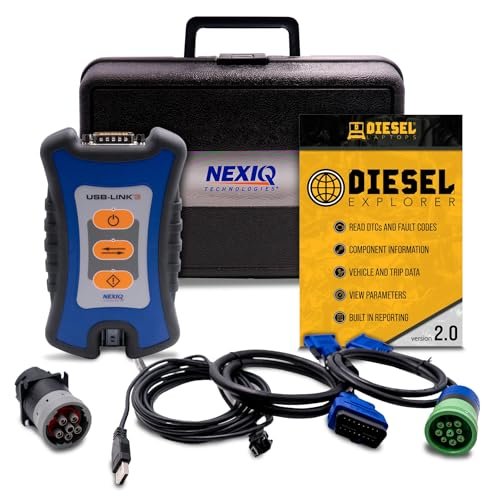
TOP CHOICE: The Diesel Laptops Nexiq USB Link 3 Wired Edition offers a strong starting point for professional truck diagnostics.
Imagine running an American repair shop during a busy workday. A delivery truck arrives with an engine warning light, another vehicle needs a service check, and a fleet customer wants a quick answer. You need more than a basic code reader. You need a reliable diagnostic computer, the right adapter, and software that can communicate with the vehicle. The right setup can help you find faults, review live data, and plan repairs. I compare these products by their intended use, listed equipment, connection type, and practical value. These reviews use the supplied product descriptions, not claims of personal laboratory testing. Some options also support the workstation rather than diagnose vehicles directly.
🏆 Top 3 Products

Diesel Laptops Nexiq USB Link 3 Wired Edition with Repair Information & Diagnostic Software
This package stands out for shops that want a wired heavy-duty truck interface with diagnostic software and repair information in one setup.

Diesel Laptops Nexiq USB Link 3 Wireless Edition with Repair Information & Diagnostic Software Bluetooth WiFi
The wireless configuration offers more freedom around trucks and service bays while retaining a software and repair information package.

2026 V3 Diagnostic Software for Heavy Duty Truck-Fleet Maintenance Tool | CF53 Laptop Diagnostic Scanner with DLA+2.0 Adapter Kits
This package deserves attention because it combines a CF53 laptop, diagnostic software, and DLA+2.0 adapter kits in one listed bundle.
Diesel Laptops Nexiq USB Link 3 Wired Review
The Diesel Laptops Nexiq USB Link 3 Wired Edition is my top choice for a professional truck diagnostic setup from this list. The package combines a wired USB Link 3 adapter with repair information and diagnostic software. This can save a shop time when it needs both a vehicle connection and useful repair resources. It targets technicians who work with heavy-duty trucks rather than drivers who only need basic engine codes.
The wired design gives you a direct connection between the adapter and the computer. It can suit a fixed diagnostic station where the laptop stays close to the vehicle. I like the idea of having the adapter and software in one package because it can reduce the number of separate items a buyer must source. Still, check the supported truck makes, models, protocols, software licenses, and update terms before you order.
✅ Pros
- ✔ Includes a Nexiq USB Link 3 wired diagnostic adapter.
- ✔ Lists diagnostic software as part of the package.
- ✔ Includes repair information for supported repair tasks.
- ✔ A wired connection suits a fixed shop workstation.
- ✔ Useful for technicians who service heavy-duty trucks.
- ✔ Combines several important diagnostic items in one purchase.
- ✔ Can support a more organized truck diagnostic workflow.
⚠️ Cons
- ✖ A cable can limit movement around a large truck.
- ✖ Vehicle coverage depends on the included software and adapter support.
- ✖ Buyers should confirm license length and future software updates.
- ✖ A compatible Windows computer may still be required.
My Recommendation
I recommend this package for independent diesel repair shops, fleet service departments, and technicians who prefer a direct wired connection. It earns the top position among the Best Professional Diagnostic Computers because its listed package combines a recognized diagnostic interface, software, and repair information. However, I would confirm that the included software supports the exact truck brands in my service area. I would also check whether the package includes a full license or only limited access. The wired setup makes the most sense when I work near a parked vehicle and do not need to move far from my laptop.
| Best For | Why |
|---|---|
| Diesel Repair Shops | The adapter and software package suits regular heavy-duty truck diagnostic work. |
| Fleet Maintenance Teams | A fixed workstation can handle repeat diagnostic tasks across supported fleet vehicles. |
| Professional Technicians | The included repair information can help connect fault findings with repair steps. |
NE-XIQ USB Link 3 Wired Truck Diagnostic Kit

The NE-XIQ USB Link 3 package is another wired option for heavy-duty truck diagnostics. Its listing describes a diagnostic scanner tool with a laptop identified by the number 7414. This makes it worth considering for buyers who want a computer and adapter together. A ready-made package may reduce setup work compared with buying each part on its own.
The main attraction is the combined laptop and wired adapter format. A technician can use a compatible diagnostic program on the laptop and connect the adapter to a supported truck. However, the product title alone does not confirm the laptop model, processor, memory, operating system, or software license. I would check these details before treating it as a complete professional workstation. I would also verify the adapter’s manufacturer and authenticity.
✅ Pros
- ✔ Lists a wired USB Link 3 diagnostic adapter.
- ✔ Includes a laptop in the advertised package.
- ✔ Targets heavy-duty diesel truck diagnostics.
- ✔ Can provide a combined computer and adapter setup.
- ✔ A wired interface can work well at a fixed service bay.
- ✔ May reduce the need to source separate hardware.
- ✔ Offers another option for shops comparing truck diagnostic bundles.
⚠️ Cons
- ✖ The laptop’s full hardware specifications need confirmation.
- ✖ The exact software package and supported brands are unclear from the title.
- ✖ Buyers should verify the adapter’s manufacturer and authenticity.
- ✖ A wired connection limits movement around the vehicle.
My Recommendation
I would consider this package if I wanted a laptop and wired truck diagnostic interface together. It may suit a small diesel shop that needs a dedicated computer for vehicle work. Before buying, I would ask the seller for the full laptop specification sheet and a list of included programs. I would also confirm whether the software has a valid license and whether it supports North American trucks. The package could be useful, but I would compare its actual contents with the better-documented options before spending shop money.
| Best For | Why |
|---|---|
| Small Diesel Shops | The advertised laptop and adapter combination may simplify initial setup. |
| Mobile Technicians | A laptop-based system can travel between service locations. |
| Budget-Conscious Buyers | A bundled setup may reduce separate hardware purchases if its contents meet your needs. |
2026 V3 CF53 Heavy Duty Diagnostic Laptop Kit
This CF53 diagnostic package targets heavy-duty truck and fleet maintenance work. Its listing names V3 diagnostic software, a CF53 laptop, and DLA+2.0 adapter kits. That combination gives it a broad role as a possible starting workstation for a truck repair business. I like the bundled approach because the computer, interface, and software all play a part in a complete diagnostic setup.
The CF53 name points to a laptop-based package, while the DLA+2.0 kit provides the listed vehicle connection hardware. The software should help the technician communicate with supported vehicle systems, but actual coverage depends on its version and license. I would not assume that every engine, transmission, or truck brand works with this package. Check the full software list, activation method, update policy, and included cables before buying.
✅ Pros
- ✔ Includes a CF53 laptop in the advertised configuration.
- ✔ Lists V3 heavy-duty diagnostic software.
- ✔ Includes DLA+2.0 adapter kits.
- ✔ Targets fleet maintenance and truck repair work.
- ✔ Offers a bundled approach to building a diagnostic station.
- ✔ May suit technicians who want a dedicated diagnostic laptop.
- ✔ Combines computer hardware and vehicle connection equipment.
⚠️ Cons
- ✖ The exact laptop condition and specifications need verification.
- ✖ The software’s supported brands and functions may vary.
- ✖ A software update or activation fee may apply.
- ✖ The listing does not establish universal vehicle coverage.
My Recommendation
I would shortlist this package for a fleet workshop that needs a laptop-based diagnostic setup. It earns the Best Value position in my showcase because it lists several core items in one bundle, not because I have verified its selling price. Among the Best Professional Diagnostic Computers, this is an appealing option for buyers who want a CF53 computer and adapter hardware together. I would request the software version, license details, laptop specifications, and supported vehicle list before ordering. Those details matter more than a broad claim of compatibility.
| Best For | Why |
|---|---|
| Fleet Workshops | The listed software and adapter kits target heavy-duty fleet service. |
| Diesel Mechanics | The package offers a dedicated laptop-based diagnostic arrangement. |
| New Diagnostic Stations | A bundled computer and adapter setup can simplify initial equipment planning. |
Diesel Laptops Nexiq USB Link 3 Wireless Review
The Diesel Laptops Nexiq USB Link 3 Wireless Edition offers a different way to connect a diagnostic computer to a heavy-duty truck. The listing names Bluetooth and Wi-Fi support, along with repair information and diagnostic software. This design can give a technician more freedom when moving around a service bay. It may also reduce the need to keep a laptop right beside the vehicle connection point.
I see this package as a strong choice for busy shops that value flexible positioning. A wireless setup can make it easier to check data while standing near an engine bay or moving around a truck. However, wireless convenience does not remove the need for stable communication, correct software, and supported vehicle protocols. I would check the exact wireless connection requirements, laptop compatibility, included license, and supported truck brands before ordering.
✅ Pros
- ✔ Lists a wireless Nexiq USB Link 3 interface.
- ✔ Supports the advertised Bluetooth and Wi-Fi connection options.
- ✔ Includes diagnostic software according to the listing.
- ✔ Lists repair information as part of the package.
- ✔ Allows more freedom around the service bay than a wired setup.
- ✔ Can suit technicians who move between work areas.
- ✔ Offers a useful alternative to a fixed cable connection.
⚠️ Cons
- ✖ Wireless communication depends on a suitable connection.
- ✖ The laptop must support the required connection method.
- ✖ The included software license and update terms need checking.
- ✖ Wireless hardware may require extra setup or troubleshooting.
My Recommendation
I recommend this package for professional diesel technicians who often move around large vehicles. It earns the Highly Recommended badge because the wireless design can make routine checks more convenient. I would choose it over the wired version when mobility matters more than having a direct cable connection. For a fixed workstation, however, the wired model may be simpler. I would also confirm the actual Bluetooth and Wi-Fi functions, supported laptop systems, and software access before making a purchase.
| Best For | Why |
|---|---|
| Busy Truck Repair Bays | Wireless communication can reduce cable movement around the service area. |
| Mobile Diesel Technicians | The setup offers more freedom when working at different vehicle positions. |
| Fleet Service Teams | Technicians can use a more flexible diagnostic arrangement for supported trucks. |
CAT ET4 Diagnostic Adapter With CF54 Laptop

The ET4 478-0235 Communication Adapter 3 package targets Caterpillar heavy equipment. Its listing names compatibility with CAT ET software and SIS diagnostic tools. It also includes a CF54 laptop in the advertised package. This makes it different from a general heavy-duty truck scanner because its main purpose is to support Caterpillar equipment service.
For a shop that works with CAT machines, the correct communication adapter matters. A compatible computer and software can help a technician review machine faults and service information. However, the exact machine coverage, software access, and adapter status need careful checking. I would confirm support for the machine’s model and serial range before ordering. I would also verify whether the software is licensed and whether the laptop comes ready to use.
✅ Pros
- ✔ Targets Caterpillar heavy equipment diagnostics.
- ✔ Lists an ET4 478-0235 Communication Adapter 3.
- ✔ Names CAT ET software compatibility.
- ✔ Also lists SIS diagnostic tool compatibility.
- ✔ Includes a CF54 laptop in the advertised package.
- ✔ May suit construction and equipment repair businesses.
- ✔ Offers a machine-focused alternative to general truck diagnostic tools.
⚠️ Cons
- ✖ Its main focus is CAT equipment rather than every truck brand.
- ✖ Exact machine and serial-number coverage must be confirmed.
- ✖ Software licensing and activation terms are not clear from the title.
- ✖ Buyers should verify adapter authenticity and laptop condition.
My Recommendation
I would choose this product only if Caterpillar equipment forms a regular part of my workload. It can be a useful option for construction equipment shops, machinery fleets, and independent CAT service technicians. I would not buy it as my only diagnostic computer if I mainly repair passenger cars or mixed-brand road trucks. The key step is to match the adapter and software to the exact CAT machines in the shop. Confirming that information first can prevent an expensive compatibility mistake.
| Best For | Why |
|---|---|
| CAT Equipment Shops | The package targets Caterpillar diagnostic software and communication. |
| Construction Fleets | A dedicated CAT diagnostic station can support machine maintenance. |
| Heavy Equipment Mechanics | The CF54 laptop and adapter bundle may simplify workshop setup. |
CF53 Nexiq Truck Diagnostic Laptop With 16 Programs

This CF53 laptop package combines a wired Nexiq USB Link 3 diagnostic adapter with a group of advertised software programs. The listing mentions 16 software packages, excavator compatibility, and a carrying case. It also describes the included software as a recent package. This makes the product interesting for technicians who want a ready-made computer and adapter combination for truck and equipment work.
The carrying case can help keep the laptop and related items together during service calls. The wired adapter may also suit a workshop that uses one regular diagnostic station. However, a software count does not prove useful coverage. I would ask for the full list of programs, supported brands, license status, and update dates. I would also check the laptop’s processor, memory, storage, battery condition, and operating system before placing an order.
✅ Pros
- ✔ Includes a CF53 laptop in the advertised package.
- ✔ Lists a wired Nexiq USB Link 3 adapter.
- ✔ Advertises 16 diagnostic software programs.
- ✔ Includes a carrying case according to the listing.
- ✔ Targets heavy-duty truck diagnostic work.
- ✔ Mentions excavator compatibility.
- ✔ Can provide a single package for a dedicated diagnostic station.
⚠️ Cons
- ✖ The names and versions of all 16 programs need confirmation.
- ✖ A software count does not guarantee broad vehicle coverage.
- ✖ The laptop’s condition and hardware specifications need checking.
- ✖ Older software may need updates or new activation.
My Recommendation
I would consider this package for a diesel shop that wants a laptop, wired adapter, and several diagnostic programs together. The carrying case adds practical value for technicians who move between locations. Still, I would never choose a diagnostic bundle only because it advertises many software titles. I would ask the seller to name every program and show which truck brands and model years each one supports. This check is important for buyers comparing the Best Professional Diagnostic Computers for commercial repair work.
| Best For | Why |
|---|---|
| Diesel Repair Businesses | The advertised software bundle targets commercial vehicle diagnostics. |
| Mobile Repair Teams | The carrying case can help organize and transport the diagnostic setup. |
| Multi-Brand Workshops | Multiple listed programs may help if they cover the shop’s actual vehicle brands. |
Isuzu G-IDSS Truck Diagnostic Laptop Kit
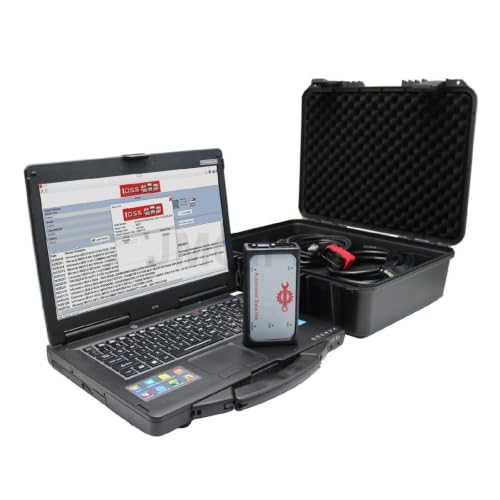
The Isuzu G-IDSS diagnostic kit is a brand-specific option for technicians who work with supported Isuzu vehicles. Its listing describes a laptop-based system that can read and clear engine fault codes. That can help a mechanic identify stored engine faults during a basic diagnostic check. The product also states that it does not support programming, which is an important limit.
There is another major warning for American buyers. The listing says this kit is incompatible with North American trucks. That restriction makes it a poor choice for most US truck repair shops that service North American Isuzu models. I would not overlook this warning. Before buying, check the exact vehicle market, model, and engine coverage. If your work involves North American Isuzu trucks, choose a system that clearly supports those vehicles instead.
✅ Pros
- ✔ Targets supported Isuzu diagnostic applications.
- ✔ Lists a G-IDSS laptop-based diagnostic setup.
- ✔ Can read engine fault codes on supported vehicles.
- ✔ Can clear supported stored engine fault codes.
- ✔ May suit workshops working with compatible non-North-American models.
- ✔ Offers a brand-focused option for a narrow service need.
⚠️ Cons
- ✖ The listing says it is incompatible with North American trucks.
- ✖ It does not support vehicle programming.
- ✖ Its functions appear more limited than a full service system.
- ✖ Exact model and market coverage need careful verification.
My Recommendation
I would not recommend this kit for a typical US truck repair shop. Its stated North American incompatibility is a major concern for the American market. It may have a place in a workshop that services the specific supported Isuzu models outside North America, but only after a model-by-model check. I would also treat it as a code-reading and clearing tool, not a full programming workstation. Buyers should choose a properly supported alternative if they need advanced functions.
| Best For | Why |
|---|---|
| Compatible Isuzu Workshops | The software targets supported Isuzu vehicles and engine fault checks. |
| Basic Engine Diagnostics | The listed functions include reading and clearing engine fault codes. |
| Specialized Service Centers | A narrow brand-focused tool may suit shops with matching vehicle coverage. |
Automotive Programming Stabilized Power Supply

This listing describes essential diagnostic computer tools for car repair shops, including a programmable DC stabilized power supply. A stable power source can play an important role during some automotive programming tasks. Vehicle voltage can change during service, especially when the ignition stays on and several electronic systems remain active. A suitable regulated supply can help maintain the required voltage during approved work.
This product is not a complete diagnostic computer or vehicle scanner. It is better viewed as supporting equipment for a professional programming station. I would check its voltage range, current output, adjustment method, protection features, and rated duty cycle before buying. I would also confirm what equipment the package actually includes because the listing title mentions several shop tools and mobile cart terms. A clear parts list matters.
✅ Pros
- ✔ Targets automotive programming and repair shop use.
- ✔ Lists a programmable DC stabilized power supply.
- ✔ Can support stable voltage during suitable programming tasks.
- ✔ May complement a professional diagnostic computer.
- ✔ Can form part of a dedicated electronic service station.
- ✔ Offers a supporting tool for shops that work on vehicle electronics.
- ✔ May help reduce voltage-related interruptions when correctly specified.
⚠️ Cons
- ✖ It is not a standalone automotive diagnostic computer.
- ✖ The exact voltage and current ratings need confirmation.
- ✖ Protection functions and output stability require verification.
- ✖ The listing title does not clearly define every included item.
My Recommendation
I would consider this product as an addition to an existing diagnostic and programming workstation. It is most useful when the shop performs tasks that require a controlled power supply. I would not buy it as a replacement for a truck scanner or laptop. Before ordering, I would compare its rated output with the vehicle and programming equipment requirements. I would also confirm that it offers the protection and control features needed for the planned work. Never use an unsuitable supply during sensitive vehicle programming.
| Best For | Why |
|---|---|
| Automotive Electronics Shops | A regulated supply can support suitable electronic service tasks. |
| Programming Workstations | Stable power may help maintain the required voltage during approved programming. |
| Professional Repair Bays | It can complement a laptop and vehicle communication interface. |
GEARWRENCH Diagnostic Mobile Workcenter Cart

The GEARWRENCH Diagnostic Mobile Workcenter Cart is a support product for an organized repair shop. Its listing gives it an 80-pound weight capacity and a lockable cover lid. It also describes the cart as a mobile home for diagnostic devices, laptops, and accessories. This makes it useful for technicians who want their diagnostic equipment in one place.
A mobile cart can improve the way a shop handles daily work. Instead of carrying a laptop, cables, adapters, and small tools one by one, a technician can keep them together. The lockable lid can also help protect stored items when the cart is not in use. However, this cart does not read vehicle codes or communicate with an engine control module. I would check its dimensions, drawer layout, wheel design, and actual usable storage before buying.
✅ Pros
- ✔ Provides a mobile workstation for diagnostic equipment.
- ✔ Lists an 80-pound weight capacity.
- ✔ Includes a lockable cover lid according to the listing.
- ✔ Can hold laptops and diagnostic accessories.
- ✔ Helps keep cables and small equipment organized.
- ✔ Can reduce repeated trips across the service bay.
- ✔ Supports a cleaner and more organized diagnostic workspace.
⚠️ Cons
- ✖ It is a storage cart, not a diagnostic computer.
- ✖ The listed weight capacity limits the total supported load.
- ✖ Storage dimensions should be checked before buying.
- ✖ It does not replace a scanner, laptop, or communication adapter.
My Recommendation
I recommend this cart for professional shops that already own diagnostic laptops and adapters. It can make a busy service bay easier to manage by keeping key items together. I would use it as a workstation accessory rather than compare it directly with truck diagnostic computers. The 80-pound capacity is useful information, but I would still check the weight of the laptop, power supply, tools, and accessories together. A good cart should move easily and fit the available shop space.
| Best For | Why |
|---|---|
| Busy Repair Shops | A mobile cart keeps common diagnostic equipment close to the work area. |
| Diagnostic Technicians | It offers a dedicated place for laptops, cables, and adapters. |
| Organized Workstations | The lockable lid can help keep equipment stored between jobs. |
V8 USB PCIe Motherboard Diagnostic Tester
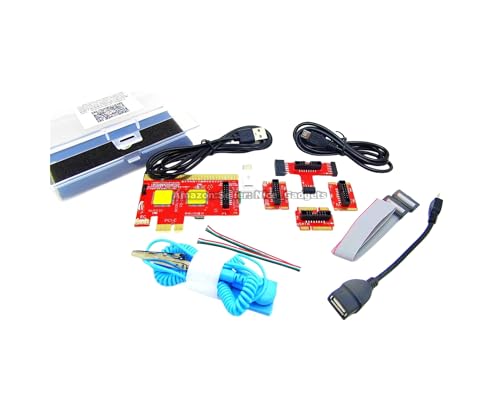
The V8 USB PCIe Motherboard Diagnostic Tester serves a very different purpose from the automotive products above. Its listing describes a computer POST test card and motherboard diagnostic kit. It targets PC, laptop, server, and other computer hardware troubleshooting. This can make it useful for a computer repair technician who needs help finding hardware startup faults.
A POST diagnostic card can help show error information during a computer startup test, depending on the board and connection. It may help narrow down problems with a motherboard or related hardware. However, compatibility can vary by device, port, and system design. I would not assume that every listed device works with every function. Most important, this product does not replace an automotive scan tool and cannot diagnose a truck engine or vehicle control module.
✅ Pros
- ✔ Targets computer motherboard diagnostics.
- ✔ Lists USB and PCIe diagnostic connections.
- ✔ Designed for POST-related hardware troubleshooting.
- ✔ May help identify certain computer startup faults.
- ✔ Targets PC and server repair applications.
- ✔ Can support a computer hardware service bench.
- ✔ Offers a specialized tool for technicians who repair diagnostic laptops.
⚠️ Cons
- ✖ It is not an automotive diagnostic computer.
- ✖ Compatibility depends on the computer and available connection ports.
- ✖ The broad device compatibility claims need checking.
- ✖ Some modern systems may not expose useful POST information through this type of card.
My Recommendation
I recommend this tester for computer repair technicians, not automotive mechanics looking for a vehicle scanner. It can have a useful role in a shop that repairs diagnostic laptops, desktop PCs, or servers. I would check the supported motherboard types and exact test functions before buying. If your goal is to diagnose engine faults, transmission problems, or vehicle networks, choose a compatible automotive interface instead. This distinction is important when comparing the Best Professional Diagnostic Computers because computer hardware testing and vehicle diagnostics are separate jobs.
| Best For | Why |
|---|---|
| Computer Repair Shops | The tool targets motherboard and startup troubleshooting. |
| IT Hardware Technicians | It may help narrow down certain PC and server hardware faults. |
| Diagnostic Laptop Repair | It can support hardware checks on compatible computer systems. |
Final Verdict: Which Should You Buy?
The Diesel Laptops Nexiq USB Link 3 Wired Edition is my overall pick because its listing combines a truck diagnostic adapter, software, and repair information. Choose the wireless version if mobility matters more. The CF53 V3 package is another strong option for buyers who want a bundled laptop and adapter setup. Always confirm vehicle coverage and software licensing first.
The Best Professional Diagnostic Computers can help your shop find faults and manage repairs. Match your computer, adapter, and software to the vehicles you service. The right setup can make daily diagnostics easier and more organized.
FAQs Of Best Professional Diagnostic Computers
Q What Is A Professional Diagnostic Computer?
Q Can One Diagnostic Computer Work With Every Truck Brand?
Q Is A Wired Or Wireless Nexiq USB Link 3 Better?
Q Do I Need A Special Laptop For Truck Diagnostics?
Q What Should I Check Before Buying A Professional Diagnostic Computer?