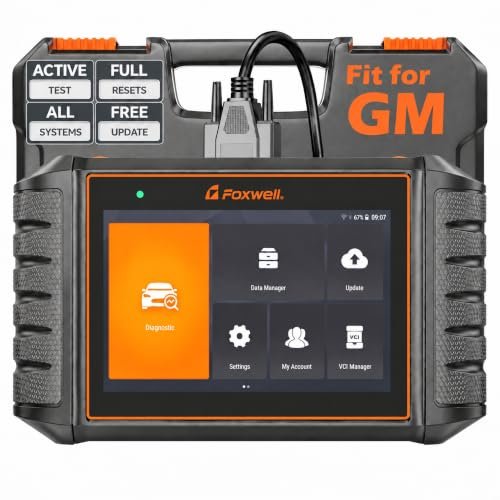
The Foxwell NT710 is a capable diagnostic scanner for DIY owners and mechanics who need advanced vehicle checks.
A check engine light can turn a normal drive into a stressful day. You may visit a repair shop just to find out what caused it. Basic code readers can help, but they often miss faults in other car systems. This is why many US drivers look for a more advanced OBD2 scanner.
The Foxwell NT710 aims to fill that gap. It offers full-system diagnostics, active tests, and many service functions in one handheld tablet. It may suit car owners who handle basic repairs at home and small repair shops that need a useful scan tool. However, vehicle coverage and the included brand software need close attention before you buy.

Is the Foxwell NT710 Good?
The Foxwell NT710 is a strong option if you want more than a basic code reader. It can scan many vehicle systems, read and clear fault codes, show live data, and run supported active tests. It also offers service tools for common repair tasks.
One of its main strengths is bidirectional control. This lets the scanner send commands to supported vehicle parts. For example, you may use it to test a cooling fan, fuel pump, or other electronic part. This can help narrow down a fault before you replace anything.
The scanner also supports many service tasks. These can include oil resets, electronic parking brake service, battery registration, and steering angle sensor calibration. The exact options depend on your car.
There are limits worth knowing. The NT710 is not a universal tool with every feature for every car. Its software setup can depend on the vehicle brand you choose. Some advanced functions may not work on certain model years or trims.
I would place it in the advanced DIY and entry-level workshop class. It offers more diagnostic depth than a basic OBD2 reader, but buyers should check their vehicle coverage before spending money.

My First impression of the Foxwell NT710
The NT710 uses a tablet-style design rather than the small shape of a basic code reader. Its 5.5-inch touch screen gives it room for menus, fault codes, and live data. The layout is aimed at people who need more than a simple warning light check.
The listed hardware includes an Android 9.0 system, a quad-core processor, 32GB of storage, and a 4000mAh battery. These details give buyers a clear idea of the device’s design and basic setup. They do not replace a real hands-on test.
Getting started involves charging the scanner, connecting it to Wi-Fi, and setting up the required vehicle software. You then connect the diagnostic cable to the car’s OBD2 port. AutoVIN may help identify a supported vehicle and reduce manual entry.
The setup is not as simple as plugging in a low-cost code reader. You may need to download software, select the right vehicle, and check which functions are available. I would review the setup guide before using it on a car for the first time.

Key Features of the Foxwell NT710
- Full-System Diagnostics: The NT710 can scan supported electronic systems beyond the engine. These may include the ABS, airbag, transmission, steering angle, battery, and air conditioning systems. This gives users a wider view of vehicle faults than a basic engine code reader. Available systems depend on the car’s make, model, and year.
- Bidirectional Control: The scanner can send commands to supported vehicle parts. These active tests may include cooling fans, fuel pumps, EVAP parts, windows, and door locks. This helps users check whether a part responds to a command. It can save time when finding an electrical fault, but each test needs vehicle support.
- 30+ Service Functions: The NT710 offers more than 30 advertised service and reset functions. These may include oil reset, EPB, ABS bleeding, SAS calibration, DPF regeneration, throttle adaptation, and battery-related tasks. Not every function works on every vehicle. Buyers should check the exact service list for their car.
- Live Data and Graphing: The scanner can show live data from supported vehicle sensors. Its four-in-one graph view lets users compare several data streams at once. This can help spot changes in sensor readings while a car runs. It is useful when a fault does not appear as a clear error code.
- ECU Coding and Adaptation: The NT710 offers selected coding and adaptation tools for supported vehicles. Some versions include brand-specific options such as BMW coding. These tools can help with certain settings and repair tasks. Coding support varies, so check the exact vehicle and function before buying.
- Battery Registration: Battery registration is useful on cars that need a battery change recorded in the battery management system. The NT710 supports this task on selected vehicles. It may help the system track the new battery and manage charging as intended. It does not mean every car needs battery registration.
- Wi-Fi Software Updates: The NT710 uses Wi-Fi to download supported software updates. Foxwell advertises lifetime free updates for the included software. This can help keep the tool current without a yearly update fee. Check the seller’s terms and the included software license before ordering.
- Tablet Hardware and Touch Screen: The device has a 5.5-inch touch screen, Android 9.0, 32GB of storage, and a 4000mAh battery. This tablet format gives users more room to view scan results and menus. It is also easier to carry around a garage than a large shop computer.

✅ What I Like
- ✔ Full-system scanning provides access to more vehicle information than a basic engine-only OBD2 reader.
- ✔ Bidirectional tests let users command supported parts and check how they respond.
- ✔ More than 30 advertised service functions can help with common maintenance and repair work.
- ✔ Live data graphing makes it easier to compare sensor readings during fault checks.
- ✔ Battery registration can help with battery replacement on supported vehicles.
- ✔ Wi-Fi updates make it easier to install available software updates without a computer.
- ✔ The tablet-style touch screen offers more room for menus and diagnostic results.
- ✔ The included software is advertised with lifetime free updates, which can reduce long-term update costs.
⚠️ What Could Be Better
- ✖ Some service functions and active tests are limited by the vehicle make, model, year, and trim.
- ✖ Additional vehicle brand software may cost extra, so the initial purchase may not cover every car in a household or shop.
- ✖ The setup process and advanced menus may take time for beginners to learn.

Who Should Buy the Foxwell NT710?
I would consider the NT710 if you work on your own vehicles and want more control over fault checks. It can help you look beyond engine codes and inspect systems such as ABS, SRS, and transmission controls. Its active tests also offer more ways to check a suspected part.
It may also suit a small independent garage. A mechanic can use the scan tool for fault checks, live data, and supported service tasks. It can help with routine work, but it should not replace the right repair manual or a proper test plan.
Before buying, check the software version and vehicle coverage. Some listings offer different brand options. Make sure the version you order includes the software you need. Also confirm whether any extra brand license is needed.
| Best For | Why It Fits |
|---|---|
| DIY Car Owners | It offers full-system scans, live data, and supported service functions for owners who handle their own car care. |
| Home Mechanics | Bidirectional control and system-level checks can help narrow down faults before replacing parts. |
| Small Repair Shops | Its mix of diagnostics, active tests, and maintenance functions can support many routine jobs on covered vehicles. |
| Brand-Specific Car Owners | The selected vehicle software may provide deeper diagnostic and service access for a compatible make. |

Alternative Products You Can Consider
| Product | Best For | Key Difference |
|---|---|---|
| Foxwell NT710 | Advanced DIY users and small garages | Offers full-system diagnostics, active tests, service functions, and brand-specific software. |
| Autel MaxiCOM MK808S | Users comparing advanced tablet scanners | Uses the Autel diagnostic platform and its own vehicle coverage and service tool options. |
| Launch X431 CRP919X | DIY users and repair professionals | Offers a separate diagnostic platform with its own active test and service function coverage. |
| Foxwell NT809BT | Buyers comparing higher-tier Foxwell tools | A different Foxwell model with a separate hardware and feature set. |

Final Verdict: Which Diagnostic Scanner Should You Buy?
The Foxwell NT710 is worth considering if you need more than basic OBD2 code reading. Its main appeal is the mix of full-system diagnostics, bidirectional tests, live data, and service functions. These tools can help you find faults and handle supported maintenance tasks without relying on a simple code reader.
I would put it on the shortlist for home mechanics, serious DIY owners, and small garages. It is less suited to someone who only wants to read and clear a check engine light. A basic OBD2 scanner may offer better value for that simple job.
The biggest thing to check is vehicle coverage. Do not assume every advertised function works on your car. Also check which brand software comes with the version you plan to buy. Extra software may add to the cost.
My final take is simple: buy the NT710 if its supported tests match the work you plan to do. If you need a wider mix of vehicle brands, compare the cost of extra software and other scan tools first. The right scanner is the one that works with your car, not the one with the longest feature list.