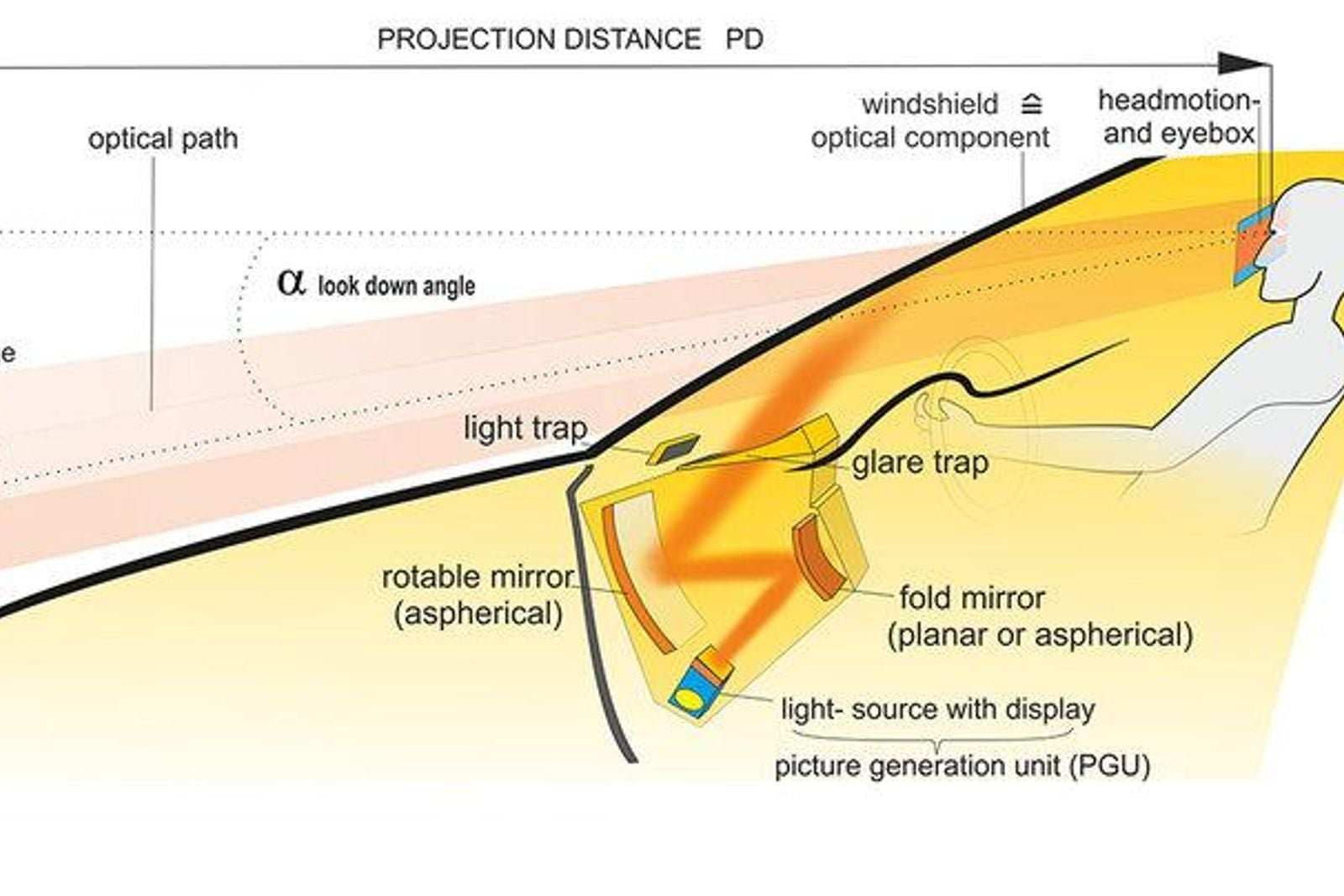
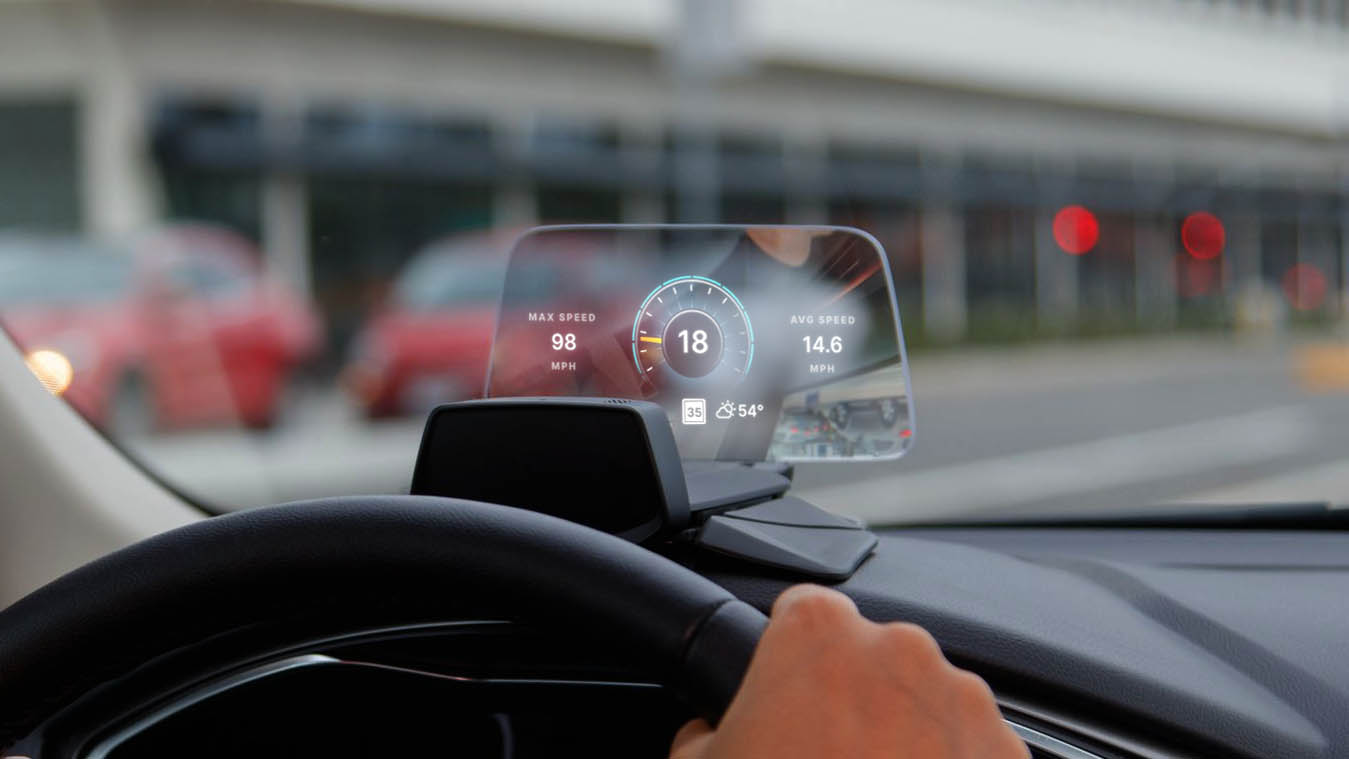
A heads up display, often called a HUD, is one of the most practical technologies found in modern vehicles. It helps drivers keep their eyes on the road by showing useful information such as speed, navigation directions, and warnings in front of them.
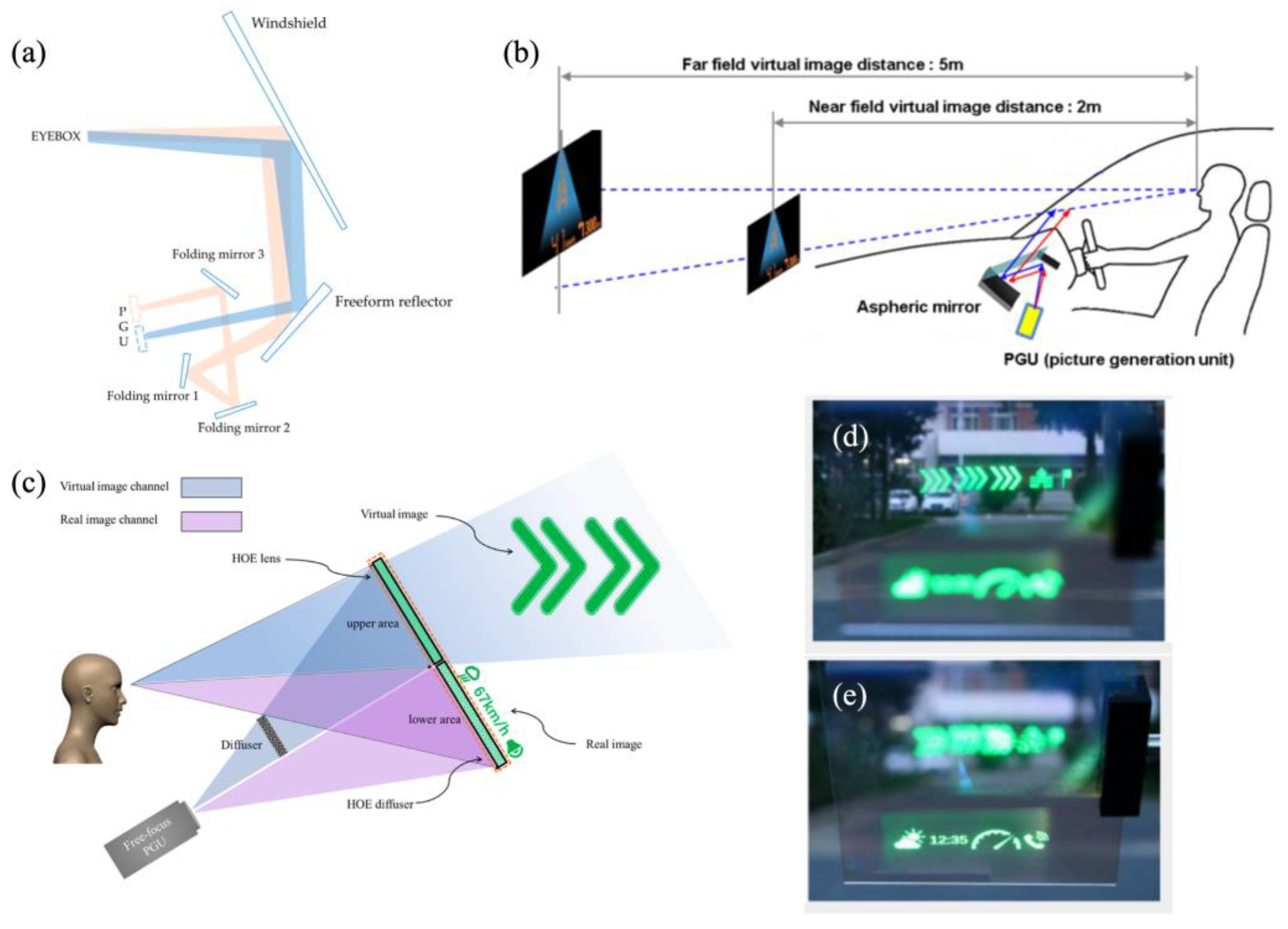
When explaining How Automotive Heads Up Displays Work, the basic idea is simple. A small projector creates an image, special mirrors adjust the light path, and a transparent surface reflects the information into the driver’s view. The driver sees the data as if it appears ahead of the vehicle.
From my experience studying automotive technology, the biggest value of a HUD is not the futuristic appearance. The real benefit is reducing the need to move your eyes between the road and the dashboard during everyday driving in the United States.

What Is an Automotive Heads Up Display?
An automotive heads up display is a system that shows vehicle information directly within the driver’s line of sight. Instead of checking a traditional instrument cluster, the driver can view important details while looking through the windshield.
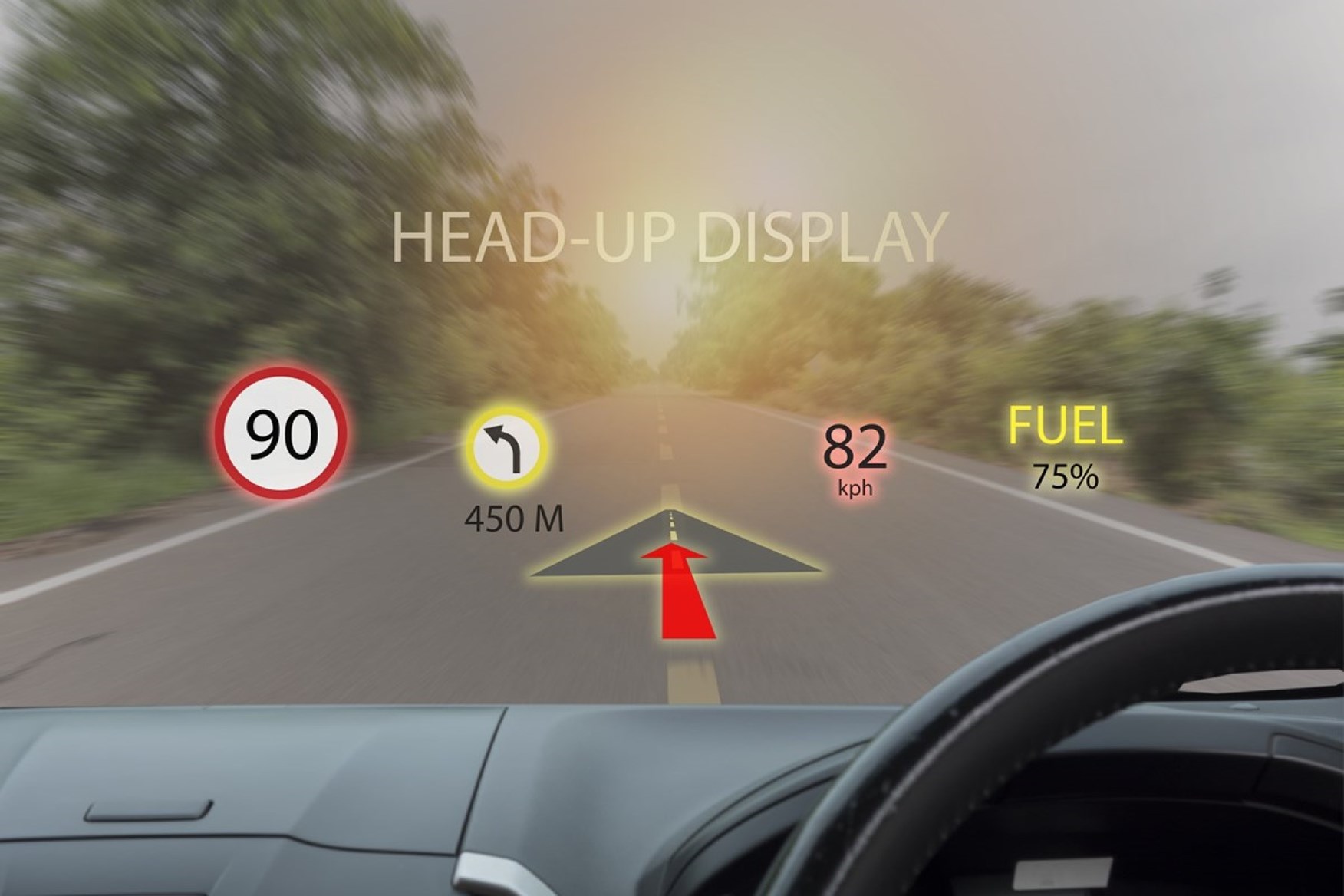
The information shown depends on the vehicle model. Many systems display speed, fuel level, traffic signs, navigation instructions, and driver assistance alerts. Premium vehicles may also include advanced graphics that interact with the road ahead.
Understanding How Automotive Heads Up Displays Work starts with knowing that a HUD does not create information by itself. It collects data from the vehicle computer, navigation system, cameras, and sensors before displaying it.
- ✦ Driver Information
HUDs can show speed, cruise control status, warnings, and navigation details.
- ✦ Reduced Distraction
Drivers can view important data without frequently looking down at the dashboard.
Traditional HUD vs Augmented Reality HUD
Traditional HUD systems display information on a fixed area of the windshield. They usually show simple graphics like speed numbers or arrows.
Augmented reality HUD systems are more advanced. They can place digital images over the actual road view, such as navigation arrows that appear to follow a lane.
- ✦ Traditional HUD
Uses basic projection technology for essential vehicle information.
- ✦ AR HUD
Combines cameras, sensors, and graphics to create interactive road guidance.
How Automotive Heads Up Displays Work Step by Step
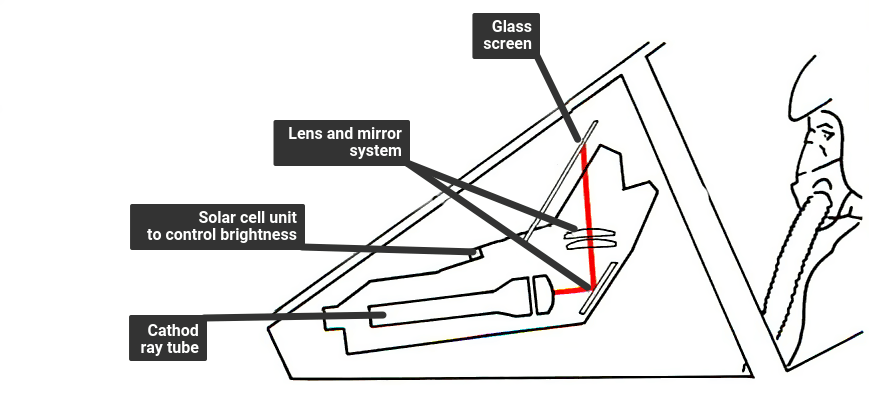
The process behind How Automotive Heads Up Displays Work involves several connected parts working together in real time. The vehicle first gathers information from different electronic systems.
The HUD computer processes this information and decides what should appear on the display. It then sends instructions to the projection system, which creates the final image visible to the driver.
Although the technology seems simple from the driver’s seat, the system requires accurate positioning, brightness control, and image adjustment to remain clear in different lighting conditions.
- ✦ Step 1: Data Collection
Vehicle sensors and computers provide information such as speed, location, and warnings.
- ✦ Step 2: Image Creation
The HUD system converts digital information into a visible graphic.
- ✦ Step 3: Projection
A projector and reflective surface send the image into the driver’s view.
The Role of the Combiner and Windshield
The windshield or a special transparent screen acts as a combiner. It reflects the projected image while still allowing the driver to see the road.
Modern windshields designed for HUD systems use special layers that improve image clarity and reduce distortion.
Main Components Inside a Car HUD System
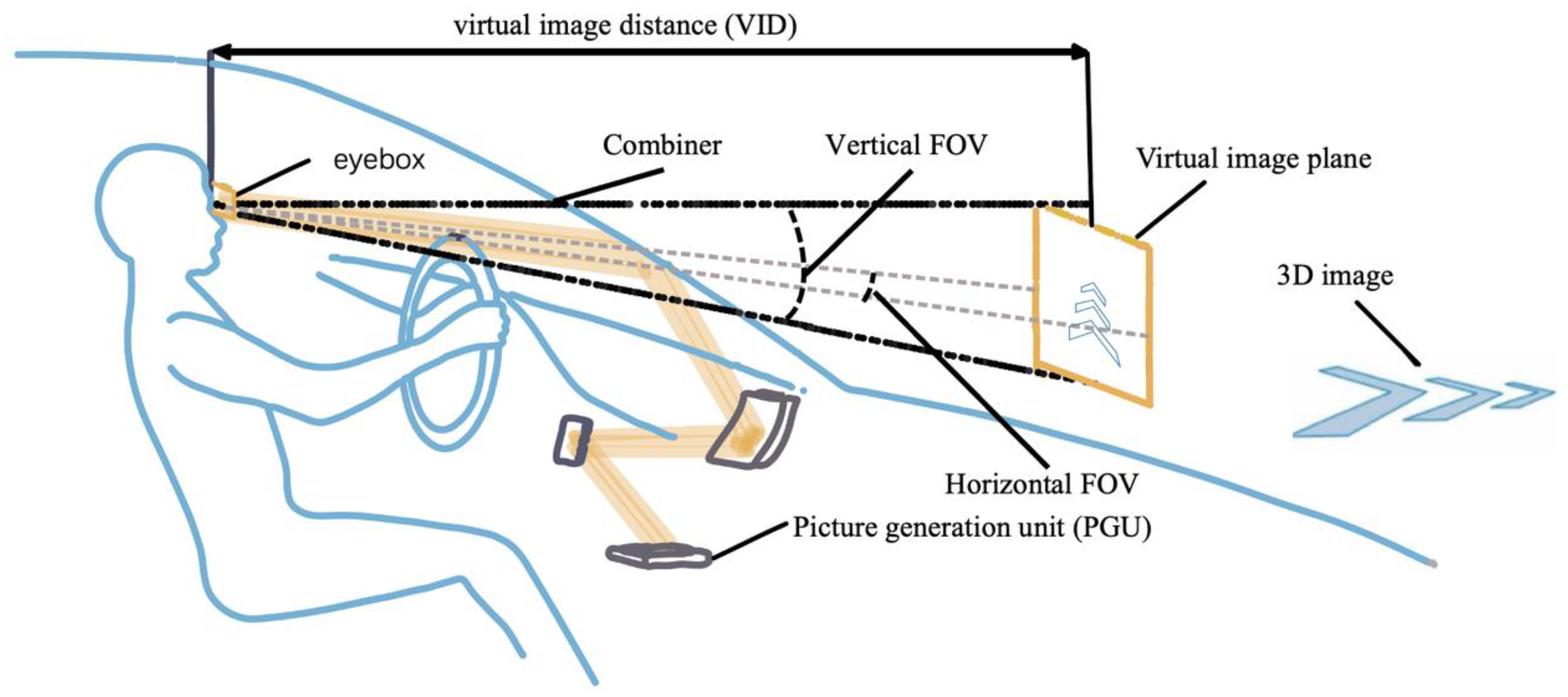
A car HUD system contains several important components that must work together. Each part has a specific role in creating a stable and readable display.
Learning these parts makes it easier to understand How Automotive Heads Up Displays Work and why some systems offer better performance than others.
- ✦ Projection Unit
Creates the digital image that will appear in front of the driver.
- ✦ Control Computer
Processes vehicle data and controls what information appears.
- ✦ Optical System
Uses mirrors and lenses to direct and focus the projected image.
- ✦ Sensors
Provide information for navigation, safety alerts, and vehicle status.
Why Brightness Adjustment Matters
A HUD must remain visible during bright sunlight and nighttime driving. Automatic brightness adjustment helps maintain clear information without distracting the driver.
Good HUD systems also adjust image position and focus based on driver settings.
How Augmented Reality HUD Technology Works
Augmented reality HUDs represent the next stage of vehicle display technology. They combine camera data, GPS information, and advanced software to create graphics that appear connected to the outside world.
For example, a navigation arrow may appear directly on the correct lane instead of only showing a small symbol on the dashboard screen.
These systems require precise calculations because the digital image must match the driver’s real view of the road.
- ✦ Camera Input
Front cameras help identify lanes, vehicles, and road signs.
- ✦ Mapping Data
GPS and map information provide accurate navigation guidance.
Connection With Driver Assistance Systems
Many modern HUDs connect with adaptive cruise control, lane keeping systems, and collision warnings.
This creates a more connected driving experience where important alerts appear naturally in the driver’s view.
Benefits of Using a Heads Up Display in a Vehicle
The main advantage of a HUD is improved access to information. Drivers spend less time moving their eyes away from the road.
In the United States, where many people spend long hours commuting or driving on highways, quick access to navigation and vehicle information can make daily trips easier.
However, a HUD works best when the information stays simple and does not overwhelm the driver.
- ✦ Better Road Awareness
Drivers can keep their attention forward while viewing essential information.
- ✦ Convenient Navigation
Turn-by-turn directions can appear closer to the driver’s natural view.
- ✦ Improved Comfort
Drivers do not need to repeatedly check lower dashboard displays.
Limitations and Challenges of Automotive HUD Systems
Although HUD technology offers many benefits, it also has some limitations. Not every driver prefers projected information, and some systems require time to adjust.
Cost is another factor. Advanced HUD systems often appear in higher trim levels because they require specialized hardware and software.
Understanding How Automotive Heads Up Displays Work also means understanding that the technology supports drivers but does not replace careful attention.
- ✦ Higher Vehicle Cost
Advanced HUD systems can increase vehicle price because of additional hardware.
- ✦ Visibility Issues
Poor positioning, sunlight, or incorrect settings may affect readability.
- ✦ Driver Preference
Some drivers may prefer traditional displays or fewer visual elements.