The CRP919E is worth considering for DIY users who need deeper diagnostics and active tests.
A check engine light can turn a normal drive into a stressful day. Your car may run fine, yet you have no clear idea what went wrong. A basic code reader can help, but it may not show enough detail to find the real fault.
This is why many American car owners look at advanced scan tools. The LAUNCH CRP919E aims to fill that gap with full-system scans, active tests, service resets, and select ECU coding. It may suit a home mechanic or a small repair shop that wants more control over car diagnostics.

Is the LAUNCH CRP919E Good?
The LAUNCH CRP919E is a capable diagnostic tool for users who need more than basic OBD2 code reading. It brings several useful repair tools into one tablet-style device. These include full-system diagnostics, bidirectional control, service resets, and ECU coding on supported vehicles. This makes it useful for people who work on cars often.
Its biggest strength is the range of diagnostic tasks it can handle. You can read fault codes, view live data, and run certain active tests. However, not every feature works on every car. Make, model, year, and system support all matter. It also takes time to learn the menus. I would check vehicle coverage before buying, as a long feature list does not guarantee support for your car.

My First Impression of the LAUNCH CRP919E
The CRP919E uses a tablet-style design rather than the small body of a basic code reader. This gives the user more room to view codes, data, and test results. The larger screen layout also makes it easier to work through several menus. Its design suits a garage or home workshop better than a small glove box tool.
Packaging and included parts can vary by seller and kit. Before buying, check the box contents and make sure the tablet, vehicle interface, OBD cable, charger, and any needed adapters are included. Also check the screen, ports, and cable condition when the unit arrives.

Key Features That Make It Stand Out
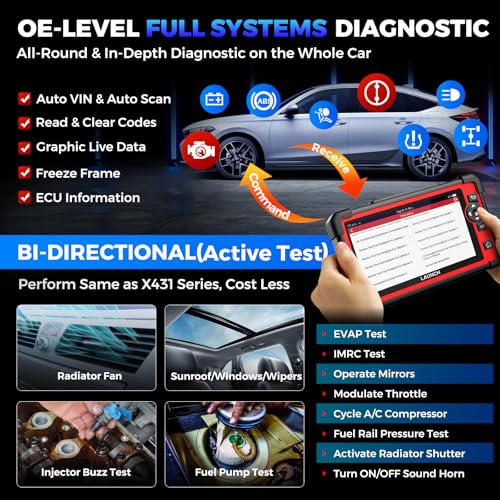
- Full-System Diagnostics: The scanner can check many vehicle systems beyond the engine. These may include the transmission, ABS, airbag, body control, and other supported modules. It can read and clear fault codes where vehicle access allows. This helps users look beyond a simple check engine light. Actual system coverage depends on the car.
- Bidirectional Control: Bidirectional control lets the scanner send commands to supported vehicle parts. This is also called an active test. A mechanic may use it to test a fan, actuator, window, or other supported component. It can help narrow down a fault without replacing parts at random. Not every active test works on every vehicle.
- ECU Coding: The CRP919E offers ECU coding on select makes and models. This feature can help with certain module settings and supported coding tasks. It may be useful after some repairs or part changes. However, ECU coding is not the same as full ECU programming or software flashing. Always check the exact vehicle and module before relying on it.
- Multiple Service Reset Functions: The tool supports a range of common service tasks. These can include oil reset, electronic parking brake service, steering angle reset, battery registration, DPF service, and other supported functions. This can reduce the need for several separate tools. The available menu depends on the vehicle and its control systems.
- CAN FD and DoIP Support: CAN FD and DoIP are newer vehicle communication methods. Support for these protocols can help the scanner communicate with compatible newer vehicles. This matters as more modern cars use advanced electronic systems. Buyers should still confirm model-year coverage before purchase.
- Live Data and Data Graphs: The scanner can show live data from supported vehicle sensors and control modules. This may include engine speed, coolant temperature, fuel data, and other readings. Graphs can help users spot changes while a system runs. This is useful when a fault does not stay active all the time.
- FCA Secure Gateway Support: The CRP919E supports FCA AutoAuth access on compatible vehicles. This can help users reach protected systems on certain Chrysler, Dodge, Jeep, and Fiat models. Such access may need an account, internet access, and proper setup. Coverage depends on the vehicle and current software support.
- Wi-Fi Software Updates: Wi-Fi support allows the device to download available software updates. Updates can add vehicle coverage, improve functions, and fix software issues. This is important for a scanner that may serve several car brands. Check the seller’s current update policy and included update period before buying.
✅ What I Like
- ✔ Full-system diagnostics give users access to more than basic engine fault codes.
- ✔ Bidirectional tests help check supported parts without relying only on code readings.
- ✔ Multiple service functions can help with common maintenance and repair tasks.
- ✔ Select ECU coding adds useful options for compatible vehicles and repair jobs.
- ✔ CAN FD and DoIP support help with communication on compatible newer vehicles.
- ✔ Live data and graphs make it easier to study sensor readings and spot changes.
- ✔ The tablet-style screen provides more room for diagnostic menus and test results.
⚠️ What Could Be Better
- ✖ Advanced features depend on the make, model, year, and control module of the vehicle.
- ✖ The number of menus and functions may feel complex to new DIY users.
- ✖ Some advanced functions need an internet connection, account access, or extra setup.

Who Should Buy the LAUNCH CRP919E?
The CRP919E makes the most sense for people who work on cars on a regular basis. It offers more repair options than a simple code reader. A home mechanic can use it to check faults, view live data, and test supported parts. A small shop may also find its mix of features useful.
However, casual drivers may not need this much power. If you only want to check a check engine light, a simple OBD2 reader may be enough. Before spending more, check the supported functions for your exact vehicle. This is the best way to avoid paying for features you cannot use.
| Best For | Why It Fits |
|---|---|
| Experienced DIY Mechanics | Full-system scans, live data, and active tests offer more control when finding vehicle faults. |
| Small Auto Repair Shops | Several diagnostic and service tools in one device can help with common repair jobs across supported vehicles. |
| Multi-Car Households | Its broad vehicle coverage may help owners who maintain more than one compatible car. |
| Advanced Car Enthusiasts | Live data, service resets, and select ECU coding offer more options than a basic code reader. |

Alternative Products You Can Consider
| Product | Best For | Key Difference |
|---|---|---|
| LAUNCH CRP919E | Advanced DIY users and small shops | Combines full-system diagnostics, bidirectional tests, service functions, and select ECU coding. |
| BlueDriver Bluetooth Pro | Everyday car owners | Uses a phone app and offers a simpler code-reading experience. |
| Autel MaxiCOM MK808S | DIY mechanics and repair users | Offers an alternative tablet-based diagnostic system with its own software and vehicle coverage. |
| LAUNCH X431 V+ | Independent repair shops | Targets users who need a more advanced workshop diagnostic platform. |

Final Verdict: Should You Buy the LAUNCH CRP919E?
The LAUNCH CRP919E is worth a look if you want a serious diagnostic scanner for home repairs or small shop work. Its mix of full-system scans, active tests, service resets, and select ECU coding gives it a useful range. It can help users find faults and test supported parts with more control than a basic OBD2 reader.
I would choose it over a simple code reader if I planned to work on several compatible vehicles. However, a casual driver may get better value from a smaller tool like BlueDriver. The biggest limit is vehicle-specific support. Check the exact features, software update terms, and included accessories before placing an order.