The LAUNCH X431 PAD V Elite is worth considering for professional shops needing advanced vehicle diagnostics and coding.
Modern cars have many electronic systems. A basic code reader may show an engine fault, but it cannot always help find the real cause. For a repair shop in the United States, this can mean more time spent on each job and more money lost.
This is where a professional scan tool can help. The LAUNCH X431 PAD V Elite aims to give mechanics access to deep system scans, live data, active tests, and advanced service tasks. It targets buyers who need more than a simple OBD2 reader.

Is the LAUNCH X431 PAD V Elite Good?
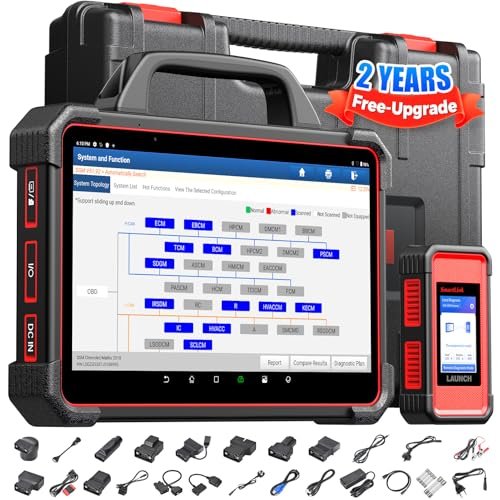
The LAUNCH X431 PAD V Elite is a professional automotive diagnostic tablet. It offers full-system scans, live data, bidirectional controls, coding, and many service functions. These tools can help a mechanic find faults and check repairs with less guesswork.
LAUNCH lists support for more than 110 vehicle brands on its PAD 5 Elite product page. The listed features also include J2534, DoIP, and CAN FD support through the SmartLink VCI. The exact functions depend on the car, its model year, and the installed software.
I would put this scanner on the shortlist for busy repair shops and skilled technicians. It offers a wide range of tools in one system. However, it may be too much for someone who only wants to clear a check engine light at home.
One key point deserves attention. Advanced features do not work on every vehicle. Buyers should check the official coverage list before paying, especially if they need coding or programming for a specific car.

My First impression of the LAUNCH X431 PAD V Elite
The PAD V Elite uses a tablet-style design. Its large screen gives technicians room to read fault codes, view live data, and move through menus. The design suits a repair bay better than a small handheld code reader.
The product manual lists a 10.1-inch touch screen with a 1920 x 1200 resolution. It also lists an eight-core 2.0GHz processor. This gives the tablet a strong base for its diagnostic tasks.
The package can include a tablet, VCI, OBD II extension cable, and other leads. The exact items may vary by seller and region. I would check the seller’s packing list before placing an order.
Setup starts with charging the tablet, connecting it to Wi-Fi, and registering the device. You then activate the VCI and update the software. New users should allow time for this step before their first repair job.
The menu system has many tools. That is useful for trained users, but it may take time to learn. A new buyer should read the manual and practice on a known vehicle before using advanced functions.

What Makes It Stand Out: Key Features
- Full-System Diagnostics: The scanner can check many vehicle systems, not just the engine. These may include the transmission, ABS, airbags, steering, and other electronic modules. It can read and clear fault codes where the vehicle supports those tasks.
- Live Data Streaming: The tablet can show live data from supported vehicle systems. Technicians can view sensor values and track changes while a system runs. This helps when a fault does not appear during a basic code scan.
- Bidirectional Controls: Active tests let a technician send commands to supported vehicle parts. For example, a test may help check an actuator or another electronic component. Available tests vary by car, module, and software.
- ECU Coding and Programming: The PAD V Elite supports advanced coding and programming tasks with compatible equipment and vehicles. J2534 pass-through work is also supported through the suitable SmartLink hardware. Buyers must check the exact software and hardware needs before using these functions.
- Multiple Service Functions: The tool lists many maintenance tasks. These include oil reset, electronic parking brake reset, ABS bleeding, battery matching, DPF regeneration, and steering angle calibration. The available tasks depend on the vehicle.
- Smart VIN Identification: The scanner can use automatic VIN identification to help find the right vehicle profile. This can save time when starting a scan. Manual vehicle selection is still useful when automatic identification does not work.
- Remote Diagnostics: The remote diagnostic tools can help repair shops connect with other technicians for support. This can be useful when a fault needs more skill or knowledge than the local shop has.
- Wireless Software Updates: The tablet supports online software updates. Users can download available diagnostic updates through a network connection. Buyers should check the included update period and future renewal cost before purchase.
- J2534 and Modern Protocol Support: The SmartLink VCI supports protocols such as J2534, DoIP, and CAN FD. These standards help the tool communicate with compatible vehicle systems. The right VCI and vehicle support are important for these functions.
- Expandable Diagnostic System: The platform can work with extra tools such as an oscilloscope, sensor simulator, battery tester, and videoscope. Some items require a separate purchase. This gives a shop room to add more testing options as its needs grow.

✅ What I Like
- ✔ Full-system scans give technicians access to more than basic engine fault codes.
- ✔ Bidirectional tests help check supported parts without relying only on fault codes.
- ✔ Live data tools make it easier to watch sensor readings during diagnosis.
- ✔ A wide range of service functions can help with common repair and maintenance work.
- ✔ J2534, DoIP, and CAN FD support provide useful options for newer vehicle platforms.
- ✔ The large tablet screen gives technicians more room to read test results and graphs.
- ✔ Remote diagnostic features can help shops get support with complex repair cases.
- ✔ Extra modules allow users to expand the tool with more testing equipment.
⚠️ What Could Be Better
- ✖ The many menus and advanced tools can feel complex for beginners who have only used basic code readers.
- ✖ Some advanced functions need extra hardware, paid software, or vehicle-specific support.
- ✖ Software renewals and compatibility checks can add to the long-term cost of ownership.

My Recommendation
I would consider the PAD V Elite if I ran a repair shop or worked on many different vehicle brands. Its full-system scans, live data, active tests, and service tools cover a wide range of repair needs. It can also support more advanced work when the car and software allow it.
For a home user, the decision is less clear. A lower-cost scan tool may be enough for reading engine codes and checking basic faults. Paying for advanced features makes more sense when you use them often.
Before buying, check three things. First, confirm that your main vehicle brands are covered. Second, ask the seller which VCI and accessories are included. Third, confirm the software update period and renewal terms. These steps can prevent costly surprises.
| Best For | Why It Fits |
|---|---|
| Independent Auto Repair Shops | Full-system scans, active tests, and service functions can help shops handle a wide range of repair jobs. |
| Experienced Automotive Technicians | Live data, coding, and advanced diagnostic tools can support more complex fault checks. |
| Multi-Brand Repair Centers | Broad vehicle coverage can help technicians work on different makes with one diagnostic platform. |
| Automotive Electrical Specialists | Live data, active tests, and support for extra test modules can help with electronic fault diagnosis. |
| Advanced DIY Mechanics | Skilled home users can benefit from deeper system access when they own compatible vehicles and understand the repair steps. |

Alternative Products You Can Consider
| Product | Best For | Key Difference |
|---|---|---|
| LAUNCH X431 PAD V Elite | Professional multi-brand diagnostics | Combines full-system scans, service functions, coding, and expandable diagnostic tools. |
| Autel MaxiSys Ultra S2 | Advanced diagnostics and electrical testing | Offers an advanced VCMI 2 measurement unit with oscilloscope and multimeter functions. |
| TOPDON Phoenix Max | Professional shops needing broad vehicle coverage | Features topology mapping, cloud-based coding, and optional oscilloscope hardware. |
| LAUNCH X-431 PAD 5 Elite | Technicians who prefer the LAUNCH platform | A related LAUNCH model with its own hardware, software, and package details. |

Final Verdict: Which Should You Buy?
The LAUNCH X431 PAD V Elite is a strong option for professional vehicle diagnosis. It offers more than basic code reading. Its system scans, live data, active tests, service tasks, and coding tools can help a busy shop handle many types of work.
I would choose it for a repair business that works on several vehicle brands and needs advanced diagnostic access. A skilled technician may also find good value in its wider range of tools. However, a casual car owner may get better value from a simpler scanner.
The biggest issue is not a lack of features. It is the need to check vehicle coverage, software access, and extra hardware before buying. Some functions may not work on every car, and future software renewals can affect the total cost.
My final advice is simple. Buy this scanner when you have real use for its advanced tools. If you only need to read and clear engine codes, save your money and choose a more basic diagnostic tool.