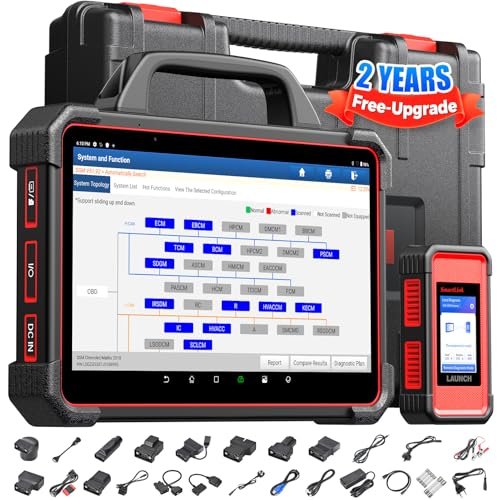
The Launch X431 PAD VII Link is a powerful professional scanner for advanced vehicle diagnostics, coding, and repair work.
Finding a car fault can take hours without the right tools. A basic code reader may show a warning, but it cannot always explain what caused it. For a busy repair shop, that means lost time and unhappy customers.
This is why many American mechanics look at advanced diagnostic systems. The Launch PAD VII Link aims to bring deep system scans, ECU coding, live data, and remote diagnostic support into one setup. It targets people who need more than a simple OBD2 reader.

Is the Launch X431 PAD VII Link Good?
Yes, the Launch X431 PAD VII Link is a strong option for professional mechanics and serious repair shops. It offers full-system diagnostics, active tests, advanced coding, and programming support. Its SmartLink C V2.0 unit also adds remote diagnostic and J2534 PassThru capabilities. This gives the system a wider role than a standard scan tool.
One major strength is its large 13.3-inch screen. It gives technicians more room to view live data, wiring details, and fault reports. The 8GB RAM and 256GB storage also support a large diagnostic workspace. However, this is not a simple plug-and-play tool for every car owner. Some advanced features need extra setup, subscriptions, compatible vehicles, or separate hardware.

My First Impression of the Launch X431 PAD VII Link
The first thing to notice is the size of this diagnostic system. Its 13.3-inch tablet looks more like a small workshop computer than a handheld code reader. The large screen is useful when you need to view several data values at once.
The official package setup centers on the tablet and SmartLink C V2.0 communication unit. Buyers should check the seller’s package list before ordering. Cables, adapters, extra modules, and other items may vary by bundle.
The tablet runs Android 9.0 and uses an eight-core 2.0GHz processor. It has 8GB RAM and 256GB storage. These are useful hardware details for a tool that stores vehicle data and runs large diagnostic programs.
Getting started requires more work than using a basic scanner. You need to register the device, activate the software, connect to Wi-Fi, and install the needed vehicle updates. You also need to learn the SmartLink connection process. New users should allow time to explore the menus before using it on customer vehicles.

Key Features of the Launch X431 PAD VII Link
- Full-System Diagnostics: The scanner can access many vehicle control systems, not just the engine module. It can read and clear diagnostic trouble codes from supported systems. These may include ABS, SRS, transmission, body, and other electronic modules. Launch lists coverage for more than 110 vehicle brands across US, Asian, and European markets. Actual coverage depends on the vehicle, model year, and software.
- SmartLink C V2.0: The SmartLink C V2.0 is a key part of this package. It connects the tablet to the vehicle for local diagnosis. It also supports remote diagnostic work through a compatible SmartLink setup. Its communication options include Wi-Fi, Bluetooth, and USB for local work, while remote communication supports Wi-Fi and Ethernet. This makes it useful for shops that handle more complex repair jobs.
- Bidirectional Control: Bidirectional control lets a technician send commands to supported vehicle parts. For example, a compatible system may allow a mechanic to activate a fan, pump, or other component during a test. This helps narrow down faults without replacing parts at random. The exact tests depend on the car and its control modules.
- Advanced ECU Coding and Programming: The PAD VII Link supports advanced coding and programming functions. These tools can help with certain module changes, setup tasks, and repair work. It also supports J2534 PassThru use through the SmartLink system. However, not every vehicle supports every function. Some programming jobs need OEM software, paid access, stable power, and extra steps.
- Topology Mapping: Topology mapping gives a visual view of vehicle communication and module status. It helps technicians see which systems report faults and how the modules communicate. This can save time when several warning lights appear at once. It also gives a clearer view of network-related problems than a basic list of fault codes.
- CAN FD and DoIP Support: The scanner supports modern communication protocols such as CAN FD and DoIP. It also supports CAN and J2534 standards. These protocols matter on newer vehicles that use faster data networks. This helps the tool work with a wider range of supported models. Buyers should still check the exact model-year coverage before starting a repair.
- Live Data and Real-Time Voltage Display: Live data lets technicians view sensor readings while a vehicle runs. They can also graph selected values to spot changes over time. The system includes real-time voltage display during diagnosis. This is useful when checking battery and charging system conditions. A separate battery test may still be needed for a full battery health check.
- Service and Maintenance Functions: Launch advertises up to 41 service functions for this model. These cover supported maintenance and repair tasks. Common service areas include oil reset, electronic parking brake, steering angle reset, ABS bleeding, injector coding, and DPF regeneration. The exact list can vary with software and vehicle support. Buyers should confirm the current function list for their main vehicles.
- TPMS Support: The PAD VII Link supports extended TPMS service solutions. This can help a shop work with tire pressure monitoring systems. Extra TPMS hardware may be required for certain sensor tasks. The tablet itself does not mean every TPMS job can be completed without an added tool.
- ADAS Calibration Support: The system supports ADAS calibration through compatible Launch equipment. ADAS systems include driver aids such as lane warning and radar-based safety features. This can be useful for repair shops that handle windshields, collision work, or sensor replacement. However, the calibration equipment and setup may need to be purchased separately.
- Large Full HD Display: The tablet has a 13.3-inch touch display with a 1920 x 1080 resolution. This gives users a large area for wiring diagrams, fault reports, and live data. The screen size is helpful during long repair sessions. It also makes the tablet less compact than smaller handheld diagnostic tools.
- Built-In Repair Information: Launch includes access to its X-431 FIX repair information resources. These can provide wiring diagrams and repair illustrations for supported vehicles. Training videos and repair details can help users understand faults. Access and available information may depend on the software package and region.

✅ What I Like About the Launch PAD VII Link
- ✔ Full-system diagnostics help technicians inspect more than engine codes. This is useful when several electronic systems show faults.
- ✔ The 13.3-inch Full HD screen gives more room for live data, diagrams, and repair details.
- ✔ SmartLink C V2.0 adds remote diagnostic support and J2534 PassThru capability for compatible workflows.
- ✔ Bidirectional tests help mechanics check supported parts before buying replacements.
- ✔ Topology mapping gives a clear view of module communication and fault status.
- ✔ CAN FD and DoIP support make the scanner suitable for many newer vehicle platforms.
- ✔ The 256GB storage provides plenty of room for diagnostic software and saved files.
- ✔ Advanced coding and programming tools make it useful for shops that handle complex electronic repairs.
- ✔ ADAS and TPMS support provide ways to expand the shop’s service range with compatible extra equipment.
⚠️ What Could Be Better
- ✖ The large tablet is less convenient to carry around than a compact handheld scanner.
- ✖ Some advanced functions need paid access, extra equipment, or separate OEM software. The full cost can rise beyond the initial purchase price.
- ✖ The Android 9.0 operating system is an older platform, so buyers should check the seller and Launch for current software support and update terms.

Who Should Buy the Launch X431 PAD VII Link?
I would place this scanner in the professional workshop category. It makes the most sense for shops that work on several vehicle brands and need more than basic fault reading. Its large screen, system coverage, active tests, and coding tools can support a wide range of repair tasks.
It may also suit mobile mechanics who perform advanced work. However, the tablet is large, and remote diagnosis needs a compatible network and setup. A home user who only wants to turn off a check engine light may spend more than needed. A smaller scanner could offer better value for that job.
| Best For | Why It Fits |
|---|---|
| Professional Auto Repair Shops | Full-system scans, active tests, live data, and coding tools help with daily repair work across supported vehicle brands. |
| Advanced Independent Mechanics | The SmartLink system, J2534 support, and advanced diagnostic tools suit mechanics who handle complex electronic faults. |
| Multi-Brand Workshops | Coverage across US, Asian, and European vehicles can help shops that service different makes and models. |
| Automotive Diagnostic Specialists | Topology mapping, network protocols, and remote diagnostic features support deeper fault checks. |
| Shops Planning Service Expansion | Compatible ADAS, TPMS, and other extended modules can help add new services as the business grows. |

Alternative Products You Can Consider
| Product | Best For | Key Difference |
|---|---|---|
| Launch X431 PAD VII Link | Professional shops needing advanced diagnostics and SmartLink features | Large 13.3-inch screen with SmartLink C V2.0 and remote diagnostic support. |
| Launch X431 PAD VII | Shops seeking the standard PAD VII diagnostic platform | Similar core diagnostic platform, but package and communication hardware should be checked. |
| Launch X431 PAD V Link | Technicians who want a smaller professional tablet | Smaller 10.1-inch display and a different hardware configuration. |
| Autel MaxiSys Ultra | Shops considering the Autel diagnostic ecosystem | A competing professional diagnostic platform with its own software and hardware system. |

Final Verdict: Which Diagnostic Scanner Should You Buy?
The Launch X431 PAD VII Link is worth considering if you run a repair shop or perform advanced vehicle diagnostics. Its biggest strengths are full-system access, bidirectional testing, topology mapping, coding, and SmartLink C V2.0 support. The large screen also makes long diagnostic sessions easier to manage.
I would choose this model over a basic scanner when the work involves many vehicle brands and complex electronic faults. However, it is not the best buy for every driver. The large tablet, learning curve, older Android version, and possible costs for extra services all matter. Before ordering, confirm the software subscription, supported vehicles, included accessories, and warranty with the seller. If you only need basic engine code checks, a cheaper tool will make more sense.