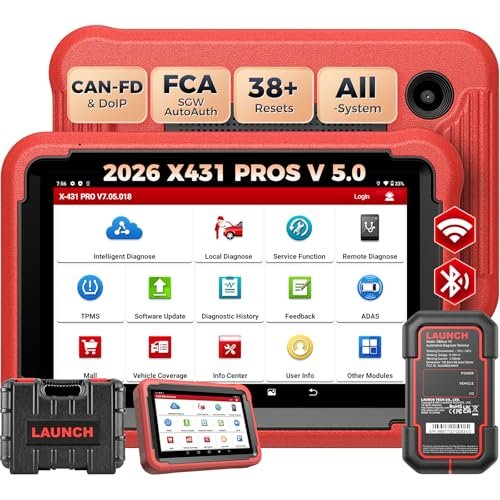
The LAUNCH X431 PRO SE is worth considering for technicians who need advanced diagnostics without excessive complexity.
A check engine light can turn a normal workday into a costly guessing game. You may replace a part, clear a code, and still face the same problem. A basic OBD2 reader may not give you enough information to find the real cause.
This is why many American car owners and repair shops look at professional scan tools. The LAUNCH X431 PRO SE aims to offer deeper system checks, live data, active tests, and coding tools in one tablet. It targets entry-level technicians, small garages, and skilled DIY users who want more control over car repairs.

Is LAUNCH X431 PRO SE Good?
The LAUNCH X431 PRO SE looks like a capable diagnostic tool for small repair shops and serious home mechanics. Its main strength is its broad diagnostic range. It can access multiple vehicle systems, read and clear fault codes, show live data, and perform supported active tests.
The tablet also supports coding and service functions. Its CAN FD support adds value for newer vehicles. DoIP support is also available, but an extra cable is needed. These features make it more useful than a basic engine code reader.
The hardware offers an 8-inch screen, Android 10, 4GB RAM, and 64GB storage. This gives users a familiar tablet-style setup. Wireless and wired connections also provide more flexibility during repair work.
However, this is not a universal repair solution. Some functions depend on the vehicle make, model, year, and control module. Certain features also need extra tools or subscriptions. Buyers should check exact coverage before spending money.
My main takeaway is simple: this scanner makes sense when you need more than basic code reading. It is less appealing if you only want to check an occasional check engine light.

My First impression of the LAUNCH X431 PRO SE
The PRO SE has a tablet-based design. Its 8-inch screen gives you more room to view codes and data than a small handheld scanner. The layout also suits workshop use, where you may need to switch between several menus during a repair.
The listed hardware includes Android 10, a quad-core 2.0GHz processor, 4GB RAM, and 64GB storage. These are useful details to check when comparing diagnostic tablets. The 6300mAh battery also supports portable use away from a wall outlet.
The package should be checked against the seller’s listing. Confirm that the tablet, vehicle communication interface, cables, and other listed parts come with your order. Do not assume that optional DoIP, ADAS, or TPMS equipment is included.
Getting started involves charging the tablet, connecting the VCI to the vehicle, and following the setup prompts. You will also need a stable internet connection for software updates and online features. New users should take time to learn the menus before running advanced tests.
I would pay close attention to vehicle selection and software activation before the first scan. A small setup mistake can lead to the wrong vehicle profile or an incomplete test. Good setup habits help make later diagnosis easier.

What Makes It Stand Out: Key Features
- Full System Diagnostics: The scanner can communicate with supported vehicle control systems beyond the engine module. Depending on the vehicle, this can include ABS, airbag, transmission, body, and other electronic systems. This wider access helps users find faults that a basic OBD2 reader may miss.
- Bidirectional Control: Supported active tests let the scanner send commands to vehicle components. A technician may use this function to test a cooling fan, relay, or other supported part. It helps narrow down a fault without relying only on stored codes. Available tests depend on the vehicle.
- Live Data Streaming: The tool can show live data from supported vehicle sensors and control modules. Users can watch values while an engine runs or while a fault occurs. This can help identify unusual readings and compare sensor behavior during diagnosis.
- CAN FD Communication: CAN FD support helps the VCI communicate with vehicles that use this newer communication protocol. This matters when working with newer vehicle electronics. Actual compatibility still depends on the vehicle and software coverage.
- DoIP Protocol Support: The PRO SE supports DoIP communication when used with the required extra DoIP cable. This protocol is used by some newer vehicles. Buyers should include the extra cable in their budget if their work requires this connection.
- ECU Coding and Service Functions: The scanner offers coding and various service functions for supported vehicles. These may help with selected resets, relearns, adaptations, and control module tasks. Not every function works on every car, so check the coverage list before buying.
- Wireless and Wired VCI Connection: The tablet can connect to its vehicle interface wirelessly or through a cable. Wireless use gives technicians more room to move around a vehicle. A wired connection can provide a more stable link for certain advanced tasks.
- Diagnostic History: The diagnostic history feature helps users review earlier scan sessions and reports. This is useful when a vehicle returns with the same issue. It can also help a small shop keep track of previous diagnostic work.

✅ What I Like
- ✔ Full system access gives technicians more information than a basic engine-only OBD2 scanner.
- ✔ Bidirectional control allows supported components to be tested through direct commands.
- ✔ Live data helps users watch sensor readings and look for unusual behavior during diagnosis.
- ✔ The 8-inch touchscreen offers more viewing space for codes, menus, and data graphs.
- ✔ CAN FD support helps extend communication options for newer vehicles.
- ✔ Wireless and wired connections give users flexibility during workshop tasks.
- ✔ The 64GB storage provides room for diagnostic software and saved information.
- ✔ Diagnostic history makes it easier to revisit earlier scan sessions.
- ✔ Coding and service functions add value for users who perform regular repair work.
- ✔ Optional expansion tools give workshops room to add more diagnostic functions.
⚠️ What Could Be Better
- ✖ DoIP communication needs an extra cable, which adds another purchase to the setup.
- ✖ Some advanced functions depend on the vehicle, software coverage, and available subscriptions.
- ✖ The large range of menus and features may take time for beginners to learn.

My Recommendation
I would consider this scanner if I ran a small repair shop or worked on several vehicle brands. Full system diagnostics, live data, and active tests can make fault finding more useful. These tools can also help reduce guesswork when a vehicle has an unclear problem.
It may also suit an experienced home mechanic who enjoys doing more than oil changes and basic repairs. The tablet format gives access to a wide range of functions in one device. Still, buyers should learn how each test works before sending commands to vehicle systems.
I would not suggest buying it just to read an occasional check engine light. A lower-cost OBD2 reader may be enough for that job. I would also check the exact software version, update terms, and vehicle coverage with the seller before ordering.
| Best For | Why It Fits |
|---|---|
| Small Auto Repair Shops | Full system diagnostics, live data, and supported active tests can help with a wider range of repair jobs. |
| Independent Mechanics | The coding, service, and diagnostic tools offer more options when working on different vehicle systems. |
| Advanced DIY Car Owners | The tablet provides useful diagnostic information for people who already understand basic vehicle repair. |
| Multi-Brand Workshops | Its coverage across supported U.S., Asian, and European vehicles makes it worth checking for mixed-brand work. |
| Mobile Mechanics | The wireless VCI and portable tablet design can make it easier to work around vehicles at different locations. |

Alternative Products You Can Consider
| Product | Best For | Key Difference |
|---|---|---|
| LAUNCH X431 PRO SE | Entry-level technicians and advanced DIY users | An 8-inch tablet with full system diagnostics, CAN FD, and optional DoIP support. |
| LAUNCH X-431 PRO3 SE | Workshops that prefer a larger screen | A 10.1-inch display and a larger tablet design. |
| Autel MaxiCOM MK808S | Users who prefer the Autel product range | A different diagnostic platform with its own software and vehicle coverage. |
| LAUNCH CRP919X BT | Users comparing wireless LAUNCH scanners | A different product package with its own supported functions and coverage. |

Final Verdict: Should You Buy the LAUNCH X431 PRO SE?
The LAUNCH X431 PRO SE is a strong option to consider if you need a diagnostic tablet for regular repair work. Its full system access, live data, active tests, and coding support give it more depth than a simple code reader. CAN FD support is another useful feature for work on newer vehicles.
I would put it on the shortlist for small garages, independent mechanics, and skilled DIY users. It offers a broad set of tools in one portable tablet. The main drawback is that some functions need extra equipment or depend on vehicle-specific support.
Before buying, confirm the exact model, included VCI, software update terms, supported vehicles, and service functions. Also ask whether the seller provides a valid activation and warranty for your region. These checks matter more than a long list of advertised features.
Choose the PRO3 SE if you want a larger screen. Consider the Autel MK808S if its software and supported functions better match your needs. But if you want a compact LAUNCH tablet with broad diagnostic features, the PRO SE deserves a close look.