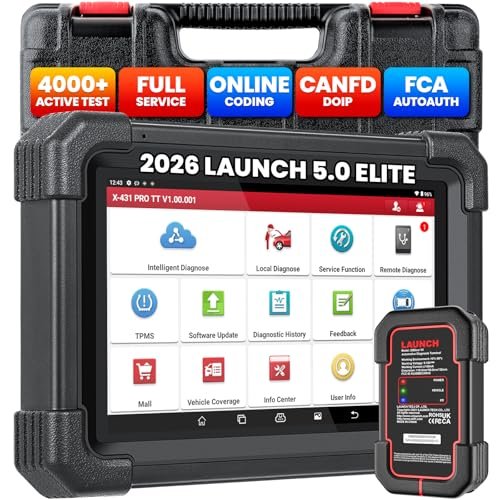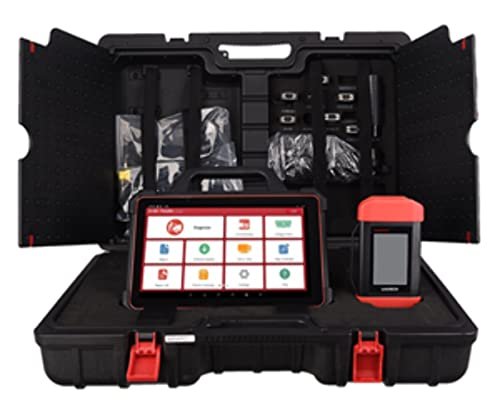
The Launch X431 Throttle III is a powerful shop scanner for technicians who need advanced vehicle diagnostics.
A basic OBD2 scanner can read engine codes, but many repair jobs need much more. You may need to test a sensor, check an ABS fault, or find a problem in another control unit. A simple code reader may not give you enough information.
This is where a professional scan tool can help. The Launch X431 Throttle III aims to bring deep vehicle tests, live data, active tests, and repair tools into one system. It may suit a busy repair shop or an advanced home mechanic who wants more control over vehicle faults.
Is Launch X431 Throttle III Good?
The Launch X431 Throttle III is a high-level automotive diagnostic tablet. It targets professional repair shops that work on many vehicle brands. Its main strengths include full-system diagnostics, bidirectional tests, a large screen, and the SmartLink C vehicle interface.
It also supports advanced communication methods and remote diagnostic work. These tools can help a technician find faults that a basic code reader may miss. The system offers a wide range of functions, but support can vary by vehicle, year, and control unit.
I would place this scanner in the professional tool class. It is not a simple device for clearing a check engine light. Its size, feature set, and cost make more sense in a shop that uses advanced diagnostics on a regular basis.
There is one major point to check before buying. The Throttle III is an older product platform based on Android 9. Buyers should check current software support, update costs, included accessories, and vehicle coverage before spending money.
My First Impression of the Launch X431 Throttle III
The Throttle III uses a large tablet design. Its 13.3-inch screen gives technicians plenty of room to view fault codes, graphs, and live data. This can help when a repair needs more than one data value at a time.
The tablet has a built-in stand. You can place it on a workbench or set it near the vehicle while you work. Its size may feel less handy than a small handheld scanner, but it offers a better view of complex test results.
The system works with the SmartLink C vehicle interface. This unit links the vehicle to the tablet through supported wired or wireless methods. The VCI is a key part of the setup, so buyers should confirm that it comes with the exact package they plan to order.
Setup starts with charging the tablet, activating the included interface, and updating the diagnostic software. You then connect the VCI to the vehicle and select the correct diagnostic path. Some functions may need an account, an active software plan, or extra hardware.
I would not describe this as a plug-and-play tool for every driver. It has many menus and advanced options. A technician who knows vehicle systems will likely get more from it than a new user.
Key Features of the Launch X431 Throttle III
- Full-System Vehicle Diagnostics: The scanner can access many vehicle control systems. These may include the engine, transmission, ABS, airbag, body, and other modules. You can read fault codes, clear supported codes, and review system data. The exact list depends on the vehicle.
- Bidirectional Active Tests: Bidirectional control lets the scanner send commands to supported vehicle parts. A technician may use it to test fans, pumps, valves, and other components. This can help confirm whether a part responds before replacing it. Available tests vary by make and model.
- SmartLink C Vehicle Interface: The SmartLink C works as the link between the vehicle and the tablet. It reads vehicle data and sends it to the diagnostic software. It also supports advanced remote diagnostic work in compatible setups. Buyers should confirm the included VCI model and its condition.
- Large 13.3-Inch Display: The large IPS touch screen makes it easier to read test results and view live data. It also gives more room for charts and diagnostic menus. This can help during long repair sessions. The tablet is less compact than many handheld scan tools.
- Auto VIN Detection: The AutoDetect feature can identify a compatible vehicle through its VIN data. This helps reduce manual vehicle selection. It can also speed up the start of a diagnostic session. Always check the detected vehicle details before running tests.
- Live Data and Data Stream: The scanner can display live information from supported vehicle sensors and control units. A technician can use this data to study changes while a vehicle runs. It can help when a fault appears only under certain conditions. Good results still depend on correct data analysis.
- Maintenance and Reset Functions: The software includes common service functions for supported vehicles. Examples include oil reset, electronic parking brake service, ABS bleeding, and DPF regeneration. Not every function works on every car. Check the coverage list before relying on a specific service task.
- Remote Technician Support: The Tech-to-Tech feature supports communication and remote diagnostic work between technicians. This can help a shop seek help with a difficult fault. It is most useful when both sides have the right tools and access. It does not replace hands-on inspection.
- Advanced Communication Protocols: The system supports several modern vehicle communication standards, including CAN, DoIP, J2534, and other supported protocols. These standards help the scanner communicate with different vehicle systems. Protocol support does not mean every vehicle function is available.
- Repair Information and Code Assist: The platform offers access to repair information and diagnostic help features in supported packages. Code Assist can help connect certain fault codes with known repair paths. Buyers should confirm which services are active, included, or subject to a subscription.
✅ What I Like
- ✔ Full-system diagnostics give technicians access to more vehicle modules than a basic engine code reader.
- ✔ Bidirectional tests help check the response of supported parts before a technician approves a replacement.
- ✔ The large 13.3-inch screen gives a clear view of live data, fault codes, and diagnostic reports.
- ✔ SmartLink C supports advanced communication between the vehicle and the diagnostic tablet.
- ✔ Auto VIN detection can reduce the time spent choosing a vehicle before a scan.
- ✔ Maintenance and reset functions can help shops handle common service tasks with one system.
- ✔ Tech-to-Tech support can help technicians work through difficult faults with remote assistance.
- ✔ Broad domestic, Asian, and European vehicle coverage makes it useful for multi-brand repair shops.
- ✔ The tablet has 8GB RAM and 256GB storage, giving it room for diagnostic software and saved records.
- ✔ Live data and vehicle health reports can help technicians explain faults and repair needs to customers.
⚠️ What Could Be Better
- ✖ The large tablet is less portable than a compact handheld scanner, especially when working in tight spaces.
- ✖ The Android 9 platform is dated, so buyers should check software support and update availability before purchasing.
- ✖ Some advanced functions, vehicle coverage, and repair services may require extra hardware, subscriptions, or paid access.
My Recommendation
I would consider the Throttle III if I ran a repair shop that handled many vehicle brands. Its full-system scans, active tests, and live data tools can support a wide range of repair work. The large display also helps when I need to review several values during a test.
It may also suit an advanced mechanic who works on complex faults at home. However, I would not buy it just to read engine codes or clear a warning light. A lower-cost scanner can handle those basic tasks.
Before placing an order, I would ask the seller for the exact package list. I would also check the software renewal price, warranty, activation status, and support for the cars I work on. These details can have a major effect on long-term value.
| Best For | Why It Fits |
|---|---|
| Professional Auto Repair Shops | Full-system scans, active tests, and live data can support daily work across many vehicle brands. |
| Advanced Independent Mechanics | The tool offers more control over vehicle systems than a basic OBD2 reader. |
| Multi-Brand Diagnostic Technicians | Its wide vehicle coverage and SmartLink C interface can help with different vehicle platforms. |
| Busy Automotive Service Centers | Vehicle reports, service resets, and remote support can fit a wider repair workflow. |
Alternative Products You Can Consider
| Product | Best For | Key Difference |
|---|---|---|
| LAUNCH X-431 Throttle III | Shops needing advanced multi-brand diagnostics | Large 13.3-inch tablet with SmartLink C and an established professional diagnostic platform. |
| LAUNCH X-431 Throttle V | Buyers who prefer a newer LAUNCH platform | Newer hardware and software platform compared with the Throttle III. |
| Autel MaxiSYS MS909 | Technicians considering another professional scan tool brand | Uses Autel diagnostic software and its own vehicle coverage and service ecosystem. |
| LAUNCH X-431 PAD VII | Shops comparing advanced LAUNCH diagnostic systems | A different professional tablet platform with its own package and diagnostic options. |
Final Verdict: Which Should You Buy?
The Launch X431 Throttle III is a serious diagnostic system for professional automotive work. Its main value comes from full-system access, bidirectional tests, live data, and the SmartLink C interface. These tools can help a skilled technician find faults and test parts with more confidence.
I would choose it for a busy repair shop that needs broad vehicle coverage and already has a clear need for advanced diagnostics. I would not choose it for basic home use or simple engine code checks. Those jobs do not need such a large and complex system.
The biggest concern is its older Android platform and the cost of keeping its software current. Buyers should also confirm the exact accessories, active subscription, and vehicle coverage before paying. If a newer platform offers better support at a fair cost, the Throttle V may be the smarter long-term choice.