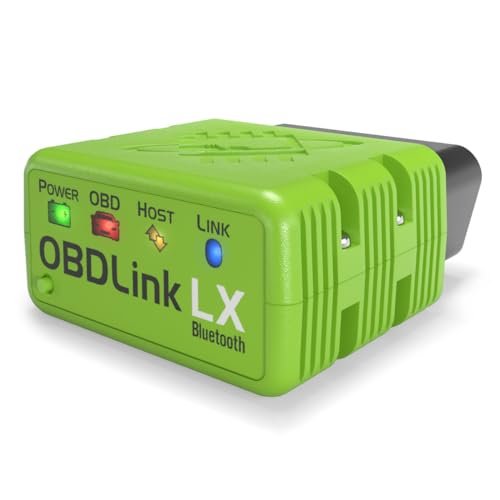
The OBDLink LX is a solid Bluetooth scanner for Android users who want fast, reliable basic car diagnostics.
A check engine light can turn a normal drive into a stressful one. You may wonder whether your car has a small issue or needs an urgent repair. Visiting a repair shop just to read a fault code can also cost time and money. An OBD2 scanner gives you a way to check basic engine data at home.
The OBDLink LX offers a simple way to connect your car to an Android phone or Windows computer. It can read trouble codes, clear certain warning lights, and show live engine data. For American drivers who like to understand their cars before visiting a mechanic, this small tool may be worth a look.

Is the OBDLink LX Good?
Yes, the OBDLink LX is a good choice for drivers who need a reliable basic OBD2 connection. It supports standard OBD-II systems and uses classic Bluetooth to connect with Android devices and Windows computers. It also works with the free OBDLink app and several third-party diagnostic apps.
One of its best features is automatic sleep mode. You can leave the adapter plugged into your car without the same battery drain concern found with some basic scanners. Its secure pairing process is another useful touch. However, the lack of iPhone support is a major drawback. It also does not offer the extra Ford and GM network access found on the OBDLink MX+.

My First Impression of the OBDLink LX
The OBDLink LX has a small, compact body. Its design keeps things simple. It plugs into the OBD2 port under the dashboard and does not need a separate screen. You use your phone or computer to view the results.
The package includes the adapter, a printed quick-start guide, and an OBDwiz software license. Setup starts with plugging the unit into the car. You then enable Bluetooth, use the connect button to pair it, and open a compatible app. The steps are simple, but the first setup may take a little time if you have never used an OBD2 scanner.

What Makes It Stand Out? Key Features
- Standard OBD-II Support: The LX supports the main OBD-II protocols used by cars and light trucks. It works with compatible U.S. vehicles from model year 1996 onward. This includes common American, Asian, and European makes. Always check your exact vehicle before buying.
- Bluetooth Connectivity: The adapter uses classic Bluetooth 3.0. It connects to compatible Android phones, tablets, and Windows computers. You can view vehicle data without sitting in the driver’s seat with a wired scanner.
- Read and Clear Trouble Codes: The LX can read standard engine trouble codes and clear supported codes. This helps you learn why the check engine light came on. Clearing a code does not fix the fault, so the cause still needs attention.
- Live Vehicle Data: The adapter can show real-time engine information through a compatible app. You can check supported values such as engine speed, coolant temperature, and vehicle speed. The data available depends on your car and its control systems.
- Automatic Sleep Mode: BatterySaver technology puts the adapter into a low-power sleep state when the car is off. It wakes when the vehicle starts. This helps reduce battery drain when the adapter stays in the OBD2 port.
- Secure Bluetooth Pairing: The LX has a connect button that helps control pairing. It also uses 128-bit data encryption. This adds protection against unwanted wireless connections while the adapter is installed.
- Free Diagnostic Software: The purchase includes the OBDLink Android app and OBDwiz software for Windows. The adapter also supports many third-party apps that use the ELM327 command set. This gives users more ways to view and study vehicle data.
- Firmware Updates: OBDLink provides firmware updates for the adapter. These updates can add improvements and help maintain compatibility. You can check the official support page for current software and setup instructions.

✅ What I Like
- ✔ Supports the main OBD-II protocols used by most U.S. cars and light trucks from 1996 onward.
- ✔ Works with Android phones and Windows computers, giving users more than one way to check vehicle data.
- ✔ Can read and clear supported check engine trouble codes without a visit to a repair shop just for a basic code check.
- ✔ Automatic sleep mode helps reduce power use when the adapter stays plugged into the car.
- ✔ Secure Bluetooth pairing adds protection against unwanted connections.
- ✔ Includes free OBDLink Android and OBDwiz Windows diagnostic software.
- ✔ Works with several third-party apps, which gives users more control over how they view vehicle data.
⚠️ What Could Be Better
- ✖ Does not support iPhones or iPads because it uses classic Bluetooth rather than Bluetooth Low Energy.
- ✖ Does not provide the Ford MS-CAN and GM SW-CAN access available with the OBDLink MX+.
- ✖ A basic OBD2 connection cannot replace a full professional scan tool for every ABS, airbag, transmission, or manufacturer-specific fault.

My Recommendation: Who Should Buy It?
I would consider the OBDLink LX for an Android user who wants a dependable way to check common engine codes. It is also a useful option for people who work on their own cars and want to view live engine data. The included software adds value because you do not need to buy a separate basic diagnostic app just to get started.
However, your phone matters before anything else. If you use an iPhone, skip this model and look at the OBDLink MX+ or CX. Ford and GM owners who need access to extra vehicle networks should also consider the MX+. Check your car’s exact diagnostic needs before making a choice.
| Best For | Why It Fits |
|---|---|
| Android Car Owners | Classic Bluetooth lets compatible Android devices connect to the adapter and view engine codes and live data. |
| DIY Car Owners | It helps users check common engine faults before deciding whether to handle a repair or visit a mechanic. |
| Windows Laptop Users | The included OBDwiz software lets users connect a compatible Windows computer for vehicle diagnostics. |
| Regular Drivers | Automatic sleep mode makes it useful for drivers who want to leave the adapter in the OBD2 port. |

Alternative Products You Can Consider
| Product | Best For | Key Difference |
|---|---|---|
| OBDLink LX | Android and Windows users | Uses classic Bluetooth and focuses on standard OBD-II diagnostics. |
| OBDLink MX+ | iPhone users and advanced vehicle diagnostics | Supports iOS and provides extra Ford and GM network access. |
| OBDLink CX | iPhone users and BMW coding | Uses Bluetooth Low Energy and is designed for BMW coding apps. |
| Veepeak OBDCheck BLE | Budget-focused iPhone and Android users | Uses Bluetooth Low Energy and works with compatible third-party apps. |

Final Verdict: Which Should You Buy?
The OBDLink LX is worth considering if you use Android or Windows and need a reliable tool for standard engine diagnostics. Its secure Bluetooth link, automatic sleep mode, and included software make it a practical option. It can help you understand common check engine faults before you spend money on a repair visit.
The biggest reason to avoid it is its lack of iPhone support. It also has limits when you need advanced manufacturer-specific data. Choose the MX+ for broader vehicle network access and iPhone support. Choose the CX for a compatible BLE setup and BMW coding. If your needs are basic and your phone is supported, the LX remains a sensible diagnostic tool.