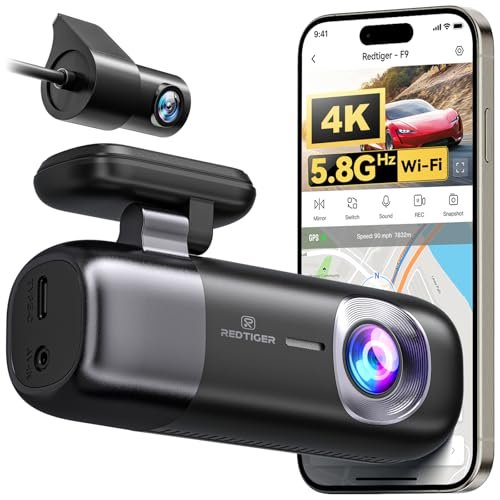
The REDTIGER F9 is worth considering for drivers who want clear road footage and useful dash cam features.
Driving in the United States can bring many surprises. A sudden stop, a small crash, or a road dispute can happen on any trip. Without a dash cam, you may have no clear record of what took place. This can make an already hard day even worse.
That is why many drivers look for a camera that records the road and helps save useful footage. The REDTIGER F9 aims to meet that need with a mix of video features and daily driving tools. I would look at its recording quality, ease of use, storage needs, and overall value before making a choice.
Is the REDTIGER F9 Good?
The REDTIGER F9 is a dash cam worth a look if you want a record of your daily drives. Its appeal comes from its video recording features and the extra tools that can make road use easier. It is aimed at drivers who want more than a basic camera.
I like the idea of having one device to record key moments on the road. A dash cam can help when you need to review an event or share footage after a crash. Still, a good camera must do more than list a high video size. Night footage, plate detail, heat control, and file storage all matter.
The F9 may suit daily commuters, family drivers, and people who take long road trips. It is also worth a look for drivers who want GPS or phone access, based on the exact package they buy. These extras can make a dash cam more useful.
There are limits to keep in mind. Video quality can change with light, speed, glare, and weather. A small camera sensor may also struggle to show fine detail at night. Buyers should check the exact F9 model and package before ordering, as product names and included parts can vary.

My First impression of the REDTIGER F9
The first thing I would check is the full package. A dash cam setup may include the main camera, a mount, power cable, rear camera, and other small parts. The exact items depend on the version sold. Check the box list before you buy.
The camera design should suit a car cabin. A compact dash cam can sit near the rearview mirror without taking up much space. This helps keep the view ahead clear. I would also check the mount and cable path before fixing the unit in place.
Setup should start with a safe spot on the windshield. Keep the camera out of the driver’s main view. Clean the glass before you attach the mount. Then connect the power cable and check the live view before you start driving.
The first setup also needs a memory card that meets the maker’s rules. Format the card in the camera if the manual asks you to do so. Set the date and time, review the video options, and test a short clip. This small check can save trouble later.

Key Features of the REDTIGER F9
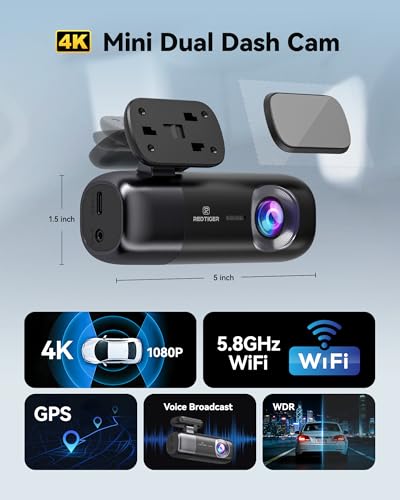
- High-Resolution Video Recording: High-resolution recording is one of the main reasons to consider this dash cam. More image detail can help when you review road signs, cars, and events. Still, the final result depends on the lens, sensor, light, and video settings. Do not judge a camera by its resolution label alone.
- Front Road Recording: A front-facing dash cam records the road ahead while you drive. This can help when you need to check the events before a sudden stop or crash. It also gives you a record of your route. Place the camera near the mirror for a clear view.
- Rear Camera Support: A rear camera can add another view of the road. This may help when another car hits your vehicle from behind or when you need to review traffic near the rear of your car. Check whether the F9 package you select includes the rear camera. Also check the cable length and fit for your vehicle.
- GPS Support: GPS can add useful trip data to dash cam footage when the feature is included and set up. This may help you review where an event took place. GPS support can also make video files easier to understand after a long trip. Check the package details and GPS setup steps before buying.
- Wi-Fi and Phone Access: Wi-Fi support can make it easier to view and move clips to a phone. This can save time when you need a file soon after an event. App support and phone features can vary by model and software version. Check app compatibility with your phone before you buy.
- Loop Recording: Loop recording helps a dash cam keep recording when the memory card fills up. It replaces older normal clips with newer ones. This reduces the need to clear the card by hand. Important saved clips may be protected from normal loop deletion, but you should still check and back them up.
- Parking Mode: Parking mode can help record events when your car is parked. This can be useful in a busy lot or on a city street. However, this feature may need a separate hardwire kit or another power setup. Check the exact power needs and battery protection options before using it.

✅ What I Like
- ✔ High-resolution recording can capture more road detail than a basic low-resolution camera.
- ✔ Front and rear recording options can provide a wider record of events around your car.
- ✔ GPS support can add useful location data to recorded trips when included in the package.
- ✔ Wi-Fi access can make it easier to review and transfer clips without removing the memory card.
- ✔ Loop recording helps keep the camera running when the card reaches its storage limit.
- ✔ Parking mode can add another layer of coverage when the vehicle is left unattended, with the right power setup.
- ✔ A dash cam can provide useful video evidence when you need to explain what happened on the road.
⚠️ What Could Be Better
- ✖ A high video resolution does not guarantee clear license plates at night or in poor weather.
- ✖ Parking mode may need extra parts and installation work, which can raise the total cost.
- ✖ Phone apps, memory cards, cables, and camera settings can take time to set up and manage.

Who Should Buy the REDTIGER F9?
I would consider the F9 if I wanted a dash cam for regular trips, work commutes, and family travel. It offers a useful mix of recording tools to explore. The key is to choose the right package and confirm that its features match your needs.
It may not be the best choice for every driver. If you only need a simple front camera, a lower-cost model may be enough. If you need strong night footage or advanced parking coverage, compare real sample clips and power options before you decide.
| Best For | Why It Fits |
|---|---|
| Daily Commuters | A dash cam can record daily road events and provide footage to review after a traffic incident. |
| Family Drivers | Road recording can add peace of mind during school runs, shopping trips, and family travel. |
| Road Trip Drivers | A camera can record long drives and help save clips from new routes and road events. |
| Drivers Who Want Phone Access | Wi-Fi support can make it easier to view and transfer video clips when the feature is available. |
| Drivers Who Need More Road Coverage | A package with a rear camera can provide another view beyond the front windshield. |

Alternative Dash Cams You Can Consider
| Product | Best For | Key Difference |
|---|---|---|
| REDTIGER F9 | Drivers who want a feature-rich dash cam setup | Offers a mix of recording and connected features, depending on the selected package. |
| ROVE R2-4K | Drivers who want high-resolution front recording | Focuses on front-facing 4K video recording. |
| VIOFO A119 Mini 2 | Drivers who want a compact front camera | Uses a compact single-channel design. |
| Vantrue N4 | Rideshare and multi-view recording | Offers front, rear, and cabin recording options. |
Final Verdict: Should You Buy the REDTIGER F9?
The REDTIGER F9 deserves a place on your shortlist if you want a dash cam with useful recording and connection features. It can suit daily drivers, families, and people who spend many hours on the road. Its value will depend on the exact package, the quality of its footage, and the price at checkout.
I would choose it after checking real day and night video samples, the rear camera setup, and the cost of any extra parts. Drivers who want only a front camera may save money with a simpler model. Rideshare drivers may prefer a camera that records the cabin as well. The biggest point to remember is simple: clear footage matters more than a long list of features. Buy the F9 only if its actual video quality and included tools meet your needs.