The TOPDON artidiag Pro is worth considering for serious DIY users and shops needing advanced vehicle diagnostics.
A check engine light can turn a normal day into a costly problem. You may visit a repair shop just to find out what caused it. A basic code reader can help, but it may not show what is wrong with your ABS, airbag, or transmission systems. This is why many car owners look for a more capable scan tool.
The TOPDON ArtiDiag Pro targets people who want more control over vehicle checks. It offers full system scans, active tests, service resets, and some ECU coding functions. These tools can help home mechanics and small repair shops find faults before they spend money on parts. However, vehicle support and software access still matter.

Is the TOPDON ArtiDiag Pro Good?
The TOPDON ArtiDiag Pro is a capable mid-level automotive scan tool. Its main strength is the range of tests it can perform. It reads fault codes across many vehicle systems. It also offers bidirectional controls, service functions, and selected ECU coding features. These tools go well beyond the basic checks found in cheap OBD2 readers.
I would put this scanner on the shortlist for skilled DIY mechanics and small repair shops. It can help users check engine, transmission, ABS, airbag, and other supported systems. Its active tests can also help narrow down faults. Instead of only reading a code, users can send commands to supported parts and check how they respond.
There are limits to consider. Not every function works on every car. ECU coding is limited to supported makes and models. Some advanced repairs still need other tools or factory software. Buyers should also check the included update period and future renewal cost before placing an order.
One useful point is its large screen. A 7-inch display gives users more room to view live data and scan results. The main trade-off is that this is a tablet-style wired scanner, not a small wireless reader that stays in the glove box.

My First Impression of the TOPDON ArtiDiag Pro
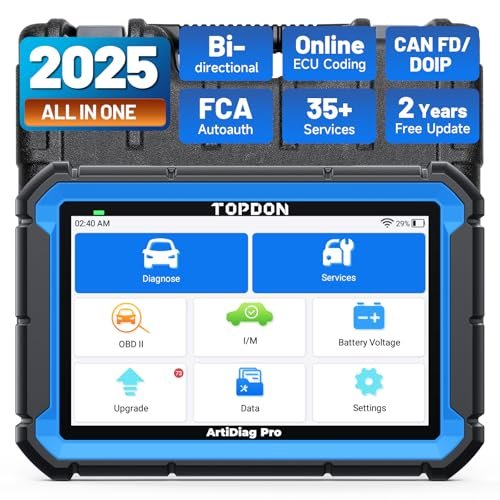
The ArtiDiag Pro has a tablet-style design with a blue and black protective frame. Its 7-inch screen gives it a more professional look than a small handheld code reader. The layout also leaves room for menus, live data, and test results. Its listed weight is about 805 grams, so it is not an ultra-light tool.
The standard package includes the scan tablet, diagnostic cable, USB cable, power adapter, user guides, and a carrying case. Buyers should check the seller’s packing list because included adapters may differ between versions. This is important when working on older or less common vehicles.
Getting started involves charging the tablet, connecting it to Wi-Fi, and installing available software updates. Next, connect the diagnostic cable to the car’s OBD2 port. Turn on the ignition and follow the on-screen steps to identify the vehicle. AutoVIN can help with this process, but manual selection may still be needed.
The interface uses an Android-based system. It has menus for diagnostics, service work, updates, and other tools. New users may need time to learn where each function sits. I would read the manual before trying active tests or coding functions. A wrong command can create problems if you do not know what the system controls.

Key Features That Make It Stand Out
- Full System Diagnostics: The scanner can check many vehicle control systems, including the engine, transmission, ABS, airbag, steering, TPMS, and air conditioning. This gives users a wider view of vehicle faults than a basic engine code reader. Coverage depends on the vehicle make, model, year, and installed software.
- Bidirectional Control: Bidirectional control lets the scanner send commands to supported vehicle parts. For example, users may test fuel pumps, cooling pumps, windows, door locks, lights, and windshield wipers. These active tests can help check whether a component responds as expected. Available tests vary by vehicle.
- 35 Maintenance Service Functions: The tool offers up to 35 advertised maintenance service functions for supported vehicles. These can include oil resets, battery resets, ABS bleeding, throttle-related resets, and other service tasks. The exact list is not the same for every car. Check the function list for your vehicle before buying.
- ECU Coding Support: The ArtiDiag Pro supports selected online ECU coding tasks. This can help users with certain module changes and vehicle settings. TOPDON lists support for selected Volkswagen Group vehicles, including VW, Audi, Skoda, and SEAT. This is not universal coding support, so buyers must confirm the exact model and task.
- AutoVIN Vehicle Identification: AutoVIN can read vehicle information through the diagnostic connection. It helps the scanner select the right vehicle profile without entering every detail by hand. Some cars may not support automatic identification. In that case, users can select the vehicle manually.
- Full OBD2 Testing: The scanner supports the standard ten OBD2 test modes on most compatible vehicles. Users can read and clear fault codes, check live data, and access other emissions-related information. This makes it useful for routine engine checks and basic fault finding.
- Live Data Comparison: The data display can show up to four data streams together. This helps users compare sensor readings during a test. For example, a mechanic can watch related engine values while checking how the vehicle responds. Graphs and live readings can make some faults easier to understand.
- Diagnostic Reports: The tool can create diagnostic reports that users can save and share. This is useful for repair records and customer discussions. A shop can keep a record of the scan results before and after a repair. Report options depend on the installed software.
- Large Display and Rechargeable Battery: The scanner has a 7-inch LCD with a listed resolution of 1024 x 600 pixels. Its 6100mAh battery is rated for up to 14 hours of screen-on use under stated conditions. Actual battery life can change with screen brightness, Wi-Fi use, and workload.
- Software Updates: TOPDON provides two years of free software upgrades with the listed package. After this period, continued updates may require a paid renewal. The US product listing has shown a separate annual renewal option. Buyers should confirm the current update terms before purchase.

✅ What I Like
- ✔ Full system scans cover far more than engine fault codes. This helps users check several major vehicle systems with one tool.
- ✔ Bidirectional tests offer a useful way to check supported parts. Users can send commands instead of relying only on stored fault codes.
- ✔ The range of maintenance services can reduce the need for separate basic reset tools. It is useful for routine service work on compatible vehicles.
- ✔ Selected ECU coding support adds value for users who work on supported Volkswagen Group vehicles.
- ✔ The 7-inch screen gives more room to read codes, compare data, and follow test steps.
- ✔ AutoVIN can save time by identifying supported vehicles through the diagnostic connection.
- ✔ Diagnostic reports help shops keep records and share scan results with customers.
- ✔ The 6100mAh battery offers useful runtime for several diagnostic jobs between charges.
⚠️ What Could Be Better
- ✖ Not every service, active test, or coding function works on every vehicle. Buyers must check the coverage list before purchase.
- ✖ The wired diagnostic cable limits movement around the vehicle compared with a wireless scan tool.
- ✖ Software updates may require a paid renewal after the included two-year period. This adds a future cost for users who want continued coverage.

Who Should Buy the TOPDON ArtiDiag Pro?
I would recommend this scanner to people who do more than read check engine codes. Its full system scans and active tests can help with deeper fault checks. The service functions also make it useful for regular maintenance work. Small repair shops may find it helpful as a general diagnostic tool.
It can also suit a home mechanic who works on several cars. The larger screen and live data tools help with more detailed checks. Still, I would not suggest buying it just for occasional engine light checks. A simple OBD2 reader may be a better use of money for that job.
Before ordering, check the official vehicle coverage list. Match your car’s exact year, make, and model with the functions you plan to use. Also check the update terms, seller warranty, and included accessories. These details can make a big difference to the value of the purchase.
| Best For | Why It Fits |
|---|---|
| Skilled DIY Mechanics | Full system scans, live data, and active tests help users investigate faults beyond basic engine codes. |
| Small Auto Repair Shops | Multiple system checks, service functions, and diagnostic reports can support routine repair work. |
| Home Mechanics With Multiple Cars | Wide vehicle coverage can make one scanner useful across several supported makes and models. |
| Volkswagen Group Vehicle Owners | Selected ECU coding and special functions may help with supported VW, Audi, Skoda, and SEAT vehicles. |
| Automotive Students | Live data and diagnostic reports can help users learn how vehicle systems behave during fault checks. |

Alternative Products You Can Consider
| Product | Best For | Key Difference |
|---|---|---|
| TOPDON ArtiDiag Pro | DIY mechanics and small repair shops | Combines full system diagnostics, active tests, service functions, and selected ECU coding. |
| Autel MaxiCOM MK808S | Users who want an alternative professional tablet scanner | Offers a different diagnostic platform and vehicle coverage system. Compare the supported functions for your car. |
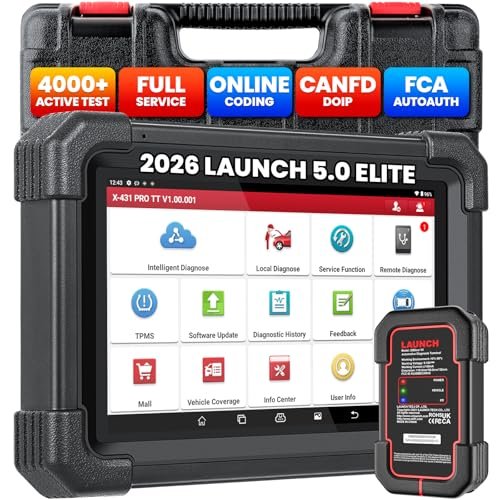
| Launch X431 PROS V5 | Mechanics who need a professional diagnostic platform | Provides another professional tool ecosystem with its own coverage, features, and update terms. |
| BlueDriver Bluetooth Pro OBDII Scan Tool | Everyday car owners | Uses a compact Bluetooth adapter and phone app instead of a dedicated diagnostic tablet. |

Final Verdict: Which Should You Buy?
The TOPDON ArtiDiag Pro makes sense for buyers who need a serious diagnostic tool without moving straight to a high-end shop system. Its main value comes from combining full system scans, active tests, maintenance services, and selected coding functions. The large display and live data tools also help with detailed fault checks.
I would choose it for a small garage or a skilled home mechanic who works on supported vehicles often. It can help reduce guesswork during diagnosis. It can also help users find faults before replacing parts. However, it does not replace every factory-level tool or advanced programming system.
The biggest concern is vehicle coverage. A feature listed on the product page may not work on your exact car. The future cost of software updates is another point to check. If you only need to read engine codes, save your money and choose a simpler scanner. If you need deeper diagnostics, the ArtiDiag Pro deserves a place on your shortlist.