The TOPDON Phoenix Max is a powerful professional scanner for advanced vehicle diagnostics, coding, and repair work.
A modern car can have dozens of control units. One fault can affect several systems at once. A basic OBD2 reader may only show a trouble code. It may not give you enough data to find the real cause. This can waste time in a busy repair shop.
That is why many American mechanics look for a more advanced scan tool. The TOPDON Phoenix Max aims to meet that need. It combines full-system diagnostics, active tests, ECU coding, and advanced test tools. It targets repair shops and skilled technicians who need more than basic code reading.
Is the TOPDON Phoenix Max Good?
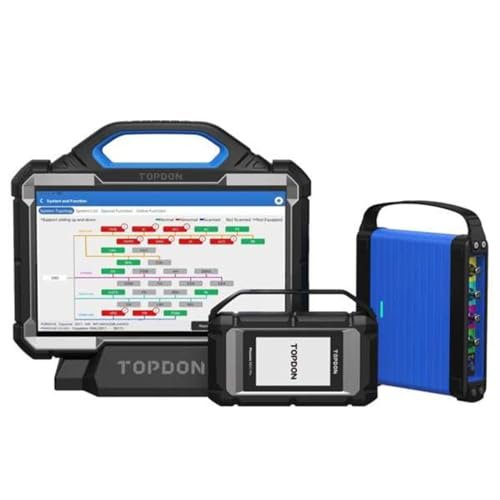
The TOPDON Phoenix Max is a high-end automotive diagnostic scanner. It offers much more than a basic code reader. Its main strengths include full-system scans, bidirectional tests, topology mapping, and ECU programming on supported vehicles. It also supports modern vehicle communication systems through its MDCI Pro interface.
The large 13.3-inch screen gives technicians room to view live data and scan results. The included four-channel oscilloscope adds another layer of testing for electrical faults. This makes the tool useful for shops that handle complex repairs. However, not every feature works on every car. Buyers must check vehicle coverage before they pay for it.
I would place this tool in the professional workshop category. It is not a simple choice for a home user who only wants to clear an engine light. Its advanced functions can save time when the right vehicle and repair task support them. The main trade-off is its high cost and the need to manage software updates.
My First Impression of the TOPDON Phoenix Max
The Phoenix Max has a large tablet-style design. Its 13.3-inch display gives it a clear work-focused look. The screen size matters when you read long data lists or view several vehicle systems. The tablet also has 8GB of RAM and 256GB of storage.
The package is built around the Phoenix Max tablet and MDCI Pro vehicle interface. The standard package details can vary by seller and selected version. The charging base, cables, adapters, and other supplied parts should be checked before purchase. Some versions also include the Phoenix Scope.
Setup starts with charging the tablet and connecting the vehicle interface. You then install or update the required diagnostic software and choose the vehicle. AutoVIN can help identify supported vehicles. Still, I would check the VIN and software coverage before starting a costly repair.
The system runs Android 9.0. That is an older Android version by current tablet standards. Buyers should focus on TOPDON software support rather than expect the same app experience as a new consumer tablet. A large screen and strong storage help, but they do not remove this limitation.
Key Features of the TOPDON Phoenix Max
- Full-System Diagnostics: The scanner can access many vehicle control systems. These include the engine, transmission, ABS, airbags, steering, and other supported modules. You can read fault codes, clear codes, view live data, and check ECU information. This gives a technician a wider view than a basic engine code reader.
- Bidirectional Active Tests: Active tests let a technician send commands to supported vehicle parts. For example, a test may activate a fan, pump, or other component. This helps check whether a part responds to a command. Available tests depend on the vehicle, control unit, and software.
- Diagnostic Topology Mapping: Topology mapping shows vehicle modules in a visual layout. It can help a technician see which systems report faults. This is useful when several modules have communication issues. It also helps reduce the need to move through long lists of control units.
- ECU Coding and Programming: The Phoenix Max supports online coding and cloud-based programming for selected vehicle brands and models. Supported functions include work with certain BMW, Mercedes-Benz, Volkswagen, Audi, Porsche, and other vehicles. These functions are not universal. Some programming tasks need extra software, online access, or manufacturer approval.
- Four-Channel Oscilloscope: The Phoenix Scope can display electrical signals from up to four channels. This helps technicians compare signals from sensors and circuits. It can support tests for wiring, ignition, and other electrical faults. The scope is most useful for people who know how to read waveforms.
- Modern Communication Protocols: The MDCI Pro interface supports CAN FD, DoIP, J2534, D-PDU, and RP1210 protocols. These standards help the scanner communicate with a wider range of modern vehicles and systems. Actual access still depends on vehicle support, software, and the task being performed.
- Large 13.3-Inch Display: The 1920 x 1200 display gives users a large area for scan reports, live data, and system diagrams. Its size can make long repair sessions more comfortable. It also helps when a technician needs to view several readings at once.
- 41 Service Functions: The scanner offers up to 41 maintenance and service functions for supported vehicles. These can include common tasks such as oil reset, EPB service, battery registration, and other maintenance operations. The exact list depends on the car and software version. Buyers should confirm the functions they need.
- AutoVIN and Vehicle Identification: AutoVIN helps identify a vehicle and select the right diagnostic software. This can reduce manual entry during daily work. Technicians should still confirm the model, year, engine, and VIN before running advanced tests.
- Optional ADAS and Heavy-Duty Expansion: The Phoenix Max can work with compatible ADAS equipment and heavy-duty diagnostic accessories. These options can expand the tool’s use in a larger shop. However, the required hardware, cables, and software may cost extra. They should not be treated as standard features without checking the package.
✅ What I Like
- ✔ Full-system diagnostics give technicians access to more than basic engine fault codes.
- ✔ Bidirectional testing helps check how supported vehicle parts respond to commands.
- ✔ Topology mapping makes it easier to view several vehicle modules in one place.
- ✔ The 13.3-inch screen offers plenty of room for live data and diagnostic reports.
- ✔ The four-channel oscilloscope supports deeper electrical fault testing.
- ✔ CAN FD, DoIP, J2534, D-PDU, and RP1210 support adds useful communication options.
- ✔ ECU coding and cloud-based programming offer advanced functions for supported vehicles.
- ✔ The 256GB storage and 8GB RAM provide useful space for software and diagnostic work.
⚠️ What Could Be Better
- ✖ The purchase cost is high for home users and small shops with limited diagnostic needs.
- ✖ Some advanced functions, ADAS work, and heavy-duty features need extra tools or software.
- ✖ Android 9.0 is an older operating system, and buyers should check long-term software support.
Who Should Buy the TOPDON Phoenix Max?
I would consider the Phoenix Max for a busy repair shop that works on many vehicle brands. Its wide system access and active tests can help with daily fault checks. The topology map also gives technicians a useful view of network faults.
It makes more sense for a shop that can use coding, programming, and electrical testing. Those functions can add value when the shop handles the right vehicles. A mechanic who only needs to read engine codes will not get the same value from this large tool.
Before buying, I would make a list of the vehicle brands in the shop. Then I would check the exact functions for those models. I would also confirm the included scope, software update period, warranty, and cost of future renewals.
| Best For | Why It Fits |
|---|---|
| Professional Auto Repair Shops | Full-system scans, active tests, and topology mapping can support daily work across many vehicle systems. |
| Advanced Automotive Technicians | ECU coding, programming, and electrical signal tests offer more ways to diagnose complex faults. |
| Multi-Brand Repair Businesses | Broad vehicle coverage and modern communication protocols help shops work across several makes. |
| Electrical Diagnostic Specialists | The four-channel oscilloscope can help inspect signals and trace complex electrical problems. |
| Growing Independent Garages | Optional ADAS and heavy-duty expansion can support new services when the right extra equipment is added. |
Alternative Products You Can Consider
| Product | Best For | Key Difference |
|---|---|---|
| TOPDON Phoenix Max | Advanced multi-brand workshops | Large 13.3-inch display, topology mapping, advanced programming, and four-channel scope options. |
| Autel MaxiSys MS909 | Professional multi-brand diagnostics | An alternative professional diagnostic platform with its own vehicle coverage and software ecosystem. |
| Launch X431 PAD VII | Shops needing advanced diagnostics and coding | A competing professional platform with different software coverage and supported functions. |
| TOPDON Phoenix Smart | Technicians who want a smaller scanner | A more compact Phoenix option with a different hardware and feature package. |
Final Verdict: Should You Buy the TOPDON Phoenix Max?
The TOPDON Phoenix Max is built for serious automotive diagnostic work. It combines full-system scans, active tests, topology mapping, and advanced programming in one platform. The large screen and optional electrical testing tools make it a useful choice for repair shops that handle complex faults.
I would choose it if my work involved several vehicle brands and I could use its advanced functions on a regular basis. It can offer good value when its features help a shop complete more repair jobs. However, its price, extra accessory costs, and older Android system deserve careful thought.
For a home mechanic, a simpler and less costly scanner may be enough. A technician who needs another professional platform should compare the Autel MS909 and Launch PAD VII as well. The best choice is the one that supports the cars you service and the tests you perform. Check the latest package contents and software terms before placing your order.