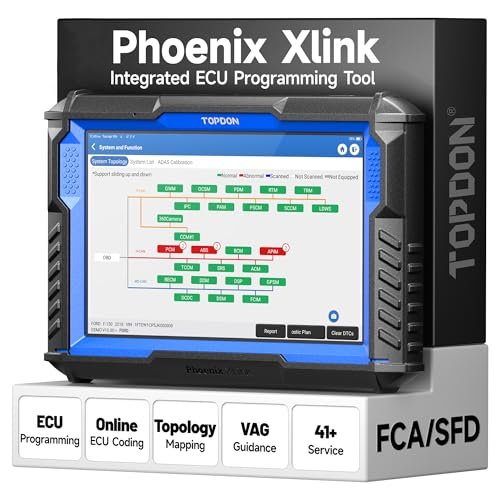
The TOPDON Phoenix Remote is a powerful shop scanner, best suited to professionals who need advanced diagnostics and programming.
Finding a fault in a modern car can take hours. A basic code reader may show a fault, but it may not explain the real cause. This can slow down repairs and keep a customer’s vehicle off the road.
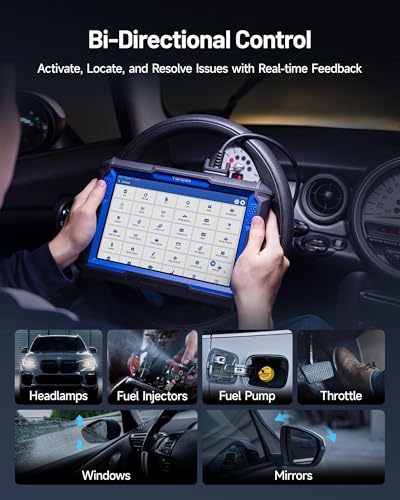
A professional repair shop needs more than a simple OBD2 reader. It may need full system scans, active tests, coding, and programming. The Phoenix Remote aims to meet these needs with local and remote diagnostic tools in one system.

Is the TOPDON Phoenix Remote Good?
Yes, the TOPDON Phoenix Remote looks like a strong option for busy auto repair shops. It offers advanced vehicle diagnostics, online coding, ECU programming, and support for many vehicle brands. It also adds remote communication between technicians and customers.
Its biggest strength is its wide range of professional tools. It supports more than 200 vehicle makes and new energy vehicle models. It also supports protocols such as CAN FD, DoIP, and J2534 for remote access programming. These tools can help shops handle more complex jobs.
However, this is not a scanner for every car owner. Its professional price, yearly renewal cost, and learning curve may be hard to justify for home use. There is also an important detail to check: TOPDON’s US product listing has stated that remote diagnostics would be released at a later date. Buyers should confirm that this feature is active in their region before paying for it.
I would put this scanner on the shortlist for shops that work on many vehicle brands. I would not suggest it as a first scanner for someone who only needs to read and clear engine codes.

My First impression of the TOPDON Phoenix Remote
The Phoenix Remote has a large tablet-style design. Its 10.1-inch display gives technicians more room to read data and view vehicle systems. The body is made for shop use, where a tool may move between work bays throughout the day.
The package includes the main tablet, power adapter, battery clamps, OBD2 extension cable, and several brand-specific adapter cables. It also includes an Ethernet cable and other useful leads. This gives a shop a broad set of connection options.
The tablet runs Android 10. It has 4GB of RAM and 128GB of storage. The screen has a 1280 x 800 resolution. These details suggest a system built for diagnostic work rather than casual use.
Getting started involves charging the tablet, setting up Wi-Fi, registering the software, and connecting the vehicle interface. A new user should take time to learn the menus and update process. I would also check vehicle coverage before starting a repair job.
One point deserves care. A large feature list does not mean every function works on every car. Model year, engine, control unit, region, and software access can all affect the result.

What Makes It Stand Out: Key Features
- Full-System Vehicle Diagnostics: The scanner can check many electronic systems across supported vehicles. It can read and clear fault codes and view live data. This helps a technician look beyond the engine control unit and check other systems when a warning light appears.
- Remote Diagnostics: The remote diagnosis concept lets technicians communicate with other users and support staff through connected devices. TOPDON describes voice calls, video calls, and remote diagnostic sessions. Buyers should confirm current feature availability and regional support before purchase.
- Cloud-Based ECU Programming: The Phoenix Remote supports cloud-based programming for selected vehicle brands. This can help repair shops perform advanced module work without relying only on local programming files. Vehicle compatibility and access rules still apply.
- Online Coding: Online coding gives technicians access to selected coding functions for supported brands. These functions can help configure vehicle modules and adjust approved settings. They are useful for advanced repairs, but they do not cover every model or control unit.
- CAN FD and DoIP Protocols: Modern cars use faster communication systems than older vehicles. CAN FD and DoIP help the scanner communicate with supported vehicle networks. This makes protocol support an important point for shops that service newer cars.
- J2534 Programming Support: The scanner supports J2534 for remote access programming. This matters when a repair calls for a supported programming process. Buyers should check the required software, vehicle coverage, and programming conditions before taking on this type of work.
- Diagnostic Topology Mapping: Topology mapping shows a layout of vehicle control units and their communication links. It can help a technician spot network faults and find modules that fail to communicate. This may save time when a fault affects several systems.
- FCA Secure Gateway Access: The tool supports FCA Secure Gateway access for compatible vehicles. This helps technicians work with protected vehicle functions on supported models. Access may depend on vehicle coverage, account setup, and current security rules.
- Large Storage and Display: The 10.1-inch screen has a 1280 x 800 resolution. The tablet also has 4GB of RAM and 128GB of storage. These features provide room for diagnostic software, reports, and vehicle data.
- New Energy Vehicle Support: TOPDON lists support for new energy vehicle models. This gives repair shops a way to explore work beyond standard gas-powered cars. The exact functions depend on the vehicle and available software coverage.

✅ What I Like
- ✔ Wide vehicle coverage: TOPDON lists support for more than 200 vehicle makes and new energy vehicle models, which can suit shops that work on many brands.
- ✔ Advanced programming tools: Online programming and coding give trained technicians more repair options than a basic code reader.
- ✔ Modern protocol support: CAN FD, DoIP, and J2534 support make the tool relevant to many newer vehicle platforms.
- ✔ Remote communication concept: Voice and video calls can help technicians discuss faults and repair steps without being in the same place.
- ✔ Full-system diagnostics: Access to multiple vehicle systems helps technicians investigate faults beyond the engine.
- ✔ Topology mapping: The visual network layout can help narrow down communication faults and module problems.
- ✔ Large tablet display: The 10.1-inch screen gives more room for live data, menus, and diagnostic results.
- ✔ Useful adapter package: The included cables and brand adapters give shops more connection options for different vehicles.
⚠️ What Could Be Better
- ✖ High purchase cost: The US listing has shown a price of $2,950, which makes this a serious investment for a small shop or home user.
- ✖ Yearly renewal cost: The US listing shows a $795 annual renewal after the included two-year update period. Buyers should include this cost in their long-term budget.
- ✖ Remote feature availability needs checking: TOPDON’s US listing has noted that remote diagnostics would be released at a later date. Buyers should confirm the current status before relying on it.

My Recommendation
I would consider the Phoenix Remote if I ran a repair shop that handled many vehicle brands. Its diagnostic, coding, and programming tools can help a shop take on more advanced work. The large screen and broad protocol support also make sense for daily use.
Still, I would not buy it based on the feature list alone. I would first check the vehicle coverage file for the cars I service most often. I would also ask TOPDON about remote diagnosis access, programming limits, warranty terms, and yearly renewal fees.
A shop should also think about how often it performs ECU programming. If most jobs involve basic engine codes and common service resets, a less costly scanner may offer better value. A high-end tool only makes sense when its advanced features solve real shop problems.
| Best For | Why It Fits |
|---|---|
| Professional Auto Repair Shops | Full-system scans, coding, programming, and broad vehicle coverage can support a wide range of repair jobs. |
| Advanced Automotive Technicians | CAN FD, DoIP, topology mapping, and advanced diagnostic functions can help with complex vehicle faults. |
| Multi-Brand Repair Centers | Support for many vehicle makes can help technicians work across American, Asian, and European models. |
| Shops Handling ECU Work | Online programming and coding can be useful when supported vehicles need module updates or configuration. |
| Growing Diagnostic Businesses | The range of tools may help a shop expand into more advanced diagnostic services, subject to training and coverage. |

Alternative Products You Can Consider
| Product | Best For | Key Difference |
|---|---|---|
| TOPDON Phoenix Remote | Shops needing advanced diagnostics and remote support | Focuses on remote diagnosis, cloud programming, and broad vehicle coverage. |
| TOPDON Phoenix Smart | Technicians seeking a professional TOPDON diagnostic tablet | Offers a different professional tool package without the same Phoenix Remote focus. |
| Launch X431 PAD VII | Shops that prefer the Launch diagnostic ecosystem | Uses Launch software and its own range of diagnostic and service functions. |
| Autel MaxiSys Ultra | Advanced repair shops comparing premium diagnostic platforms | Provides an alternative high-end diagnostic platform from Autel. |
Final Verdict: Which Should You Buy?
The TOPDON Phoenix Remote is built for serious automotive diagnostic work. It brings full-system scans, advanced coding, ECU programming, modern protocols, and a remote support concept into one tablet. These features make it worth considering for professional repair shops.
I would choose it if my shop worked on many vehicle brands and often handled complex electronic faults. Its strongest reason to buy is the mix of advanced programming and broad diagnostic coverage. However, the high purchase price and $795 yearly renewal make the total cost an important part of the decision.
I would choose a simpler scanner if I only needed to read engine codes, check live data, and reset common service alerts. I would also compare the Phoenix Smart, Launch X431 PAD VII, and Autel MaxiSys Ultra before spending this much money.
One final point matters. Confirm that remote diagnosis is available in your region and check the coverage list for your most common vehicles. If those details match your needs, the Phoenix Remote could be a useful long-term shop tool. If not, a less costly scanner may be the smarter buy.