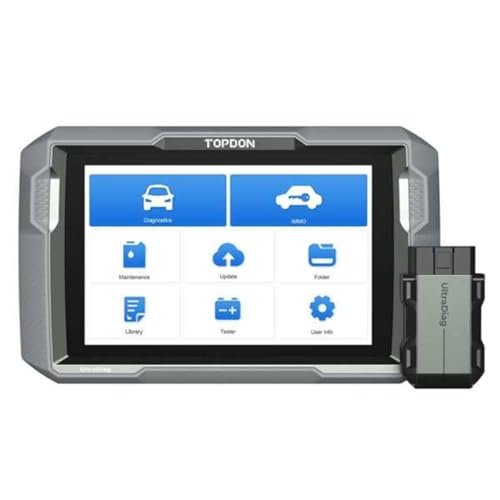
The TOPDON UltraDiag is worth considering for repair shops needing advanced diagnostics, active tests, and supported key programming.
A check engine light can turn a normal day into a costly problem. A basic code reader may show the fault, but it often cannot tell you enough to find the real cause. This is why many US car owners and repair shops look for a more capable scan tool.
The TOPDON UltraDiag aims to fill that gap. It combines full-system vehicle scans, service functions, active tests, and key programming in one tablet. This makes it an option for busy garages, independent mechanics, and skilled DIY users who want more control over vehicle repairs.

Is TOPDON UltraDiag Good?
The TOPDON UltraDiag is a capable diagnostic tool with a wide range of functions. It supports full-system scans for over 100 vehicle brands. It also offers 30 service functions, bidirectional controls, and key programming for supported vehicles. These tools make it more useful than a basic OBD2 code reader.
Its main strength is the mix of diagnostic and repair tools. A mechanic can read fault codes, view live data, scan several vehicle systems, and run supported active tests. The key programming tools add another useful option for shops that handle immobilizer and key-related work.
However, this is not a simple tool for every driver. Its advanced features need some repair knowledge. Key programming also depends on the vehicle, model year, and available coverage. Some functions may need extra access or setup. Buyers should check the coverage list before paying for it.

My First impression of TOPDON UltraDiag
The UltraDiag uses a tablet-style design. Its large 8-inch screen gives users more room to view menus, fault codes, and live data. This is useful when working through several vehicle systems. The design also feels more like a shop tool than a small handheld code reader.
The listed package includes the diagnostic tablet, Bluetooth VCI, power adapter, OBD2 extension cable, USB cable, user guide, and carrying case. The VCI is magnetic, so users can store it on the tablet when it is not in use. This helps keep the main parts together in a busy work area.
Getting started involves charging the tablet, connecting the VCI, and setting up the software. The AutoVIN feature can help identify supported vehicle details. AutoScan can then check available vehicle systems and retrieve fault codes. First-time users should read the manual and install available updates before starting a repair.
I would not treat the first setup as a quick plug-and-play task for every buyer. A professional scan tool has more menus and options than a basic reader. Learning where each function sits can take time. Still, the large display and wireless VCI help make the process easier to manage.
Key Features That Make It Stand Out
- Full-System Vehicle Diagnostics: The UltraDiag supports full-system diagnostics for over 100 vehicle brands. It can access supported systems such as the engine, transmission, ABS, airbag, TPMS, steering, immobilizer, gateway, and air conditioning. This gives repair shops more information than a basic engine code reader. Actual access depends on the vehicle and its supported functions.
- Bidirectional Active Tests: Bidirectional control lets the scanner send commands to supported vehicle parts. Examples include fuel injectors, coolant pumps, power windows, and windshield wipers. A mechanic can use these tests to check whether a part responds to a command. This can help narrow down a fault before replacing parts.
- 30 Service and Maintenance Functions: The tool offers 30 service functions for supported vehicles. These include oil reset, EPB reset, BMS reset, throttle adaptation, ABS bleeding, DPF regeneration, injector coding, and other service tasks. These functions can help shops handle common maintenance work without switching between several tools. Coverage varies by make, model, and year.
- Key Programming and Immobilizer Support: The UltraDiag adds key-related functions for supported vehicles. These include PIN reading, key learning, remote control learning, deleting keys, and all-keys-lost procedures where supported. TOPDON lists coverage for more than 40 vehicle brands. This can be useful for automotive locksmiths and repair shops. Buyers should confirm the exact vehicle and key function before purchase.
- Standard OBD2 Functions: The scanner handles core OBD2 tasks. It can read and clear diagnostic trouble codes, show live data, view freeze-frame data, check I/M readiness, and perform supported emissions tests. These tools help users understand engine and emissions faults. They also make the device useful for routine vehicle checks.
- AutoVIN and AutoScan: AutoVIN can identify supported vehicle details without entering all the information by hand. AutoScan checks available vehicle systems and collects fault codes. These features can save time during an initial inspection. They also help reduce manual steps when a shop handles several vehicles each day.
- Repair Data Library: The repair library adds useful information for diagnosis. It includes a DTC repair guide, technical service bulletins, DLC location details, and a warning light library. These resources can help users understand fault codes and find useful repair information. The available content depends on the vehicle and software coverage.
- Bluetooth VCI Connection: The included vehicle communication interface connects to the tablet through Bluetooth. This removes the need to keep the tablet beside the OBD2 port during a scan. The magnetic design also makes storage easier. It can be helpful when a technician needs to move around a vehicle during testing.
- Large Touchscreen and Tablet Hardware: The UltraDiag has an 8-inch touchscreen, a 10,000mAh battery, and an Android-based system. It also has 2GB RAM and 32GB storage according to TOPDON’s product information. The larger screen helps display live data and system reports. Its storage can also hold diagnostic records and software.
- Built-In FCA Secure Gateway Support: The scanner supports FCA Secure Gateway access for supported Chrysler, Dodge, Jeep, and Fiat vehicles. It works through AutoAuth, which requires an active account and a separate subscription. This feature can help shops that service newer FCA vehicles. Buyers should check the current access rules before relying on it.
✅ What I Like
- ✔ Full-system diagnostics cover many important vehicle modules, including engine, transmission, ABS, airbag, and TPMS systems.
- ✔ Bidirectional controls help mechanics test supported components instead of relying only on stored fault codes.
- ✔ The 30 service functions cover many common repair and maintenance tasks in one device.
- ✔ Key programming adds value for shops and locksmiths that work with supported vehicle brands.
- ✔ The 8-inch touchscreen gives users more space to read fault codes, view data, and move through menus.
- ✔ Bluetooth VCI support allows more freedom to move around the vehicle during diagnostic work.
- ✔ AutoVIN and AutoScan can reduce the time spent on vehicle selection and initial system checks.
- ✔ The repair data library gives users access to fault code guidance, technical service bulletins, and other useful information.
- ✔ TOPDON lists free lifetime software updates on its US product page, which can help keep supported functions current.
⚠️ What Could Be Better
- ✖ The price is much higher than that of a basic OBD2 scanner, so casual drivers may not use enough features to justify the cost.
- ✖ Not every function works on every vehicle. Buyers must check make, model, year, and function coverage before purchasing.
- ✖ Key programming can involve extra steps, vehicle security rules, and account access. It is not a universal solution for every lost-key situation.
Who Should Consider Buying It?
I would put the UltraDiag on the shortlist for independent repair shops and trained automotive technicians. Its main value comes from the combination of full-system scans, active tests, service functions, and key programming. A shop that uses these features often may get more value from one tablet than from several basic tools.
It can also suit automotive locksmiths who need supported immobilizer and key functions. However, they should check the key coverage list with care. A scanner that supports a vehicle brand may not support every key type or procedure for that brand.
For a home mechanic, the decision is less clear. If you only need to read a check engine light, a much cheaper OBD2 reader may be enough. The UltraDiag makes more sense when you plan to diagnose several vehicle systems and use its advanced service tools.
| Best For | Why It Fits |
|---|---|
| Independent Auto Repair Shops | Full-system scans, active tests, and service functions can support a wide range of daily repair tasks. |
| Automotive Locksmiths | Supported key learning, PIN reading, remote learning, and immobilizer tools add useful key service options. |
| Experienced DIY Mechanics | It offers more diagnostic depth than a basic code reader for owners who understand vehicle repair. |
| Multi-Brand Repair Technicians | Coverage across many vehicle brands can help shops that work on different makes and models. |
| Mobile Mechanics | The tablet design and wireless VCI can make diagnostic work easier when moving around different vehicles. |
Alternative Diagnostic Scanners to Consider
| Product | Best For | Key Difference |
|---|---|---|
| TOPDON UltraDiag | Shops needing diagnostics and key programming | Combines full-system diagnostics, active tests, service functions, and supported key programming. |
| TOPDON Phoenix Lite 2 | Technicians focused on vehicle diagnostics | A diagnostic-focused option from TOPDON for buyers who may not need the UltraDiag key programming package. |
| Autel MaxiCOM MK900 | Multi-brand repair shops | An alternative professional diagnostic tablet from the Autel product range. |
| Launch X431 V+ | Professional mechanics | A multi-brand diagnostic platform from Launch with its own software and vehicle coverage. |
Final Verdict: Should You Buy TOPDON UltraDiag?
The TOPDON UltraDiag is a strong option for buyers who need more than basic engine code reading. Its full-system scans, 30 service functions, bidirectional tests, and supported key programming give it a broad range of uses. The 8-inch screen and wireless VCI also help make shop work more practical.
I would choose it for an independent garage or locksmith business that can use several of its advanced functions on a regular basis. It may also suit a skilled DIY mechanic who works on different vehicles and wants deeper diagnostic access. Its biggest selling point is the mix of diagnostic and key programming tools in one system.
However, I would not recommend it as the first choice for a driver who only wants to check an engine warning light. The cost and learning curve may be hard to justify for occasional use. Some advanced functions also depend on exact vehicle coverage and extra account access.
Before ordering, check the official coverage list for your vehicles. Confirm the key programming functions, service tasks, and update terms that matter to your work. If those checks match your needs, the UltraDiag deserves a place on your shortlist.