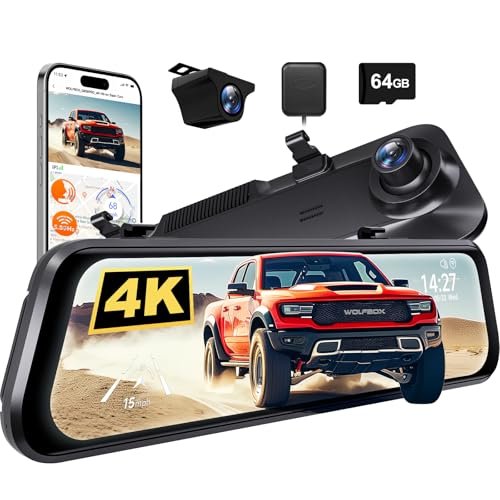
The WOLFBOX G850 Pro is worth considering for drivers who want front and rear recording with a large mirror display.
Driving through busy streets can be stressful. A sudden stop, a close call, or a small crash can leave you with no proof of what happened. A good dash cam can help protect your side of the story.
The WOLFBOX G850 Pro offers a different take on car cameras. It replaces the view in your stock rearview mirror with a large screen. It also records the road ahead and the area behind your vehicle. This setup may appeal to daily commuters, families, and people who spend long hours on American roads.

Is the WOLFBOX G850 Pro Good?
The WOLFBOX G850 Pro is a feature-rich mirror dash cam. It combines a 4K front camera, a 1080P rear camera, and a 12-inch touch screen. It also offers GPS, WiFi, voice control, and driver alert features. These tools make it a strong option for drivers who want more than a basic dash cam.
One of its main strengths is the large mirror display. You can use it to view the rear camera feed while driving. This can help when passengers or cargo block your normal rear view. The front camera also records in 4K, which gives you more image detail than a basic 1080P camera.
However, this is not a simple plug-and-play camera for every car. You need to route the rear camera cable and place the GPS unit. Some features may also need careful setup. The rear camera records at 1080P, so it does not match the front camera’s 4K resolution.
My main takeaway is that this model makes the most sense when you want a digital rearview mirror and a dual-camera recording system in one unit. It may be less appealing if you only need a small front-facing camera.

My First Impression of the WOLFBOX G850 Pro
The G850 Pro has a long, slim mirror-style body. Its 12-inch screen gives it a modern look. It sits over your existing rearview mirror with the included straps. This design keeps the camera close to the normal driving view.
The package is designed to include the main parts needed for setup. These include the mirror camera, rear camera, GPS module, power cable, mounting straps, cable clips, and a 64GB memory card. Check the seller’s package list before buying, as bundle contents can vary.
Setup takes more work than fitting a small windshield camera. You need to connect the rear camera and run its cable toward the back of the car. You also need to place the GPS module where it can receive a clear signal. Cable clips help keep the wiring neat.
The touch screen gives you access to the camera views and settings. New users should take time to read the guide before driving. I would also check the camera angle, date, time, and recording settings before using it on the road. These steps help avoid missed footage.

Key Features of the WOLFBOX G850 Pro
- 4K Front Camera: The front camera records at 2160P resolution and up to 30 frames per second. This gives you more image detail than standard 1080P footage. It can help capture road signs, nearby vehicles, and other details. Actual results still depend on light, motion, and camera placement.
- 1080P Rear Camera: The rear camera records in 1080P at up to 25 frames per second. It helps capture events behind your vehicle. This is useful in busy parking lots and on crowded roads. The rear camera also feeds the digital mirror display.
- 12-Inch Touch Screen: The large IPS display acts as a digital rearview mirror. You can view the front and rear camera feeds and change the display view with touch controls. Its wide screen may help drivers who want a larger rear view than a stock mirror can provide.
- GPS Tracking: The external GPS module records location and driving data with compatible footage. This can help you review where an event took place. GPS also adds useful context to a recording. Place the module where it has a clear view of the sky.
- 5.8GHz WiFi and App Support: Built-in WiFi lets you connect the camera to a compatible phone app. You can use the app to view and manage recorded clips. The 5.8GHz connection is designed to make file access faster. Phone and app compatibility should be checked before purchase.
- Voice Control: Voice commands let you control supported camera functions without reaching for the touch screen. This can be helpful when you need to keep your hands on the wheel. Check the manual for the supported commands and their exact wording.
- ADAS and Blind Spot Alerts: The G850 Pro offers driver alert features for situations such as lane departure, forward collision, and rear collision warnings. It also includes blind spot detection functions. These systems can provide extra alerts, but they are not a replacement for mirrors, safe driving, or driver attention.
- Loop Recording and G-Sensor: Loop recording allows the camera to reuse older storage space as new footage is saved. The G-sensor can detect certain sudden movements and help protect important clips. Check the sensitivity settings to reduce unwanted locked files.
- Parking Monitoring: The parking monitoring feature can help record certain events while the vehicle is parked. A suitable hardwire kit and correct installation may be needed for this function. Check the exact package and power requirements before relying on it.
- Expandable Storage: The package includes a 64GB memory card. The camera supports larger cards, with the listed maximum depending on the product version and manual. A larger card can provide more room for saved clips. Use a compatible high-quality card for reliable recording.

✅ What I Like
- ✔ The 4K front camera provides more image detail than a standard 1080P front dash cam.
- ✔ Front and rear recording gives drivers wider coverage of events around the vehicle.
- ✔ The 12-inch touch screen provides a large digital rearview display.
- ✔ GPS adds location and driving data to compatible recordings.
- ✔ WiFi and app support make it easier to access footage without removing the memory card.
- ✔ Voice control offers a hands-free way to use supported camera functions.
- ✔ Loop recording helps keep the camera recording when storage fills up.
- ✔ The included 64GB memory card lets buyers get started without shopping for a card right away.
⚠️ What Could Be Better
- ✖ The rear camera records at 1080P rather than 4K, so front and rear footage have different levels of detail.
- ✖ Running the rear camera cable can take time, especially in larger vehicles.
- ✖ Parking monitoring may require a separate hardwire setup, which adds work and possible extra cost.

My Recommendation: Who Should Buy It?
I would consider the G850 Pro if I wanted a large digital mirror and front and rear video in one system. It has a useful mix of recording, display, and connection features. The 4K front camera is also a key reason to consider it.
It is not the best fit for every driver. Someone who wants a quick and simple installation may prefer a small windshield dash cam. Drivers who need the same high resolution at both ends should also look at other models. Think about your car, mirror size, and cable route before making a choice.
| Best For | Why It Fits |
|---|---|
| Daily Commuters | Front and rear recording can help document events during busy daily trips. |
| Families | The digital rear view can help when passengers or cargo block the normal rear window view. |
| SUV and Truck Owners | The rear camera feed can offer a useful view when a large vehicle makes the stock mirror less helpful. |
| Long-Distance Drivers | GPS, loop recording, and front and rear coverage can support long trips. |
| Drivers Who Want More Control | Touch controls, voice commands, and phone app support provide several ways to manage the camera. |

Alternative Products You Can Consider
| Product | Best For | Key Difference |
|---|---|---|
| WOLFBOX G850 Pro | Drivers who want a 4K mirror dash cam | 4K front, 1080P rear, 12-inch display, GPS, WiFi, and driver alert features. |
| WOLFBOX G900 Pro | Drivers who want higher front and rear camera detail | Uses higher-resolution front and rear camera hardware than the G850 Pro. |
| WOLFBOX G840H | Buyers who want a simpler mirror camera setup | Uses a 2.5K front camera and 1080P rear camera. |
| Vantrue N4 Pro | Rideshare drivers and cabin recording | Uses a multi-channel camera layout rather than a mirror-mounted display. |

Final Verdict: Should You Buy the WOLFBOX G850 Pro?
The WOLFBOX G850 Pro is a good option for drivers who want a modern mirror dash cam with front and rear recording. Its 4K front camera, large touch screen, GPS, WiFi, and voice control give it a useful mix of features. The digital rear view is also a strong reason to consider it.
I would choose it for a car, SUV, or truck where a large screen and rear camera view would make daily driving easier. However, I would compare it with the G900 Pro if rear video quality is a top concern. I would also look at a simpler dash cam if I wanted less wiring and a faster setup.
The biggest trade-off is the 1080P rear camera and the work needed to install the full system. You should also check the parking power setup and storage needs before buying. Overall, this model is worth considering when you want more than basic road recording and value a digital mirror as part of the package.