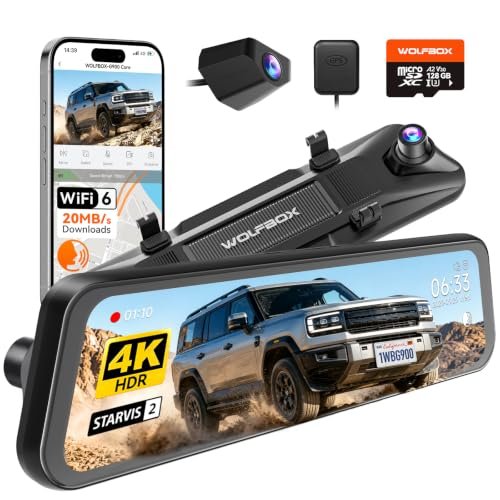
The WOLFBOX G900 is worth considering if you want sharp dual-camera footage and a large digital rearview mirror.
Driving through busy streets can be stressful. Large SUVs, trucks, and packed parking lots can make it hard to see what is behind your car. A standard mirror may not give you the view you need. A dash cam can help by recording the road and showing a wider view of traffic.
This is where a mirror-style dash cam can help. The WOLFBOX G900 combines a large touchscreen with front and rear cameras. It aims to replace your normal mirror view with a live camera feed while saving video for later use. For daily commutes, family trips, and long highway drives, this setup may offer useful value.

Is the WOLFBOX G900 Good?
The WOLFBOX G900 is a capable mirror-style dash cam for drivers who want front and rear video in one system. Its main draw is the large 12-inch touchscreen. It also records in 4K at the front and 2.5K at the rear on the standard G900 model. This gives drivers a useful mix of road recording and live rear visibility.
I see its mirror design as the main reason to consider it. It can help when your car has a blocked rear window or a full load of bags and gear. The rear camera also helps when you back into a tight parking spot. Still, this is not a simple plug-and-play camera for every car. You need to plan the rear camera cable and check how the screen fits over your factory mirror.
The standard G900 should not be confused with the G900 Pro or newer G900 Core models. Features can differ by version and package. Some G900 listings also show different storage limits and extra parts. Check the exact model, camera set, memory card, and included cables before you order.

My First Impression of the WOLFBOX G900
The first thing that stands out is the wide mirror screen. It looks more like a digital rearview mirror than a small dash cam. The slim shape helps it sit over the factory mirror, while the touch controls make it easy to change the camera view.
The box contents can vary by package. A common G900 kit includes the mirror unit, front camera, rear camera, power cable, rear camera cable, mounting straps, GPS parts, and basic fitting tools. Check the seller’s pack list because some kits may not include the same memory card or hardwire parts.
The build uses a screen and camera setup that needs a secure fit. You should take time to place the mirror and test the camera angle before you hide the wires. The rear camera also needs a good spot near the back of the car. A clean fit may take more time than a basic windshield dash cam.
Getting started is not too hard if you follow the manual. First, mount the mirror and connect the front camera. Then route the rear camera cable and connect the power lead. Test both camera views before putting the trim back in place. This simple step can save time if you need to adjust a cable.

Key Features That Make It Stand Out
- 4K Front Camera: The front camera records in 4K UHD on the standard G900. This high level of detail can help capture road signs, lane marks, and nearby cars. Video quality still depends on light, lens position, and road speed. Clear 4K footage does not mean every license plate will be readable in every scene.
- 2.5K Rear Camera: The rear camera records in 2.5K on the standard dual-camera version. It gives you a live view behind your vehicle and saves rear footage at the same time. This can help when traffic follows close behind or when your rear window is blocked. The final view also depends on where you mount the camera.
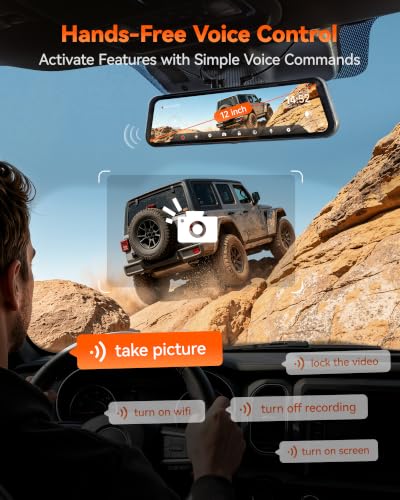
- 12-Inch Touchscreen: The large 12-inch screen acts as a digital rearview mirror. You can view the front or rear camera and change the display with touch controls. The wide screen makes the live rear view easy to see. However, the display may need some brightness changes in strong sunlight or at night.
- Wide Camera Views: The standard G900 lists a 170-degree front view and a 150-degree rear view. These wide angles help cover more of the road than a narrow camera view. They can also show more nearby traffic. Wide views may make distant objects look smaller, so they are not a replacement for direct mirror checks.
- GPS Support: The GPS feature can record driving data such as speed, direction, and route details when the required GPS unit is connected. This can add useful context to saved clips. Check whether your chosen package includes the GPS unit, as the parts can vary by seller.
- G-Sensor: The built-in G-sensor can detect a strong impact and lock the related video. This helps protect important clips from normal loop recording. You should still check the locked files from time to time. A full memory card with protected clips may limit the space available for new footage.
- Loop Recording: Loop recording lets the camera keep recording when the memory card fills up. It replaces older unlocked clips with newer footage. This reduces the need to clear the card by hand. Important locked clips remain protected until you remove or manage them.
- Parking Monitoring: The G900 supports parking monitoring with a suitable hardwire kit. This can help record events while your car is parked. The hardwire kit is needed for this feature and may be sold separately. Check your car battery needs and the kit instructions before using parking mode for long periods.
- Reverse Assistance: The rear camera can also act as a reversing aid. When connected and set up for this use, it can show the area behind the car on the mirror screen. This is useful in driveways and tight parking spaces. It should not replace a direct look around the car or a proper check of blind spots.
- Supercapacitor Power Design: The G900 uses a supercapacitor rather than a common built-in lithium battery. This design can handle heat and cold better than many battery-based dash cams. It also helps the unit save power safely when the car turns off. The camera still needs a proper power source to work.

✅ What I Like
- ✔ The 4K front camera offers detailed video for daily driving and road trips.
- ✔ The 2.5K rear camera records traffic behind the car and adds a live rear view.
- ✔ The 12-inch touchscreen gives you a large and clear camera display.
- ✔ The mirror design can help drivers whose rear windows are blocked by passengers, cargo, or vehicle parts.
- ✔ The G-sensor can lock impact clips to help protect key video files.
- ✔ Loop recording keeps the camera running without the need to clear old clips each day.
- ✔ GPS support can add speed and route details to recorded footage when the GPS unit is connected.
- ✔ The supercapacitor design is useful for cars that face hot or cold weather.
⚠️ What Could Be Better
- ✖ Rear camera wiring can take time, especially when you route the cable through a long SUV or truck.
- ✖ The large screen may not fit every factory mirror or suit every driver’s view and seating position.
- ✖ Parking mode needs a hardwire kit, and some packages may not include one.
Who Should Buy the WOLFBOX G900?
I would put this camera on the list for drivers who want more than a small windshield dash cam. The large screen and rear camera are useful for cars with poor rear visibility. It may also suit people who drive long routes and want both front and rear video saved.
It makes the most sense when you are happy to spend time on setup. The rear camera cable needs a neat path, and the mirror must sit in a good spot. If you want a very small camera with a fast setup, a standard front-and-rear dash cam may be a better fit.
Before buying, check the exact G900 version. Confirm the front and rear video quality, included GPS parts, memory card support, and parking mode kit. These details can change across product packages and newer versions.
| Best For | Why It Fits |
|---|---|
| SUV and Truck Owners | The digital mirror view can help when the rear window is small or blocked by cargo and seats. |
| Daily Commuters | The front and rear cameras can record traffic during busy trips and daily drives. |
| Road Trip Drivers | The dual-camera setup can save footage from both ends of the vehicle during long trips. |
| Drivers Who Want a Large Display | The 12-inch touchscreen gives a larger live view than many small dash cam screens. |
| Drivers Who Need Parking Monitoring | The camera supports parking monitoring when used with a suitable hardwire kit. |

Alternative Products You Can Consider
| Product | Best For | Key Difference |
|---|---|---|
| WOLFBOX G900 | Drivers who want a digital rearview mirror | 12-inch touchscreen with 4K front and 2.5K rear recording on the standard model. |
| WOLFBOX G900 Pro | Drivers who want an upgraded mirror dash cam | A more feature-rich model in the same mirror-style product family. |
| VIOFO A229 Pro 2CH | Drivers who focus on front and rear video | A traditional dual-channel dash cam rather than a mirror replacement. |
| Vantrue N4 Pro | Rideshare drivers and cabin recording | A multi-camera setup that adds interior coverage instead of a large digital mirror. |

Final Verdict: Which Dash Cam Should You Buy?
The WOLFBOX G900 is a good choice if you want a large digital rearview mirror and front and rear video recording. Its 4K front camera, 2.5K rear camera, touchscreen, and impact detection make it a useful option for daily driving. The mirror design is its biggest selling point. It offers more than a small camera that sits on the windshield.
I would choose it for an SUV, truck, or family car where rear visibility is not ideal. It can also suit drivers who want a live rear camera view and recorded footage in one system. However, buyers who want a quick setup or a small camera may prefer the VIOFO A229 Pro 2CH. Rideshare drivers may get more value from the Vantrue N4 Pro because it offers cabin coverage.
The biggest thing to plan for is installation. You need to mount the rear camera, route its cable, and make sure the large screen fits your mirror. You should also check the exact product version and the items in the box. If those points work for your car, the G900 is worth a place on your shortlist.