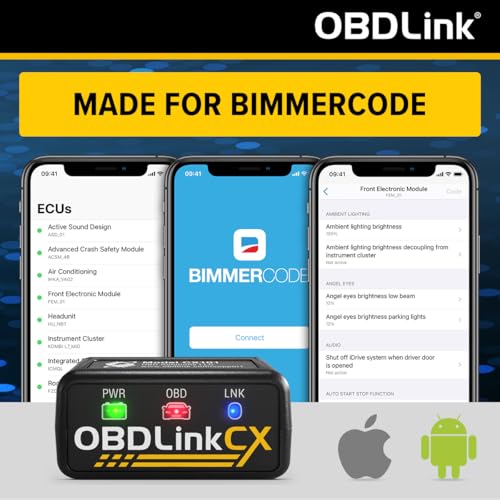
The OBDLink CX is a strong choice for BMW owners who want wireless diagnostics and easy coding with BimmerCode.
Have you ever wanted to change a setting in your BMW without visiting a repair shop? Maybe you want to check a warning light, read engine codes, or adjust a feature that your car already supports. Buying a large scan tool for these simple jobs can feel like overkill.
That is where a small Bluetooth OBD2 adapter can help. The OBDLink CX connects your car to a phone and works with apps such as BimmerCode and the OBDLink app. It can be useful for DIY car owners who want more control over basic diagnostics and supported BMW coding tasks.
Is the OBDLink CX Good?
Yes, the OBDLink CX is a good wireless OBD2 adapter, especially for BMW and MINI owners. Its main strength is its support for BimmerCode. It also works with the free OBDLink app for basic vehicle diagnostics. You can use a phone to read fault codes, view live data, and clear supported engine fault codes.
The adapter uses Bluetooth 5.1 Low Energy. This helps it connect with modern iPhones and Android phones. Its small body also keeps it out of the way when plugged into the car. OBDLink includes low-power sleep technology and protection against voltage spikes. These features make it more practical for regular use.
However, this is not the best adapter for every car owner. OBDLink designed the CX with BMW use in mind. It does not support some older Ford, GM, and FCA vehicle protocols. It also does not offer the same broad vehicle coverage as the OBDLink MX+. You should check your car and app before buying.
My main takeaway is simple: the CX makes the most sense when you already know which app and coding tasks you want to use. It is less appealing if you only need a basic code reader for many different car brands.

My First impression of the OBDLink CX
The OBDLink CX has a small and simple design. It plugs into the OBD2 port under the dashboard. There is no large screen, cable, or separate control panel to deal with. You use your phone as the main display.
The compact body is useful in cars with limited space near the diagnostic port. Its dark casing also gives it a clean look. The adapter has status lights that help show power, activity, and connection status.
Setup is fairly simple. First, find the OBD2 port in your car. Plug in the adapter and turn on the ignition as the app instructs. Then open a compatible app and follow its pairing steps. BimmerCode offers an in-app connection process for supported phones.
One thing buyers should know is that the CX uses Bluetooth Low Energy. It does not use Classic Bluetooth. This matters because older apps and devices may not support the same connection method. I would check app compatibility before placing an order.
There is no built-in screen or button system. That is normal for this type of adapter. The phone handles the menus, readings, and coding choices. You also need a compatible app to get the most from the device.

Key Features That Make It Useful
- Bluetooth 5.1 Low Energy: The CX uses Bluetooth 5.1 BLE to connect with supported iPhones and Android phones. This gives you a wireless link without a cable between your phone and car. It also avoids the need for a separate handheld display.
- BimmerCode Support: The adapter was made for use with BimmerCode and is recommended by its team. BMW and MINI owners can use supported coding options to change certain car settings. Available features depend on the vehicle, model year, and installed control units.
- Free OBDLink App: The OBDLink app gives users access to basic vehicle diagnostics. You can read and clear supported engine fault codes, view live sensor data, and check stored information. This is useful when you want to learn why the check engine light came on.
- Live Vehicle Data: The adapter can send live data to a compatible app. You can view supported engine readings while the vehicle runs. This may help you spot changes in engine behavior or check sensor values during basic troubleshooting.
- BatterySaver Technology: The CX has a low-power sleep mode that helps reduce battery use when the car is parked. OBDLink lists sleep current below 1 mA in its product specifications. This makes the adapter more practical for owners who prefer to leave it plugged in.
- Voltage Spike Protection: The adapter includes overvoltage and load-dump protection. OBDLink lists protection up to 100 volts. This helps protect the adapter from certain voltage events in a vehicle’s electrical system.
- Multiple OBD2 Protocols: The CX supports common OBD2 standards, including CAN, ISO 9141, and ISO 14230. This gives it useful diagnostic coverage across many compatible vehicles. However, it does not support every protocol found in other OBDLink models.
- Firmware Updates: OBDLink provides lifetime firmware updates for the adapter. Updates can help maintain software support and improve the device over time. Buyers do not need to purchase a new adapter just to receive supported firmware updates.

✅ What I Like
- ✔ Strong BMW and MINI coding support through BimmerCode, making it useful for owners who want to adjust supported vehicle settings.
- ✔ Bluetooth 5.1 BLE support allows wireless use with compatible iPhones and Android phones.
- ✔ The free OBDLink app offers basic fault code reading, code clearing, and live data without requiring a separate handheld scanner.
- ✔ BatterySaver technology helps reduce power use while the car is parked.
- ✔ Its compact size keeps the adapter out of the way under the dashboard.
- ✔ Built-in voltage protection adds another layer of protection against certain electrical spikes.
- ✔ Lifetime firmware updates help keep the adapter supported over time.
⚠️ What Could Be Better
- ✖ It does not support every vehicle protocol, so some older Ford, GM, and FCA models are not compatible.
- ✖ BimmerCode and some other third-party apps may require a separate purchase.
- ✖ It has no built-in screen, so you need a compatible phone and app to view diagnostic data.

Who Should Buy the OBDLink CX?
I would put BMW and MINI owners at the top of the buyer list. If you want to use BimmerCode, the CX is a strong option because it was built with that app in mind. It can help you access supported coding features without buying a large professional scan tool.
It also makes sense for DIY owners who want a simple way to check engine codes. The free OBDLink app gives you a useful starting point for basic diagnostics. You can use your phone instead of carrying a separate scanner.
However, I would not choose it without checking vehicle compatibility first. Owners of older American vehicles may need another OBDLink model. People who want advanced system scans, service resets, or broad manufacturer-specific data should also check the features of their chosen app before buying.
| Best For | Why It Fits |
|---|---|
| BMW Owners | It works with BimmerCode and supports coding options for compatible BMW models. |
| MINI Owners | It offers a wireless way to access supported MINI coding features through BimmerCode. |
| DIY Car Owners | The OBDLink app helps read engine fault codes and view live vehicle data. |
| iPhone and Android Users | Bluetooth 5.1 BLE allows wireless connection with supported mobile devices. |
| Regular Home Mechanics | Its small size and low-power sleep mode make it practical for routine diagnostic checks. |
Alternative Products You Can Consider
| Product | Best For | Key Difference |
|---|---|---|
| OBDLink CX | BMW and MINI owners | Bluetooth 5.1 BLE adapter made for BimmerCode support. |
| OBDLink MX+ | Multi-brand vehicle owners | Broader protocol support and wider device compatibility. |
| OBDLink LX | Android and Windows users | Uses Bluetooth Classic and does not support iOS. |
| OBDLink EX | Home workshop users | Uses a wired USB connection instead of wireless Bluetooth. |
Final Verdict: Which Should You Buy?
The OBDLink CX is worth considering if you own a compatible BMW or MINI and want to use BimmerCode. It gives you a simple wireless connection, useful basic diagnostic tools, and support for selected coding tasks. Its small size and low-power mode also make it a practical choice for regular use.
I would choose the MX+ instead if I needed wider vehicle coverage or wanted to work with more brands. The LX is worth a look for Android users who prefer Bluetooth Classic. The EX is a better fit for people who want a wired setup in a home workshop.
The biggest limitation of the CX is its vehicle and protocol coverage. It is not a universal replacement for a professional scan tool. You should also remember that some coding apps cost extra. Check your car’s exact model year, the app’s supported vehicle list, and the functions you need before buying. If those details match your needs, the CX is a smart little tool to keep in your car.