Top picks for clear codes, fast data, and smart car tuning.
Your dash lights up and you feel that sinking worry. I have been there, and I know how a tiny adapter can save time and stress. In this best bluetooth obd2 adapters review I walk through compact tools that plug into your OBD2 port, pair fast, and give clear readouts on phones and tablets. I focus on ease, app support, and real-world reliability. This guide helps you pick a reliable adapter, avoid cheap clones, and get the features you need for DIY fixes, routine checks, or deeper diagnostics. I aim to make the choice simple and smart. Every gasoline vehicle sold in the U.S. since 1996 has a standardized OBD-II port, so if your car is from that year or later, one of these adapters will physically fit — the comparison table below breaks down which one fits your phone and your goals. Outside the US, coverage follows regional standards instead: EOBD applies to European vehicles from 2001 (petrol) or 2004 (diesel), and JOBD covers compliant Japanese models. Check your vehicle’s compliance if you’re outside the US before assuming a port match.
Quick Comparison: Best Bluetooth OBD2 Adapters at a Glance
| Adapter | Best For | Platform | Connection | Price Tier |
|---|---|---|---|---|
| Panlong Bluetooth OBD2 Code Reader | Beginner DIYers, Android-only budget users | Android only | Bluetooth Classic | Budget |
| Vgate iCar Pro BLE | iPhone + Android on a budget | iOS & Android | BLE | Budget |
| OBDLink MX+ | Speed, enhanced Ford/GM PIDs, and fleet use | iOS, Android & Windows | Classic + BLE | Premium |
| OBDLink CX (BimmerCode) | BMW/MINI owners who want coding | iOS & Android | BLE 5.1 | Premium |
| SinoTrack Bluetooth 4.2 | Everyday routine diagnostics | iOS & Android | BLE 4.2 | Mid-range (paid renewal after year 1) |
| BlueDriver Bluetooth Pro | Guided repair reports without a third-party app | iOS & Android | BLE | Mid-range (paid renewal after year 1) |
| ThinkDiag2 | Full-system diagnostics, ECU coding, and resets | iOS & Android | Bluetooth 5.0 | Mid-range (paid renewal after year 1) |
| Veepeak OBDCheck BLE | Straightforward cross-platform use without a proprietary app | iOS & Android | BLE | Mid-range (paid renewal after year 1) |
How to Choose a Bluetooth OBD2 Adapter
What OBD2 Protocols Do These Adapters Support?
Most Bluetooth OBD2 adapters need to support several communication protocols because different automakers standardized on different systems before CAN became universal. The main ones you’ll see referenced are CAN (used on virtually all vehicles from the mid-2000s onward), ISO 9141-2 (common on older European and Asian imports), KWP2000, and J1850 PWM (used by older Ford models).
A genuine, well-supported chip handles these protocols automatically. A stripped-down clone may drop support for older protocols to reduce manufacturing costs, which is why the same $10 adapter can work perfectly on one car but fail to connect at all on another.
How Do I Avoid a Fake or Underpowered ELM327 Chip?
Most adapters under roughly $30 use a cloned ELM327 chip rather than the original ELM Electronics design, and that is not automatically a problem. The issue is specifically low-cost clones that mislabel their firmware.
Genuine or well-implemented firmware, often labeled v1.5, tends to maintain broad protocol support. Some budget clones report a “v2.1” firmware version but have quietly dropped support for older protocols to reduce costs, which can lead to connection failures on certain vehicles.
Buying from a known brand is the simplest way to avoid these issues without having to check firmware versions yourself. The adapters listed in this best Bluetooth OBD2 adapters review all come from established manufacturers.
When Should I Buy a Handheld Scanner Instead of a Bluetooth Adapter?
A Bluetooth adapter is the right tool when you’re comfortable using a phone app and mainly need engine codes and live data. Some Bluetooth scanners, including BlueDriver, read ABS, airbag (SRS), TPMS, and transmission codes on supported makes without extra app purchases, but coverage varies by vehicle. A dedicated handheld scanner can still be the better choice for a make your adapter does not cover, or for working in a shop bay without relying on a phone. For handheld options, see our guide to car code readers under $50.
Will Leaving an OBD2 Adapter Plugged In Drain My Car Battery?
A genuine, well-designed adapter goes into a low-power sleep mode when the ignition is off and draws minimal current — but some cheap clones keep drawing continuous power around the clock, which can drain a car battery over several days of parking. Battery-drain protection isn’t something most product listings advertise clearly, so it’s worth checking user reviews specifically for battery-drain complaints before buying, especially if the vehicle sits unused for extended periods.
What Is the Difference Between Bluetooth Classic and Bluetooth LE?
iPhones connect to Bluetooth Low Energy (BLE) OBD2 adapters or Apple-certified models such as the OBDLink MX+, while Android phones can use Classic Bluetooth, BLE, or both. Classic Bluetooth is the older standard used by many budget dongles, including the Panlong in this guide. The OBD Fusion iPhone app states that it is not compatible with generic ELM Bluetooth scan tools.
Connection steps differ too. Most BLE adapters connect inside the diagnostic app rather than in the phone’s Bluetooth settings, while the OBDLink MX+ must be paired in iOS Bluetooth settings first. If one adapter has to serve both an iPhone and an Android phone, choose a BLE adapter or the MX+.
Panlong Bluetooth OBD2 Code Reader

Product Overview
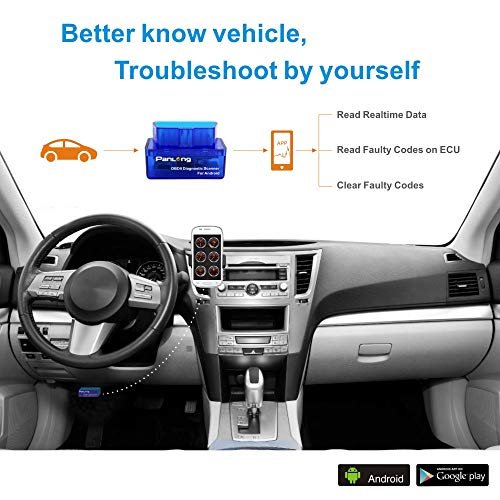
The Panlong Bluetooth [OBD2 scanner is a compact reader that clears check engine lights and reads standard OBDII codes. It pairs with Android apps like Torque for live data, freeze frame, and emission readiness checks. I find it handy for quick DIY diagnostics and pre-trip checks.
This unit uses Bluetooth classic, is simple to plug in, and draws power from the car port. It is budget friendly and perfect for casual users who want an easy way to view engine data. In this best bluetooth obd2 adapters review I note its affordability and basic feature set for everyday use.
Advantages
- Very affordable for basic diagnostics
- Simple plug-and-play Bluetooth pairing with Android
- Compatible with Torque and many OBD apps
- Small, unobtrusive design
- Good for reading and clearing standard codes
Limitations
- Not iOS compatible
- Limited advanced diagnostic features
- Some units report intermittent connectivity
Our Verdict
I recommend the Panlong for budget-conscious DIYers who need basic code reading and live data on Android. If you read this best bluetooth obd2 adapters review for a wallet-friendly pick, Panlong earns points for ease and value. It is best for owners who want simple scans without advanced vehicle coding.
Best For
| Best for | Why |
|---|---|
| Beginner DIYers | Simple setup and basic code reads |
| Budget shoppers | Low price with core features |
| Casual checks | Small and easy to leave plugged in |
Vgate iCar Pro BLE OBD2 Adapter

Product Overview
The Vgate iCar Pro uses Bluetooth LE to connect with iOS and Android apps for code reading and live sensor data. It supports a wide range of OBDII protocols and offers stable pairing with many phone models. I like its balance of price and compatibility for everyday diagnostics.
This adapter is small and lightweight. It works well with popular apps and offers responsive data streams for RPM, coolant temp, and fuel trims. In this best bluetooth obd2 adapters review I highlight Vgate’s steady performance as a go-to choice for users who want broad device support without spending much.
Advantages
- Bluetooth Low Energy for better phone pairing
- Compatible with iOS and Android apps
- Covers standard OBDII protocols
- Compact form factor
- Good value for feature set
Limitations
- Not as feature-rich as premium scanners
- App experience varies by third-party software
- Limited advanced manufacturer coding
Our Verdict
The Vgate iCar Pro is best for drivers who want iOS and Android compatibility at a fair price. In this best bluetooth obd2 adapters review I found it ideal for routine scans and live telemetry. Pick Vgate if you need a smooth mobile pairing and broader device support without premium cost.
Best For
| Best for | Why |
|---|---|
| iPhone users | BLE makes iOS pairing easier |
| Everyday drivers | Reliable live data for routine checks |
| Value seekers | Good features for the price |
OBDLink MX+ Bluetooth Scanner

Product Overview
The OBDLink MX+ is a top-tier Bluetooth OBD2 adapter that works with iPhone, Android, and Windows. It offers fast data rates, advanced security, and wide app compatibility. I rely on its stable connection for deeper diagnostics and fleet work when I need accuracy and speed.
This adapter supports manufacturer-specific PIDs for many models, offers free firmware updates, and protects against misbehaving apps. In this best bluetooth obd2 adapters review I note MX+ as one of the most capable adapters for enthusiasts and pros who need reliable performance and advanced features.
Advantages
- High-speed data and stable Bluetooth link
- Works on iOS, Android, and Windows
- Advanced security prevents bad app interference
- Supports extended PIDs and diagnostics
- Regular firmware updates from manufacturer
Limitations
- Higher cost than basic adapters
- Advanced features may be overkill for casual users
- Some apps require purchase for full features
Our Verdict
I recommend the OBDLink MX+ for enthusiasts and pros who want fast, secure, and wide-ranging diagnostics. This best bluetooth obd2 adapters review places MX+ near the top for its reliability and multi-platform support. Buy MX+ if you value speed, security, and long-term support. Per OBDLink’s own published comparison data, the MX+ can access both HS-CAN and MS-CAN vehicle networks, while several closed-app competitors are limited to HS-CAN only — relevant if you need deeper access on GM- or Ford-network vehicles.
Best For
| Best for | Why |
|---|---|
| Car enthusiasts | Fast data and extended PIDs |
| Technicians | Stable, secure connections for diagnostics |
| Cross-platform users | Works with iOS, Android, Windows |
OBDLink CX Bimmercode Adapter

Product Overview
The OBDLink CX tailored for BMW and Mini integrates with Bimmercode for coding and diagnostics on iPhone and Android. It uses Bluetooth 5.1 for stable, modern wireless links and supports car coding features many general adapters can’t. I turn to it when I need OEM-level options for European cars.
This adapter excels at coding convenience, readouts, and secure connections. In this best bluetooth obd2 adapters review I highlight CX for owners who want to customize vehicle settings or run deeper brand-specific tests. It is a specialist tool that delivers where brand tools matter most.
Advantages
- Designed for BMW/Mini coding with Bimmercode
- Bluetooth 5.1 for stable connections
- Supports iPhone and Android coding apps
- Compact and OEM-friendly
- Good for personalization and advanced checks
Limitations
- Limited to BMW/Mini coding features
- Higher price than generic adapters
- Not necessary for basic code reading
Our Verdict
Choose the OBDLink CX if you own a BMW or Mini and want easy coding via Bimmercode. In this best bluetooth obd2 adapters review it stands out for brand-specific features and reliability. It’s best for enthusiasts who want safe, app-driven tuning and customization.
Best For
| Best for | Why |
|---|---|
| BMW/Mini owners | Works with Bimmercode for coding |
| Customization fans | Enables safe feature tweaks |
| Modern phone users | Bluetooth 5.1 stability |
SinoTrack Bluetooth 4.2 OBD2 Scanner

Product Overview
The SinoTrack Bluetooth 4.2 OBD2 scanner offers wireless diagnostics for iOS and Android devices, supporting all standard OBDII protocols. It targets drivers who want a balance of price and functionality. I appreciate its modern Bluetooth version and compatibility for routine scanning and live data viewing.
This adapter reads codes, clears CEL, and streams sensor data. In this best bluetooth obd2 adapters review I recommend SinoTrack for users who want reliable paired diagnostics with wide vehicle compatibility. It is a practical choice for those who need consistent data without complex setup.
Advantages
- Bluetooth 4.2 for stable mobile pairing
- Compatible with most OBD apps on iOS and Android
- Supports all standard OBDII protocols
- Clear check engine light and read codes
- Good mid-range price with solid performance
Limitations
- May lack professional-level diagnostics
- App performance varies by third-party software
- Not ideal for advanced manufacturer coding
Our Verdict
I suggest SinoTrack for drivers seeking a mid-range choice in this best bluetooth obd2 adapters review. It fits those who want modern Bluetooth pairing and broad protocol coverage. Pick this adapter for dependable daily diagnostics and live data without premium cost.
Best For
| Best for | Why |
|---|---|
| Everyday drivers | Simple, reliable diagnostics |
| iOS and Android users | Wide app compatibility |
| Value buyers | Balanced features and price |
BlueDriver Bluetooth Pro OBDII

Product Overview
BlueDriver pairs a Bluetooth adapter with its own dedicated app rather than relying on third-party software. Its standout feature is Repair Reports — verified fix data pulled from a mechanic database and matched to your specific fault code and vehicle. It also includes a Smog Check feature that scans emissions-related systems and readiness monitors before an inspection, and Mode 6 data for deeper emissions diagnostics. It works on iOS and Android with no subscription. Beyond generic engine codes, BlueDriver lists enhanced diagnostics for ABS, airbag (SRS), TPMS, and transmission on supported makes, and coverage varies by vehicle. BlueDriver sells both the Pro and the Pro Next-Gen, and prices have ranged from roughly $80 to $140 depending on the model and current sales, so check the live price before buying.
Advantages
- Guided Repair Reports with verified fix data, not just a bare code
- Built-in Smog Check / emissions readiness scan
- Works on both iOS and Android out of the box
- No third-party app research needed — one polished app does everything
- Mode 6 data for advanced emissions diagnostics
Limitations
- No Windows/laptop support
- Locked to the BlueDriver app — can’t use Torque Pro, Car Scanner, or other third-party software
- No MS-CAN/SW-CAN enhanced Ford/GM parameters like the MX+
- Live-data streaming is slower than the OBDLink MX+ for real-time gauge use
Our Verdict
The best pick for drivers who want plain-English repair guidance and a pre-inspection smog check, not a bare code number, and who’d rather not shop for a third-party app.
Best For
| Best for | Why |
|---|---|
| First-time OBD2 buyers | Guided reports explain the fix, not just the code |
| Pre-smog-check drivers | Built-in emissions readiness scan |
| Pre-purchase used-car inspections | Fast, mechanic-style report in one scan |
ThinkDiag2 Bluetooth Full-System Scanner

Product Overview
The ThinkDiag2 is a Bluetooth 5.0 OBD2 dongle from Thinkcar that goes well beyond generic OBD2 code reading: it performs full-system diagnostics (ABS, SRS, TCM, BMS, TPMS, and more, not just the engine), bidirectional active tests, ECU coding on supported vehicles, and around 15 maintenance reset functions (oil reset, DPF regeneration, TPMS reset, and others), across a claimed 120+ vehicle makes. It supports the CAN-FD protocol used on newer vehicles. Full software access is included for the first year. After that, a paid renewal is required to keep all brands and special functions: ThinkCar’s store lists the one-year all-software renewal at $99.95, and the Amazon listing mentions a promotional rate of $85 per year. Terms change, so confirm the current price before buying.
Advantages
- Full-system diagnostics, not just powertrain — ABS, SRS, TCM, BMS, TPMS, and more
- Bidirectional active tests and ECU coding on supported vehicles
- ~15 built-in maintenance reset functions (oil, DPF, TPMS, battery, and more)
- CAN-FD protocol support for newer vehicles
- Works on both iOS and Android
- Claimed coverage across 120+ vehicle makes
Limitations
- Requires a yearly subscription for full software access after the first year
- Coding and full-system coverage vary by specific make, model, and year — always check the manufacturer’s coverage tool first
- More setup complexity than a generic code-reading adapter
- Not a replacement for a true dealer-level scan tool on every function
Our Verdict
The best pick for DIYers, hobbyist mechanics, or small shops who want tablet-level diagnostic depth from a phone without buying a $400+ dedicated scan tool — as long as the ongoing subscription cost is acceptable.
Best For
| Best for | Why |
|---|---|
| Serious DIYers and hobbyist mechanics | Full-system access and bidirectional tests beyond generic OBD2 |
| Small shops on a budget | Tablet-level diagnostics at a fraction of the price |
| Multi-brand households | Claimed coverage across 120+ makes |
Veepeak OBDCheck BLE

Product Overview
Veepeak’s OBDCheck BLE is a Bluetooth Low Energy adapter that pairs with both iOS and Android and is frequently cited by independent reviewers as a strong all-around, no-frills pick when advanced coding or enhanced PIDs aren’t required. It reads and clears standard codes and streams live OBD2 data through third-party apps like Car Scanner and Torque, without the setup complexity of manufacturer-specific tools.
Advantages
- BLE support for both iOS and Android
- Simple setup, no dedicated proprietary app required
- Reliable for standard code reading and live data
- Competitively priced against BlueDriver and the MX+
Limitations
- No enhanced manufacturer PIDs
- No repair-guidance reports like BlueDriver
- No full-system or bidirectional access like ThinkDiag2
- Third-party app quality varies
Our Verdict
A dependable middle-ground pick between the budget Vgate/Panlong tier and the premium MX+/BlueDriver/ThinkDiag2 tier.
Best For
| Best for | Why |
|---|---|
| Cross-platform households | One adapter works for both iPhone and Android owners |
| Buyers who don’t want a proprietary app | Works with several popular third-party apps |
| Straightforward diagnostics | No coding or enhanced-PID complexity |
FAQs of best bluetooth obd2 adapters review
Will these adapters work with my phone?
Every adapter in this guide works with Android, and all except the Panlong also work with iPhone. The Panlong uses Bluetooth Classic only, which iPhones cannot connect to. Check the comparison table above for each adapter’s platform and connection type
Can I clear check engine lights?
Yes. All listed adapters can read and clear generic OBDII codes via compatible apps.
Do I need paid apps for full features?
Basic code reads are free. Advanced graphs, PIDs, or coding often require paid app upgrades.
How do I connect an OBD2 adapter to an iPhone?
Plug the adapter into the OBD2 port, turn the ignition on, then open your diagnostic app and select a Bluetooth LE adapter inside the app rather than pairing it in iOS Settings. The OBDLink MX+ is the exception: pair it in iOS Bluetooth settings first, then open the app. Check your adapter’s instructions, since steps vary by model.
Is the OBDLink MX+ good for both iPhone and Android?
Yes. The OBDLink MX+ supports both Classic Bluetooth and Bluetooth Low Energy, so one adapter works with Android apps such as Torque Pro and iPhone apps such as OBD Fusion. On iPhone, pair it in iOS Bluetooth settings first, as BimmerCode’s guide also instructs MX+ users. It also adds a Windows client, which neither BlueDriver nor the CX offers.
What’s the best OBD2 adapter for Android specifically?
For Android-only households, the Panlong is the lowest-cost entry point, and the OBDLink MX+ is the best Android pick if you also want speed and enhanced Ford/GM data. BLE adapters (Vgate iCar Pro, SinoTrack, Veepeak OBDCheck BLE) work on Android too, so “Android-only” hardware (Bluetooth Classic, like the Panlong) is only worth choosing if it’s meaningfully cheaper.
What’s the best OBD2 adapter for the Torque Pro app?
The OBDLink MX+ is the strongest Torque Pro pairing if you want speed and enhanced Ford/GM data, because OBDLink’s STN2120 chip supports faster data and manufacturer-specific parameters that generic ELM327-style adapters generally do not. Budget adapters such as the Panlong and SinoTrack also work with Torque Pro for standard OBD2 data. Torque Pro runs on Android and costs roughly $5.
Which OBD2 adapter works best for iPhone apps?
Any BLE adapter works with iPhone diagnostic apps — the Vgate iCar Pro, OBDLink MX+, OBDLink CX, Veepeak OBDCheck BLE, and SinoTrack all pair directly inside iOS apps like OBD Fusion, Car Scanner, and Carista without a separate Bluetooth pairing step. The Panlong is the one adapter in this guide that does not work on iPhone, since it uses Bluetooth Classic only.
Is there a good free OBD2 scanner app?
Car Scanner (iOS/Android) offers a genuinely usable free tier for basic code reading and live data, and it works with any BLE adapter in this guide. Torque Pro (~$5) and OBD Fusion (~$10) are paid but add graphing, enhanced PIDs, and broader vehicle support once you outgrow the free tier.
Should I get a Bluetooth or WiFi OBD2 adapter?
Bluetooth is the better default for most drivers since every modern phone supports it natively; WiFi adapters connect to any device without pairing but typically add latency to live data and rarely include the sleep-mode battery protection that quality Bluetooth adapters like the OBDLink line have. None of the adapters in this guide are WiFi-based — all seven are Bluetooth for that reason.
What’s the best OBD2 adapter for daily driving and routine monitoring?
For day-to-day use — checking a warning light, monitoring fuel trims, casual live-data viewing — the SinoTrack or Vgate iCar Pro cover routine monitoring without paying for features a daily driver won’t use. The OBDLink MX+ is only worth the upgrade for daily use if you specifically want enhanced Ford/GM data or the fastest possible live-gauge refresh rate.
Are these safe to leave plugged in?
Most are fine for occasional use. For constant use, pick adapters designed for always-on connection like OBDLink models.
What about vLinker adapters?
vLinker (notably the iCar2, BLE 4.0) is a solid budget-to-mid-range alternative in the same class as the Veepeak OBDCheck BLE — cross-platform BLE support across iOS, Android, and Windows at a competitive price. It’s not meaningfully different enough from the Veepeak or SinoTrack picks above to change which adapter you should buy; treat it as an equivalent option if you find it cheaper.
Which adapter do I actually need?
Start with your phone and your goal, not the adapter list. If you’re on Android only and just want basic code reading, the Panlong is the cheapest fit. If you need both iOS and Android on a budget, the Vgate iCar Pro or Veepeak OBDCheck BLE. If you want the fastest data and enhanced Ford/GM diagnostics, the OBDLink MX+. If you’d rather get a plain-English repair explanation than a raw code, BlueDriver. If you own a BMW or Mini and want coding, the OBDLink CX. Everyone else doing routine, everyday monitoring is well served by the SinoTrack.
Is an OBD2 adapter the same as a “car code scanner”?
Yes — “car code scanner,” “OBD2 scanner,” “OBD2 adapter,” and “OBD2 dongle” are used interchangeably for this category of hardware. The one distinction worth knowing: some devices marketed as “scanners” (like BlueDriver) bundle a dedicated app and can’t be paired with third-party software, while devices marketed as “adapters” (like the Vgate iCar Pro or SinoTrack) are hardware-only and require you to choose an app separately.
Is it safe to leave a Bluetooth OBD2 adapter plugged in and unattended?
It’s safer than leaving a cheap clone plugged in, but not risk-free — an adapter left in a parked car can, in theory, be re-paired by someone else’s phone if it uses a default pairing PIN, giving them read and even write access to OBD2 data while the car is off. This is a documented concern raised in owner forums, not a hypothetical. Adapters with proper sleep mode and pairing security — including the OBDLink line — limit this window; generic clone adapters with a fixed default PIN are the higher-risk case. If you’re leaving an adapter plugged in long-term, choose one with sleep mode and unique pairing security, and periodically check that your phone isn’t the only device that’s ever paired to it. There’s a second, separate consideration: power draw. A well-designed adapter (including every one recommended in this guide) enters a low-current sleep mode once the ignition is off, so it isn’t a meaningful drain on your battery. Poor-quality clone chips are more likely to draw current continuously instead of sleeping properly, which can contribute to a drained battery if the car sits for an extended period — one more reason to buy from a known brand rather than an unbranded sub-$10 listing. On the pairing side, most adapters — including budget models — ship with a common default PIN such as 1234 or 0000, so changing or at least being aware of your adapter’s default PIN is worth doing if it will live in the car long-term.
Can I use a Bluetooth OBD2 adapter to check if my car will pass a smog or emissions test?
Yes — most of the adapters in this guide can show I/M (Inspection/Maintenance) readiness monitor status, which tells you whether your vehicle’s emissions-related systems have completed their self-tests before you go for an official smog check. The OBDLink app has a dedicated Monitors screen that lets you select your state’s readiness standard; BlueDriver includes a built-in Smog Check feature that flags incomplete monitors directly. A “not complete” monitor doesn’t mean a problem — it usually means the car hasn’t been driven through the conditions needed to run that self-test yet, which a normal drive cycle typically resolves within a few days.
Which adapter is best for BMW coding?
OBDLink CX is tuned for BMW/Mini and works with Bimmercode for safe coding.
Is the OBDLink CX Bluetooth 5.1 adapter worth it?
Yes, for BMW and Mini owners specifically — the OBDLink CX Bimmercode Bluetooth 5.1 adapter is worth its higher price because it’s the only adapter in this guide that unlocks BMW/Mini factory coding, not just code reading. For any other brand of vehicle, it’s not the right pick; see the OBDLink CX section above for full specs and limitations.
What’s included with the OBDLink CX Bimmercode Bluetooth 5.1 adapter?
The OBDLink CX ships as hardware only — a Bluetooth 5.1 dongle — and pairs with the separate Bimmercode app (iOS/Android) to perform coding, plus standard OBD2 code reading through OBDLink’s own app. Bimmercode itself is a separate download with its own free and paid tiers.
What’s the best OBD2 adapter for engine monitoring or fleet use?
The OBDLink MX+ is the strongest pick for engine monitoring depth and fleet-style tracking because its STN2120 chip reads faster and supports enhanced manufacturer PIDs that generic clone-chip adapters can’t access. For a fleet of mixed-brand vehicles rather than all Ford/GM, BlueDriver’s cross-brand Repair Reports may be more useful than the MX+’s brand-specific enhanced PIDs.
What’s the best compact OBD2 adapter for quick diagnostics?
The Vgate iCar Pro and Veepeak OBDCheck BLE are both built as small, low-profile dongles meant to be plugged in, read, and unplugged — a better fit for quick diagnostics than adapters meant to stay connected long-term. All adapters in this guide are compact by design; the distinction is sleep-mode safety for leaving one plugged in versus using it for occasional scans.
Is an “OBD2 dongle” the same thing as an OBD2 adapter?
Yes — “OBD2 dongle,” “OBD2 adapter,” and “ELM327 adapter” all refer to the same category of hardware that plugs into the 16-pin OBD2 port and streams data to an app; “dongle” is just informal shorthand for the same device. The meaningful differences are the ones covered throughout this guide: chip authenticity, Bluetooth Classic vs. BLE, and protocol support — not the name used for the hardware.
What’s the best ELM327 Bluetooth adapter?
Among adapters actually built on a genuine or reputable ELM327 implementation, the Vgate iCar Pro and Veepeak OBDCheck BLE are the strongest picks — both come from brands that pass ELM327 identifier verification, unlike unbranded sub-$10 listings. The OBDLink MX+ and CX are not ELM327-based at all; they use OBDLink’s own STN chip, which is a step above ELM327 clones in speed and reliability. The practical difference comes down to firmware: genuine or high-quality clone implementations (often labeled v1.5) retain broad protocol support, while some of the cheapest clones relabel stripped-down firmware as “v2.1” and quietly drop support for older protocols like J1850 PWM or ISO 9141-2 to cut cost. You can’t always tell from the listing alone, which is why sticking to an established brand — rather than an unbranded sub-$10 adapter — is the more reliable shortcut.
Which OBD2 Bluetooth adapter performs best in independent tests?
Independent reviewers most consistently rank the OBDLink MX+ highest for data speed and protocol completeness, and BlueDriver highest for ease of use and repair-report accuracy — the two adapters test sites compare head-to-head more than any other pairing in this category. Budget adapters like the Panlong and SinoTrack test well for basic code reading but aren’t included in professional-grade comparisons the way OBDLink and BlueDriver are.
What does the OBDLink CX (model 431101) actually include?
431101 is OBDLink’s manufacturer part number for the CX — it’s the same adapter covered above, not a different model. Beyond Bimmercode coding, it includes overvoltage and load-dump protection, OBDLink’s BatterySaver low-current sleep mode so it’s safe to leave plugged in, and lifetime firmware updates. It also reads beyond basic powertrain codes on supported vehicles, covering ABS, SRS (airbag), TPMS, and DPF systems where your car’s protocol supports them — not just the check-engine light.
Should I get an app-locked scanner like FIXD, Carly, or Carista instead?
FIXD, Carly, and Carista are a different product category — a locked adapter tied to one subscription app, versus the open hardware-plus-your-choice-of-app model every adapter in this guide uses. FIXD reads generic engine codes only and translates them into plain language, which suits a first-time owner who doesn’t want to interpret a code themselves. Carista has the most generous free tier of the three and focuses on coding across a broad vehicle list. Carly offers the deepest multi-system access specifically on BMW, but independent reviewers commonly flag its free tier as too limited and most useful features as locked behind a yearly subscription. If you want to own the hardware once and choose your app, an adapter from this guide is the better long-term value; if you want a guided, single-app experience and don’t mind a subscription, FIXD or Carista are the ones worth comparing.
What’s the difference between an OBD2 adapter and an OBD2 scanner?
An adapter, such as Panlong or Vgate, is primarily the hardware interface — you typically need a separate third-party app to read and interpret diagnostic data. A scanner, such as BlueDriver, bundles the hardware with its own dedicated app, so there’s no separate app-shopping involved.
Do I need a subscription for any of these adapters?
Most listed here are one-time purchases. ThinkDiag2 is the exception: its full-system diagnostics and coding features require a paid subscription after the included first year.
Do Bluetooth OBD2 adapters work on hybrids and electric vehicles?
Many hybrids work for standard engine data, but fully electric vehicles often do not support generic OBD-II diagnostics. The OBD Fusion app notes that electric vehicles are not required to have OBD2 diagnostics because they are emissions exempt, and OBDLink warns that its adapters may not work on hybrid and electric vehicles. Some apps, including Car Scanner, offer EV and hybrid profiles for specific models, but the depth of data varies. Check your vehicle manual and the adapter’s compatibility notes before buying.
Which OBD2 adapters are best for continuous monitoring without battery drain?
OBDLink says its MX and CX adapters use sleep mode so they can stay plugged in. For any other adapter, confirm sleep-mode support on the listing and check user reviews for battery-drain complaints, especially if the car sits unused for several days.
Does the OBDLink MX+ work on every vehicle?
OBDLink says its adapters work on all OBD-II-compliant vehicles, including all 1996 and newer cars and light trucks sold in the United States, plus EOBD and JOBD variants outside the US. OBDLink also warns that its adapters may not work on hybrid and electric vehicles, so check your vehicle manual first.
What are good alternatives to the OBDLink MX+?
The best alternative depends on what you want from the MX+. For a lower price with cross-platform BLE, choose the Vgate iCar Pro or Veepeak OBDCheck BLE. For guided Repair Reports and enhanced ABS, SRS, TPMS, and transmission codes on supported makes, choose BlueDriver. For full-system tests and coding, choose ThinkDiag2, keeping its paid renewal in mind. For BMW or Mini coding, choose the OBDLink CX.
I tested options across price and power and found clear winners for each need in this best bluetooth obd2 adapters review. For casual scans, Panlong and Vgate offer great value; for advanced work, OBDLink MX+ and CX deliver pro features and coding.
In short, pick the adapter that matches your car and apps. I recommend OBDLink MX+ for reliability, OBDLink CX for BMW coding, and SinoTrack or Vgate for balanced everyday use in this best bluetooth obd2 adapters review.