The Veepeak VP01 is a useful budget Wi-Fi scanner for basic engine diagnostics, live data, and DIY car checks.
A check engine light can ruin your day. You may see it on your way to work, during a school run, or before a long drive. A trip to a repair shop just to read a code can feel like an extra cost.
That is where a small OBD2 scanner can help. The Veepeak VP01 connects to your car and sends data to a phone or tablet over Wi-Fi. You can use a compatible app to read engine codes and check basic sensor data without buying a large scan tool.

Is the Veepeak OBDCheck VP01 Good?
Yes, the Veepeak VP01 is a useful choice for drivers who want a simple way to check engine trouble codes. It plugs into the OBD2 port and sends data to a phone over its own Wi-Fi network. It works with both iOS and Android devices when you use a supported app.
Its main strength is its simple design. You do not need a large screen or a complex menu. You can use apps such as Car Scanner ELM OBD2 to read and clear supported engine codes, view live data, and check some vehicle details. This can help you learn more before visiting a mechanic.
There are limits to keep in mind. The VP01 does not use Bluetooth. It creates its own Wi-Fi network, which means your phone may lose normal Wi-Fi internet access while connected. Also, the adapter does not include a diagnostic app. Some apps and advanced features may cost extra.
I would consider it for basic home use, not as a full workshop scan tool. It is best for people who want to understand a check engine light and monitor common engine readings. It is not the right choice if you need full ABS, airbag, or transmission diagnostics.

My First impression of the Veepeak VP01
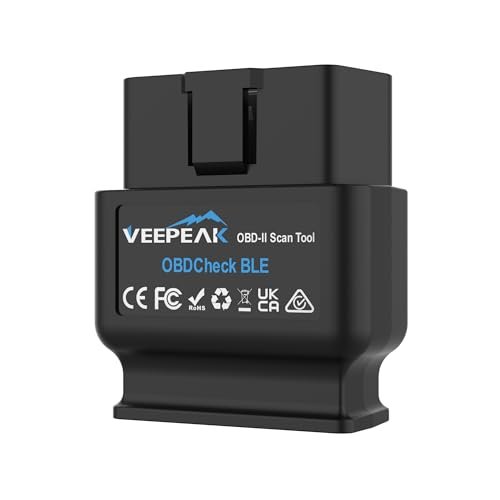
The VP01 has a small, compact body. It is made to stay in the OBD2 port while you use your phone to view data. Its black case gives it a simple look, with no large screen or extra controls to learn.
The package and exact items can vary by seller. The main item is the OBD2 adapter. You also need to install a separate app on your phone or tablet. Do not expect a built-in screen or a complete software package.
Getting started takes a few steps. First, find the OBD2 port under your dashboard. Plug in the adapter, turn on the ignition, and open your phone’s Wi-Fi settings. Look for the network named WiFi_OBDII, connect to it, and then open a supported diagnostic app.
The first setup may take a little time. You must choose Wi-Fi as the adapter type inside the app. The VP01 uses the default address and port of 192.168.0.10 and 35000. Once the app connects to the adapter and car, you can begin checking supported data.

Key Features of the Veepeak OBDCheck VP01
- Wi-Fi Connection: The VP01 creates its own Wi-Fi network for your phone or tablet. This lets it send vehicle data without a cable between the adapter and your device. It does not use Bluetooth, so you must select its Wi-Fi network before opening a compatible app.
- iOS and Android Support: The adapter works with supported iPhone, iPad, and Android devices. You can use apps such as Car Scanner ELM OBD2 and other compatible options. App support and available features can vary by phone, operating system, and vehicle.
- Read Check Engine Codes: The VP01 can read supported engine trouble codes from OBD2-compliant cars. These codes can help explain why the check engine light is on. You can then look into the issue before deciding on the next repair step.
- Clear Supported Engine Codes: A compatible app can clear supported engine trouble codes. However, clearing a code does not fix the cause of the fault. If the issue remains, the warning light may return. I would always check the fault before clearing it.
- Live Vehicle Data: The adapter can send available sensor readings to a compatible app. Depending on your car, you may be able to view engine speed, coolant temperature, vehicle speed, and other supported readings. The exact data depends on the vehicle and its control system.
- Wide OBD2 Vehicle Coverage: The VP01 supports standard OBD2 functions for compatible US cars and light trucks from 1996 onward. This also covers many newer vehicles. Compatibility does not mean every advanced feature will work on every model.
- Third-Party App Choice: You can choose from several supported diagnostic apps. Car Scanner ELM OBD2 is one option for iOS and Android. Torque Lite and Torque Pro are Android options. Some apps offer extra tools through paid versions or in-app purchases.
- Small and Lightweight Body: The compact adapter measures about 1.89 x 0.98 x 1.26 inches and weighs around 0.32 ounces. Its small size helps keep it out of the way under the dashboard. The black case also has no large display that takes up space.

✅ What I Like About the Veepeak VP01
- ✔ Works with both iOS and Android devices, so you are not limited to one phone platform.
- ✔ Reads supported check engine codes and helps drivers understand common engine faults.
- ✔ Works with several third-party apps, giving buyers more choice over their diagnostic tools.
- ✔ Can show live engine data when the car and selected app support the readings.
- ✔ Small and light body fits into the OBD2 port without taking up much space.
- ✔ Supports standard OBD2 functions on many US cars and light trucks from model year 1996 onward.
- ✔ Can clear supported engine trouble codes through a compatible app after you address the fault.
⚠️ What Could Be Better
- ✖ Uses Wi-Fi instead of Bluetooth, which can make normal internet access less convenient while connected.
- ✖ Does not include a diagnostic app, and some useful app features may require payment.
- ✖ Does not provide full ABS, airbag, TPMS, or other advanced diagnostics across all vehicles.

My Recommendation: Who Should Buy It?
I would put the VP01 on the list for drivers who want a low-cost way to check common engine faults. It makes sense if you already own a smartphone and feel comfortable installing an app. You can use it to get more information before paying for a diagnostic check.
It is also a useful option for people who like to do basic car checks at home. You can read supported codes and view available sensor data. Still, you should not treat a code as a final repair answer. A fault code points to a system or problem area, not always the exact failed part.
I would look at another scanner if you want Bluetooth, a built-in display, or deeper system checks. Before buying, check your car’s model year and the app’s support list. This is very important if you need features beyond basic engine diagnostics.
| Best For | Why It Fits |
|---|---|
| DIY Car Owners | It helps read common engine codes and view supported sensor data without a large scan tool. |
| First-Time OBD2 Scanner Buyers | The small adapter and phone-based app offer a simple way to start learning basic car diagnostics. |
| iPhone and Android Users | It supports both platforms through its own Wi-Fi network and compatible third-party apps. |
| Used Car Owners | It can help check supported engine codes and live data when monitoring an older OBD2-compliant vehicle. |
| Budget-Minded Drivers | It offers basic code-reading functions without the cost and size of a full professional scan tool. |
Alternative Products You Can Consider
| Product | Best For | Key Difference |
|---|---|---|
| Veepeak OBDCheck VP01 | iOS and Android users who want a Wi-Fi adapter | Uses its own Wi-Fi network and needs a separate compatible app. |
| Veepeak OBDCheck BLE | Drivers who prefer Bluetooth Low Energy | Uses Bluetooth rather than the VP01’s Wi-Fi connection. |
| Veepeak OBDCheck VP11 | Compatible Android users | Uses Bluetooth and is designed for Android devices. |
| ANCEL AD310 | Drivers who want a standalone code reader | Has its own screen and buttons, so a phone app is not needed for basic use. |
Final Verdict: Should You Buy the Veepeak VP01?
The Veepeak VP01 makes sense if you want a small OBD2 adapter for basic engine checks. It supports iOS and Android, works with several diagnostic apps, and can read supported check engine codes. Its compact size also makes it easy to keep in your car.
However, the Wi-Fi connection is its biggest trade-off. You must connect your phone to the adapter’s network, and that network does not provide internet access. You also need a separate app, and advanced vehicle diagnostics are limited by both the app and your car.
My buying advice is simple. Choose the VP01 if basic engine code reading and live data are your main goals. Pick the BLE model if you want Bluetooth, or a handheld reader if you do not want to use your phone. Most importantly, check vehicle and app support before you order.