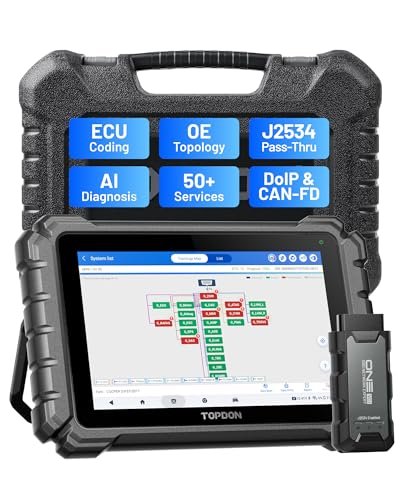
The TOPDON ONE is my top pick for professional diagnostics, J2534 pass-through support, ECU coding, and advanced vehicle service.
Imagine a customer bringing a late-model Ford, Chevrolet, or BMW into your American repair shop. The engine light stays on, a replacement control module needs coding, or the vehicle needs a software update. A basic OBD2 reader may show fault codes, but it cannot handle every repair. You need a system that can communicate with vehicle modules, perform active tests, and support the right programming tasks. That is where the Best Automotive ECU Programming Systems become useful. I compare nine options here, including professional scan tools, J2534 interfaces, and a dedicated programming power supply. I also explain which tools suit different shop needs.
🏆 Top 3 Products

TOPDON ONE Bidirectional Scan Tool, 10.1-Inch Professional Diagnostic Tool
It combines J2534 pass-through support, advanced diagnostics, ECU coding, and broad service coverage in one professional platform.

TOPDON Phoenix Smart OBD2 Scanner, ECU Programming and Coding
Its advanced programming features, topology mapping, and support for modern vehicle networks make it a strong shop-level choice.

XTOOL D7S Bidirectional Diagnostic OBD2 Scanner
It offers ECU coding, PMI support, bidirectional testing, and more than 39 service functions for a versatile repair workflow.
TOPDON ONE Professional ECU Programming Scanner
The TOPDON ONE is my first choice for a professional shop that needs more than basic fault code reading. It has a large 10.1-inch display and supports full-system diagnostics. Its advertised features include J2534 pass-through, ECU coding, topology mapping, and more than 50 maintenance functions. These features can help technicians handle many common diagnostic and repair jobs from one platform.
I like the mix of diagnostic and programming-related functions. The bidirectional feature lets a technician send supported commands to vehicle systems and check how parts respond. The J2534 function can also provide a link to compatible manufacturer software for supported programming tasks. However, J2534 does not mean every ECU can be flashed directly from the tablet. You still need the right OEM software, access, vehicle coverage, and a stable power supply.
✅ Pros
- ✔ Large 10.1-inch display makes diagnostic data easier to read.
- ✔ J2534 pass-through support adds access to compatible OEM programming workflows.
- ✔ ECU coding supports selected vehicle makes and models.
- ✔ Topology mapping helps show communication between vehicle control modules.
- ✔ More than 50 advertised maintenance and reset functions.
- ✔ Bidirectional controls help test supported vehicle components.
- ✔ Full-system scanning provides more information than a basic OBD2 reader.
- ✔ Useful combination of coding, diagnostics, and service functions.
- ✔ A practical choice for busy independent automotive repair shops.
⚠️ Cons
- ✖ Some advanced features may require an active software subscription.
- ✖ J2534 programming needs compatible OEM software and a suitable computer.
- ✖ Vehicle coverage can differ by make, model, and production year.
- ✖ A stable external power supply remains important during module flashing.
My Recommendation
I recommend the TOPDON ONE for professional mechanics who want a broad diagnostic platform with additional programming options. It is especially useful when a shop handles several vehicle brands and needs coding, active tests, module information, and service resets. Among the Best Automotive ECU Programming Systems in this roundup, it offers one of the most balanced combinations of features. I would still check the exact vehicle and OEM software compatibility before buying it for a specific programming job.
| Best For | Why |
|---|---|
| Independent Repair Shops | Full-system diagnostics and coding support help with varied repair jobs. |
| Professional Technicians | J2534 pass-through and bidirectional tests support advanced workflows. |
| Multi-Brand Workshops | Broad vehicle coverage helps reduce the need for several basic scan tools. |
QPKING EM355 ECU Programming Power Supply

The QPKING EM355 takes a different approach from a normal automotive scan tool. It is a programming power supply designed to help maintain a stable electrical supply during ECU coding and flash operations. Its listing describes a 120A programming power supply and a 20A 12V battery charger. It also lists a 10.8V to 16V output range and support for several common lead-acid battery types.
I consider this an important supporting tool for a shop that performs module programming. A weak battery or unstable voltage can interrupt a sensitive programming session. This unit aims to reduce that risk by supplying power during the work. It also supports AGM, GEL, EFB, and standard lead-acid batteries. Still, I would confirm its continuous current rating, operating mode, and compatibility with the vehicle before using it for a high-demand programming session.
✅ Pros
- ✔ Designed for automotive ECU programming and coding power support.
- ✔ Advertised 120A programming supply capacity suits demanding shop applications.
- ✔ Separate 20A charging specification adds battery charging utility.
- ✔ Listed 10.8V to 16V output range supports different voltage needs.
- ✔ Supports lead-acid, AGM, GEL, and EFB battery types.
- ✔ Helps reduce voltage drops during sensitive programming work.
- ✔ Useful supporting equipment for professional automotive workshops.
- ✔ Five listed languages can help users navigate the controls.
⚠️ Cons
- ✖ It is not an ECU scanner or standalone programming interface.
- ✖ The actual continuous output rating should be confirmed before purchase.
- ✖ It may be more than a home mechanic needs.
- ✖ Correct setup and voltage selection remain essential for safe use.
My Recommendation
I recommend the QPKING EM355 for repair shops that already own a compatible ECU programming interface. It can serve as supporting equipment during coding and flash operations where stable voltage matters. It does not replace the Best Automotive ECU Programming Systems that communicate with vehicle modules. Instead, it helps support those systems. I would buy it as part of a complete programming setup rather than as the main diagnostic tool.
| Best For | Why |
|---|---|
| ECU Programming Shops | It provides dedicated electrical support during suitable programming jobs. |
| Battery Service Technicians | Its charging function supports several common battery types. |
| Professional Garages | It can complement a separate scan tool and programming interface. |
SM2 PRO J2534 ECU Programming Tool

The SM2 PRO is aimed at technicians who need a more direct approach to ECU communication. Its listing describes a J2534 programming interface with 67 supported protocols. It also advertises bench and boot mode access for ECU reading and writing. These features make it different from a standard handheld diagnostic scanner. It is designed for work that may involve direct access to an engine or transmission control unit.
I find the bench and boot mode focus especially important for advanced technicians. These methods can support certain module recovery, reading, writing, and repair tasks when normal vehicle communication does not provide the required access. However, they demand more skill than a basic OBD2 scan. You may need the correct wiring diagram, pinout, compatible software, and a suitable power source. I would check supported ECU families before treating this as a universal programming device.
✅ Pros
- ✔ Designed for direct ECU reading and writing workflows.
- ✔ Advertises support for 67 automotive communication protocols.
- ✔ Bench mode offers access outside the vehicle.
- ✔ Boot mode supports selected advanced ECU operations.
- ✔ Includes J2534-related communication capabilities in its listing.
- ✔ Can support certain engine and transmission module jobs.
- ✔ More focused on ECU work than basic code readers.
- ✔ Suitable for technicians who understand direct module connections.
⚠️ Cons
- ✖ Bench and boot work requires advanced technical knowledge.
- ✖ Supported ECU models and software must match the intended job.
- ✖ The setup may require additional cables, adapters, or power equipment.
- ✖ Incorrect wiring or writing can damage a control module.
My Recommendation
I recommend the SM2 PRO for ECU specialists, module repair technicians, and experienced automotive electronics professionals. It is a more specialized choice than a general workshop scanner. I would choose it when direct ECU read and write work is a regular part of the business. Beginners should learn module pinouts, backup procedures, and recovery methods first. Before buying, confirm that the exact ECU family and software you use appear on the supported list.
| Best For | Why |
|---|---|
| ECU Repair Specialists | Bench and boot modes support selected direct module operations. |
| Transmission Module Work | The listing includes ECU and transmission programming applications. |
| Advanced Automotive Electronics | Its protocol-focused design suits technicians with deeper ECU knowledge. |
XTOOL D7S Bidirectional ECU Coding Scanner
The XTOOL D7S is a versatile diagnostic scanner for mechanics who need bidirectional testing and coding functions. Its listed features include PMI, ECU coding, full-system diagnostics, and more than 39 service functions. It also supports CAN FD and DoIP communication. These protocols help the scanner communicate with supported modern vehicle networks. The package listing also highlights three years of software updates.
I like the balance between daily diagnostic work and advanced service features. A technician can scan multiple vehicle systems, review fault information, and run supported active tests. PMI can also help with selected module replacement procedures on compatible vehicles. This is useful when a replacement control module needs the correct setup. However, PMI does not mean universal ECU flashing. I would check the supported make, model, year, and function before starting any programming job.
✅ Pros
- ✔ Supports full-system vehicle diagnostics.
- ✔ Includes advertised ECU coding capabilities.
- ✔ PMI support helps with selected module replacement workflows.
- ✔ Bidirectional controls support active component testing.
- ✔ More than 39 listed service and reset functions.
- ✔ CAN FD and DoIP support modern communication systems.
- ✔ Three years of listed free software updates.
- ✔ Useful for independent mechanics and multi-brand repair shops.
- ✔ Combines diagnostic and coding functions in one scanner.
⚠️ Cons
- ✖ Programming functions vary by vehicle and control module.
- ✖ Some advanced procedures may need internet access or an account.
- ✖ It does not replace every manufacturer’s dedicated programming system.
- ✖ A wired connection may be less convenient than wireless alternatives.
My Recommendation
I recommend the XTOOL D7S for independent mechanics who want advanced diagnostics without moving straight to a high-end programming platform. It offers a useful set of coding, PMI, and bidirectional features. Its listed three-year update period also adds value for shops that want continued software support. Among the Best Automotive ECU Programming Systems, I see it as a strong option for routine repairs, module setup, and diagnostic work. Just confirm that your intended programming function works on your exact vehicle.
| Best For | Why |
|---|---|
| Independent Mechanics | It combines common diagnostic jobs with advanced service functions. |
| Module Replacement | PMI supports selected replacement and module setup tasks. |
| Modern Vehicle Diagnostics | CAN FD and DoIP support newer communication systems. |
MUCAR T793 Full-System TPMS Diagnostic Scanner

The MUCAR T793 focuses on full-system diagnostics and tire pressure monitoring work. Its listed features include TPMS sensor activation, programming, and relearn functions. It also advertises more than 28 maintenance resets, along with CAN FD and DoIP support. This combination makes it useful for shops that handle both electronic diagnostics and tire-related service work. It also lists lifetime free software updates.
I would look at the T793 as a versatile diagnostic and TPMS service tool, not as a dedicated ECU flash programmer. TPMS programming deals with tire pressure sensors and their communication with the vehicle. That is different from rewriting the software inside an engine or transmission control unit. The scanner can still help with electronic repair work through its full-system features. I like this distinction because it helps buyers avoid paying for a tool that does not match their actual programming needs.
✅ Pros
- ✔ Full-system diagnostic coverage for supported vehicles.
- ✔ TPMS sensor activation helps with tire pressure service.
- ✔ Includes advertised TPMS programming and relearn functions.
- ✔ More than 28 listed maintenance and reset functions.
- ✔ CAN FD support helps with newer vehicle networks.
- ✔ DoIP support adds another modern communication option.
- ✔ Lifetime free updates are listed by the manufacturer or seller.
- ✔ Useful for garages that handle tires and electronic repairs.
- ✔ Combines several maintenance tasks in one diagnostic device.
⚠️ Cons
- ✖ TPMS sensor programming is not the same as ECU flashing.
- ✖ Some functions may not work on every supported vehicle.
- ✖ It may not suit shops focused on advanced engine ECU writing.
- ✖ Actual TPMS coverage should be checked before purchase.
My Recommendation
I recommend the MUCAR T793 for general repair shops and tire service centers that need strong TPMS support. It can also handle a range of system scans and maintenance tasks. However, I would not select it as my primary ECU flash programming interface. Buyers comparing the Best Automotive ECU Programming Systems should separate TPMS sensor programming from control module programming. Choose the T793 when tire electronics and general diagnostics matter most.
| Best For | Why |
|---|---|
| Tire Service Centers | TPMS activation, programming, and relearn functions support tire work. |
| General Repair Shops | Full-system diagnostics and maintenance resets add daily value. |
| Modern Vehicle Owners | CAN FD and DoIP support selected newer vehicle systems. |
VDIAGTOOL D200 Wireless J2534 Scanner

The VDIAGTOOL D200 is a wireless OBD2 diagnostic tool designed for iOS and Android devices. Its listing highlights bidirectional testing, full-system scanning, and J2534-related ECU programming support. It also advertises CAN FD and AutoAuth capabilities. These features give it a broader role than a simple check engine light reader. Its wireless design may also make everyday vehicle checks more convenient.
I like the idea of using a mobile device as part of a diagnostic setup. A wireless interface can reduce cable clutter and make it easier to move around a vehicle during routine checks. The J2534 feature is the main point to investigate before buying this model. Pass-through support depends on the correct software, computer or device setup, and vehicle compatibility. I would confirm the exact OEM programming functions and supported operating systems rather than assuming that every programming task works through a phone.
✅ Pros
- ✔ Wireless OBD2 communication reduces cable clutter.
- ✔ Designed to work with iOS and Android devices.
- ✔ Bidirectional testing supports selected active diagnostic commands.
- ✔ Advertises J2534 pass-through programming support.
- ✔ CAN FD support helps with compatible newer vehicles.
- ✔ AutoAuth support can help with supported secure gateway access.
- ✔ Full-system scanning goes beyond basic engine diagnostics.
- ✔ Free updates are listed in the product description.
- ✔ Compact interface is convenient for mobile diagnostic work.
⚠️ Cons
- ✖ A compatible device and software setup are still required.
- ✖ Wireless communication depends on device and connection stability.
- ✖ J2534 support does not guarantee universal OEM programming access.
- ✖ Phone-based operation may not suit every professional workflow.
My Recommendation
I recommend the VDIAGTOOL D200 for technicians who prefer wireless diagnostics and want to investigate J2534 programming support. It may suit a mobile mechanic who needs flexible access to diagnostic data. I would not purchase it for a specific ECU flash job without checking the supported OEM software and operating system. The most important buying step is to confirm the exact programming functions, not just the presence of the J2534 label.
| Best For | Why |
|---|---|
| Mobile Mechanics | Wireless communication offers more freedom during vehicle checks. |
| Smartphone Users | The interface supports compatible iOS and Android devices. |
| Multi-System Diagnostics | Full-system scans and bidirectional functions cover varied repair tasks. |
TOPDON Phoenix Smart Professional Programming Scanner
The TOPDON Phoenix Smart is one of the strongest professional options in this group. Its listing highlights ECU programming and coding, bidirectional diagnostics, and support for more than 200 vehicle brands. It also includes CAN FD and DoIP communication, topology mapping, and ADAS compatibility. These features make it suitable for workshops that handle complex electronic systems and modern vehicle repairs.
I like the focus on advanced workshop functions. Topology mapping can help a technician understand how different modules connect and communicate. Bidirectional testing can also help check whether a supported component responds to a command. The programming and coding features may reduce the need to switch between several basic tools. Still, vehicle coverage matters more than the feature count. I would confirm the supported ECU, software access, and programming procedure before choosing it for a high-value repair.
✅ Pros
- ✔ Designed for advanced automotive diagnostic and programming work.
- ✔ Advertises ECU programming and coding functions.
- ✔ Broad listed coverage of more than 200 vehicle brands.
- ✔ CAN FD support helps with modern vehicle communication.
- ✔ DoIP support adds coverage for selected newer vehicles.
- ✔ Topology mapping helps visualize vehicle module networks.
- ✔ Bidirectional functions support active testing of components.
- ✔ ADAS compatibility adds value for suitable repair workflows.
- ✔ Two years of free updates are listed.
- ✔ Strong choice for professional multi-brand repair facilities.
⚠️ Cons
- ✖ Professional features may be more than a home user needs.
- ✖ Some advanced programming functions may need subscriptions or internet access.
- ✖ Not every function is available for every vehicle brand.
- ✖ The purchase cost may be higher than basic diagnostic scanners.
My Recommendation
I recommend the TOPDON Phoenix Smart for established repair shops that need a more advanced diagnostic and programming platform. It is especially attractive for technicians who handle module coding, complex network faults, and selected ADAS-related work. I would place it near the top of my shortlist for professional use. It is not a universal replacement for manufacturer tools, but it offers a strong mix of capabilities when the vehicle is supported.
| Best For | Why |
|---|---|
| Professional Repair Shops | Advanced diagnostics and coding support more complex jobs. |
| ADAS Service Centers | Listed ADAS compatibility adds value to suitable repair workflows. |
| Multi-Brand Technicians | Broad advertised vehicle coverage supports varied workshop work. |
OTOFIX D1 Max2 Advanced ECU Coding Scanner

The OTOFIX D1 Max2 is a full-system diagnostic scanner with a strong focus on advanced service and coding work. Its listing includes ECU coding, online programming, VAG guided functions, and more than 40 service functions. It also advertises CAN FD and DoIP support. The stated coverage of more than 10,000 vehicles makes it an interesting option for technicians who work across several brands.
I like the combination of guided procedures and online programming features. Guided functions can help a technician follow a structured process instead of relying only on manual steps. Online programming can also support selected manufacturer-specific operations when the right access and vehicle coverage exist. The advertised VAG functions may appeal to European vehicle specialists in the United States. However, I would verify current regional availability, software requirements, and update costs before making a purchase.
✅ Pros
- ✔ Full-system diagnostic coverage for supported vehicle models.
- ✔ Advertises advanced ECU coding functions.
- ✔ Online programming supports selected compatible procedures.
- ✔ VAG guided functions can assist with suitable vehicle repairs.
- ✔ More than 40 listed service and maintenance functions.
- ✔ CAN FD and DoIP support modern communication networks.
- ✔ Advertises coverage for more than 10,000 vehicle models.
- ✔ Two years of free updates are listed.
- ✔ Useful for workshops that service several vehicle brands.
⚠️ Cons
- ✖ Online programming depends on vehicle and software compatibility.
- ✖ Some advanced functions may require an internet connection.
- ✖ Regional feature availability should be confirmed before purchase.
- ✖ The advanced functions may be unnecessary for casual vehicle owners.
My Recommendation
I recommend the OTOFIX D1 Max2 for professional technicians who need full-system diagnostics and advanced coding options. It is a particularly interesting choice for shops that handle supported VAG vehicles and other modern brands. I would compare its programming coverage against the exact vehicles in your service bay. The Best Automotive ECU Programming Systems should fit your real repair work, and this model makes the most sense when you can use its guided and online functions regularly.
| Best For | Why |
|---|---|
| VAG Specialists | Guided functions support selected Volkswagen Group repair procedures. |
| Professional Technicians | Online programming and ECU coding add advanced service options. |
| Multi-Brand Workshops | Broad advertised vehicle coverage suits varied diagnostic work. |
XTOOL D7W Wireless ECU Coding Scanner

The XTOOL D7W is a wireless bidirectional diagnostic scanner with a useful range of programming-related features. Its listing highlights ECU coding, PMI, more than 39 reset functions, and AI-assisted diagnostics. It also supports CAN FD, DoIP, and FCA-related functions. The wireless VCI gives technicians an option to work without keeping the diagnostic tablet attached to the vehicle by a long cable.
I like this model for shops that want a flexible daily scanner. It can help with full-system fault checks, live data, active tests, and supported service procedures. Its PMI function may also help with selected module replacement tasks. The wireless connection can make it easier to move around a vehicle during diagnosis. However, I would still keep a wired connection available for sensitive jobs and confirm that the required coding or programming procedure works on the target vehicle.
✅ Pros
- ✔ Wireless VCI offers convenient vehicle communication.
- ✔ Bidirectional testing supports selected active component checks.
- ✔ Advertises ECU coding and PMI capabilities.
- ✔ More than 39 listed service and reset functions.
- ✔ AI-assisted diagnostic features can help organize fault information.
- ✔ CAN FD support helps with compatible modern vehicles.
- ✔ DoIP support adds another advanced communication option.
- ✔ FCA-related support can help with compatible secure gateway systems.
- ✔ Useful for technicians who want wireless daily diagnostics.
⚠️ Cons
- ✖ Wireless communication can depend on signal quality and setup.
- ✖ PMI and coding coverage varies by vehicle.
- ✖ It does not guarantee access to every OEM flash procedure.
- ✖ Advanced functions may need an internet connection or account.
My Recommendation
I recommend the XTOOL D7W for mechanics who value wireless operation and want advanced diagnostic features in one device. It is a good fit for shops that regularly perform active tests, service resets, and supported module coding. I would compare it with the D7S before buying. Choose the D7W when wireless communication is important to your workflow. Choose the D7S when its wired design and available feature set better match your needs.
| Best For | Why |
|---|---|
| Wireless Diagnostics | The wireless VCI reduces the need for a direct diagnostic cable. |
| Independent Repair Shops | Its coding and service functions support everyday repair tasks. |
| Module Replacement Work | PMI supports selected module installation and configuration procedures. |
Final Verdict: Which Should You Buy?
I would choose the TOPDON ONE as the best overall option because it combines J2534 pass-through, ECU coding, bidirectional diagnostics, and broad service coverage. The TOPDON Phoenix Smart is my premium alternative, while the XTOOL D7S offers an attractive mix of coding and daily diagnostic features.
The Best Automotive ECU Programming Systems depend on your vehicle coverage, software access, and repair needs. Check compatibility before buying, use stable power during programming, and choose a tool that matches your actual workshop jobs.
FAQs Of Best Automotive ECU Programming Systems
Q What Is An Automotive ECU Programming System?
Q What Is The Difference Between ECU Coding And ECU Programming?
Q Do I Need A J2534 Tool For ECU Programming?
Q Why Is A Stable Power Supply Important During ECU Programming?
Q Can I Use A Professional ECU Programming Scanner At Home?