Yes, it is a strong choice for DIY drivers who want clear code data and guided repair help.
A check engine light can ruin your day. You may hear a new noise or feel a change in how your car runs. Your first thought may be to visit a repair shop. But what if you could read the fault codes at home first?
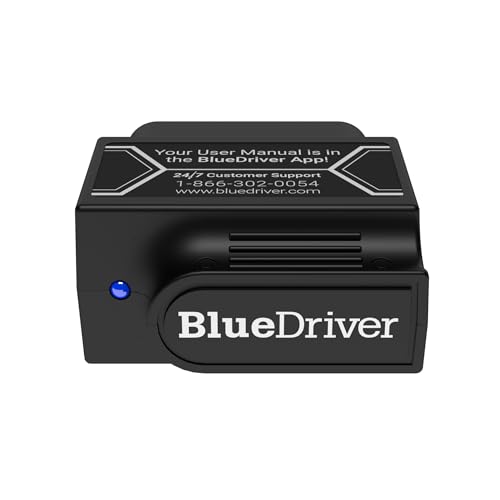
That is where a Bluetooth OBD2 scanner can help. The bluedriver sensor connects to your car and sends data to a phone app. It aims to make car checks easier for everyday drivers across the United States. You can read codes, view live data, and learn what may need attention before you spend money on repairs.
Is BlueDriver Bluetooth Pro Good?
The BlueDriver Bluetooth Pro is a good OBD2 scanner for drivers who want more than basic code reading. It pairs with a phone and uses a dedicated app to show car data. The app can also provide repair reports for supported faults. This makes it useful for people who want to understand a warning light before visiting a mechanic.
One of its best points is its wider diagnostic coverage. On supported cars, it can read certain ABS, airbag, and transmission codes. Basic scanners may only show engine codes. However, coverage depends on your car’s make, model, and year. It also cannot fix a fault or replace a full mechanic’s scan tool. I would consider it a useful home diagnostic tool, not a complete repair system.

My First Impression of BlueDriver Bluetooth Pro
The BlueDriver sensor has a small and simple design. It plugs into the OBD2 port under the dashboard. There is no large screen or long cable to manage. You use your phone to view the results. This keeps the setup compact and easy to store in a glove box.
Getting started is fairly simple. Download the BlueDriver app, plug in the sensor, and follow the pairing steps. The app guides you through the setup process. You should check phone compatibility before buying. Also, make sure your vehicle supports the features you need. The sensor does not work as a standalone screen-based scanner.

What Makes It Stand Out? Key Features
- Bluetooth Connection: The sensor connects to a compatible phone through Bluetooth. This lets you read car data without a cable running from the dashboard to your phone. You can keep the phone in your hand while checking the results.
- Engine Code Reading: It reads engine fault codes from supported vehicles. You can use these codes to learn why the check engine light may be on. The app also shows code details to help you understand the issue.
- Enhanced Vehicle Diagnostics: BlueDriver can read certain ABS, SRS airbag, and transmission codes on supported vehicles. This gives it an edge over basic engine-only scanners. However, not every car supports every system.
- Repair Reports: The app can show repair reports linked to certain trouble codes. These reports may include possible causes and repair suggestions. They give you a useful starting point when you discuss a problem with a mechanic.
- Live Data: You can view live sensor data from your vehicle. This helps you watch how the engine behaves while it runs. It can also help when you need more detail than a stored fault code provides.
- Freeze Frame Data: The scanner can show freeze frame data when the vehicle stores it. This data records certain engine conditions at the time a fault occurs. It can help you see what was happening when the warning appeared.
- Smog Check Support: The app can show emissions readiness information on supported vehicles. This is useful before a state emissions test. It can help you check whether the vehicle’s monitors are ready, but it does not guarantee a pass.
- No Subscription Fee: BlueDriver provides its core app features without a monthly subscription fee. This is useful if you only scan your car from time to time. Check the current product terms before buying, as app and service policies can change.

✅ What I Like
- ✔ It offers more than basic engine code reading on supported vehicles, including certain ABS, airbag, and transmission codes.
- ✔ The phone app makes it easy to view diagnostic information without using a small built-in scanner screen.
- ✔ Repair reports can help drivers understand possible causes and prepare better questions for a mechanic.
- ✔ Live data helps users check engine sensor readings while the vehicle runs.
- ✔ The compact sensor is easy to leave in a glove box or small tool kit.
- ✔ There is no monthly subscription fee for the core BlueDriver app features.
- ✔ It can show emissions readiness data, which is useful before a required smog test.
⚠️ What Could Be Better
- ✖ You need a compatible smartphone and the BlueDriver app to use the sensor. It does not have its own display.
- ✖ Some advanced diagnostic features depend on vehicle make, model, and year. Buyers should check compatibility before ordering.
- ✖ It is not a bidirectional scan tool and cannot perform every active test, coding task, or service reset.

My Recommendation
I would recommend BlueDriver to drivers who want a useful tool for home car checks. It can help you read fault codes and learn more about warning lights. The repair reports also give you a better starting point before you visit a repair shop. This can make a car repair visit less confusing.
However, check your vehicle before you buy it. Not every model supports every advanced feature. Also, think about how you plan to use the scanner. If you only want to read basic engine codes, a cheaper tool may be enough. If you work on cars often, you may want a more advanced scan tool with active tests and service functions.
| Best For | Why It Fits |
|---|---|
| Everyday Car Owners | It helps you read warning codes and understand possible vehicle problems before visiting a repair shop. |
| DIY Home Mechanics | Live data, freeze frame information, and repair reports can help with basic troubleshooting. |
| Used Car Buyers | You can check stored fault codes and available vehicle data during a car inspection. It should not replace a full pre-purchase inspection. |
| Drivers Preparing for Emissions Tests | Emissions readiness data can help you check monitor status before a required test. |

Alternative Products You Can Consider
| Product | Best For | Key Difference |
|---|---|---|
| BlueDriver Bluetooth Pro | Drivers who want guided diagnostics | Uses a dedicated phone app with repair reports and enhanced diagnostics on supported vehicles. |
| FIXD Sensor | Drivers who want simple code checks | Focuses on app-based vehicle checks and easy-to-read fault explanations. |
| OBDLink MX+ | Users who want app flexibility | Works with supported third-party diagnostic apps. |
| Innova 5610 | DIY mechanics who want a handheld tool | Has a built-in screen and offers supported diagnostic and service functions. |

Final Verdict: Which Should You Buy?
The BlueDriver Bluetooth Pro is worth considering if you want a smart way to check your car at home. Its main strength is the mix of code reading, live data, repair reports, and enhanced diagnostics on supported vehicles. You do not need a large scan tool or a monthly plan for its core features. That makes it a practical choice for many everyday drivers.
Buy it if you want more insight into your car and feel comfortable using a phone app. Choose FIXD if you mainly want simple code checks. Consider OBDLink MX+ if you want more app options. The Innova 5610 may suit you better if you want a handheld scanner with supported service functions. The biggest thing to check before buying BlueDriver is vehicle coverage. Its advanced features do not work on every car, and it cannot replace a professional mechanic or a full shop scan tool.