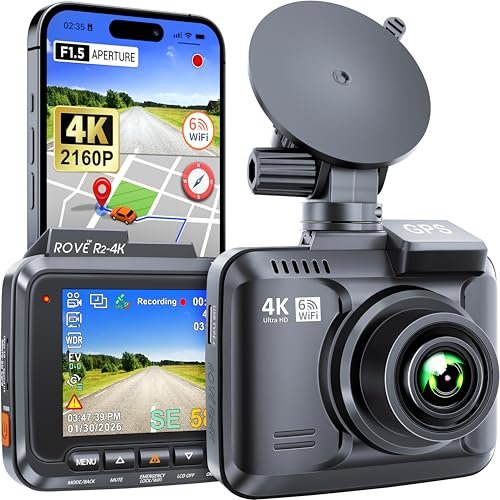
The Rove R2-4K is worth considering if you want sharp 4K footage, GPS data, and simple daily recording.
A sudden crash can happen on any road. It may happen during a short trip to work, a long highway drive, or a quick run to the store. Without video, it can be hard to prove what took place. A good dash cam can help protect your side of the story.
The Rove R2-4K aims to solve this problem with 4K video, GPS tracking, and built-in Wi-Fi. It gives drivers a way to record their trips and review key footage. For US drivers who spend time in busy traffic, these tools can offer useful peace of mind.

Is the Rove R2-4K a Good Dash Cam?
The Rove R2-4K is a solid option for drivers who want a front-facing dash cam with 4K video. Its main draw is the high video size. It also offers GPS data, Wi-Fi, and useful tools for daily recording. These features make it worth a look for daily drivers.
I like the mix of video and trip data this model aims to offer. Clear footage can help when you need to check a road event. GPS data can also add useful context to a clip. Still, 4K alone does not ensure that every plate will look clear. Light, speed, distance, and lens quality all matter.
This is not the best fit for every driver. It does not offer the same coverage as a front and rear camera kit. Buyers who need full coverage may want a dual-camera model instead. You should also check the included memory card and power setup before you buy.

My First impression of the Rove R2-4K
The Rove R2-4K has a compact dash cam design. It is made to sit near the top of the windshield. This helps keep it out of the way while you drive. Its screen gives you a direct way to check the camera and its settings.
The package and included parts can vary by seller or bundle. Before buying, check whether the listing includes a memory card, car charger, GPS support, and mounting parts. These items matter because you need them to get the camera ready for use.
Setup should be simple for most drivers. Mount the camera, connect its power cable, and place the lens so it can see the road. Then set the date, time, video quality, and loop recording. I would also test the camera before relying on it for daily trips.
The built-in screen is useful during setup. You can check the view without using your phone for every small task. Still, take time to hide the power cable in a safe way. Keep it clear of airbags, pedals, and other key parts.

Key Features of the Rove R2-4K
- 4K Ultra HD Video: The main draw is its 4K video mode. It records more image detail than standard 1080p footage under suitable light. This can help you review road signs, nearby cars, and key events. However, real detail also depends on focus, exposure, speed, and weather.
- Wide-Angle Lens: The wide-angle lens aims to capture a broad view of the road ahead. This can help record more of the scene around your car. It is useful in busy city traffic and on open roads. Keep in mind that wide lenses can make far-away objects look small.
- Built-In GPS: GPS support can add trip data to your recordings. This may include details such as your route, location, and speed. Such data can help when you review an event later. Check that GPS is active and that the date and time are set right.
- Built-In Wi-Fi: Wi-Fi lets you connect the dash cam to a phone. This makes it easier to view and manage clips without taking the memory card out. It can save time when you need a key video. App support and transfer speed may affect how smooth the process feels.
- Night Recording: The camera is built to record in low light as well as during the day. This matters for drivers who work late or often travel after dark. Night footage may help show the road and nearby cars. Do not expect every plate or dark object to remain clear in poor light.
- Loop Recording: Loop recording lets the camera reuse old storage space as the card fills up. This helps it keep recording without daily manual cleanup. Important clips may be locked by the G-sensor when the camera detects a sudden event. You should still check key clips and save them elsewhere.
- G-Sensor: The G-sensor can detect a sudden change in motion. When it senses a strong impact, it can help protect the related video from normal loop deletion. This is useful after a crash or a hard bump. Its sensitivity should be set with care to avoid too many locked clips.
- Built-In Display: The screen helps you check the camera view and change basic settings. It also makes the first setup easier. You can review the camera angle before you start driving. This small screen is a useful tool, though a phone may be better for longer video checks.

✅ What I Like
- ✔ 4K video offers more image detail than basic 1080p dash cams when light and road conditions are good.
- ✔ GPS support adds useful trip data that can help when you review a road event.
- ✔ Built-in Wi-Fi gives you a way to view and manage clips from a compatible phone.
- ✔ Loop recording helps the camera keep working when the memory card fills up.
- ✔ The G-sensor can help protect key footage after a sudden impact.
- ✔ The wide-angle lens gives you a broad view of the road ahead.
- ✔ The built-in screen makes setup and camera angle checks more direct.
⚠️ What Could Be Better
- ✖ It is mainly a front-facing camera, so it does not give you full rear road coverage on its own.
- ✖ 4K video uses more storage space than lower video modes, so a suitable memory card is important.
- ✖ Small objects and license plates can still be hard to read at night, in rain, or at a long range.

Who Should Buy the Rove R2-4K?
I would consider this dash cam if you want a simple way to record the road ahead. Its 4K video, GPS, and Wi-Fi features make it useful for daily travel. It may suit people who drive to work, take road trips, or spend long hours on US highways.
It is also worth considering if you want more than basic video recording. GPS can add context to a clip, while Wi-Fi makes it easier to view footage. However, drivers who want rear coverage should look at a dual-channel camera. You should also plan for the cost of a good memory card if one is not included.
| Best For | Why It Fits |
|---|---|
| Daily Commuters | 4K front video can record daily road trips, while loop recording helps keep the camera running. |
| Highway Drivers | The wide road view and GPS data can help when reviewing long trips and road events. |
| Rideshare Drivers | A front camera can record the road during work trips, though it does not record the cabin or rear view. |
| Road Trip Fans | GPS and video can help keep a record of routes and road events during long drives. |
| First-Time Dash Cam Buyers | The built-in screen, Wi-Fi, and loop recording offer useful tools for basic daily use. |

Alternative Dash Cams You Can Consider
| Product | Best For | Key Difference |
|---|---|---|
| Rove R2-4K | Drivers who want 4K front recording | Offers 4K video, GPS support, and Wi-Fi in a front-facing setup. |
| VIOFO A119 Mini 2 | Drivers who value night footage | Uses a STARVIS 2 sensor and records in 2K rather than 4K. |
| Garmin Dash Cam 67W | Drivers who want a compact camera | Focuses on a small body, a wide view, and Garmin app features. |
| Vantrue N4 Pro | Rideshare and multi-angle recording | Offers front, cabin, and rear camera coverage. |

Final Verdict: Is the Rove R2-4K Worth Buying?
The Rove R2-4K is a good option to consider if you want a front dash cam with 4K video, GPS, and Wi-Fi. It covers the key needs of many daily drivers. It can record your trips, help you review road events, and make it easier to access saved clips.
I would choose it for a car that needs a simple front recording setup. It makes less sense if you need rear or cabin footage. In that case, a multi-camera model such as the Vantrue N4 Pro is a better fit. The main thing to weigh is video detail against camera coverage. Also check the current bundle, memory card support, and parking mode power needs before you place an order.